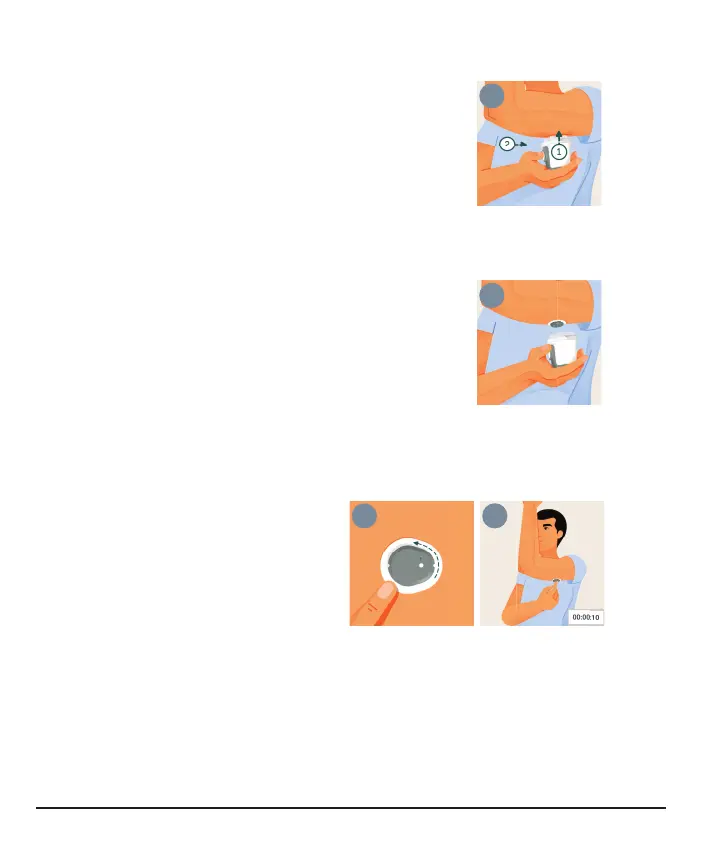
4. Use applicator to insert sensor
Relax any muscles near site.
1.
Press and hold applicator firmly against skin until clear
safety guard is pushed in.
2.
Press the button while the guard is pushed in.
Tip: Pressing applicator firmly against the skin
unlocks the button.
5. Remove applicator
a.
Move applicator away from your body. Sensor stays on
skin.
b.
Save applicator because you'll need its pairing code.
c.
Screw cap back on applicator.
6. Rub patch
To help keep the patch on your
skin:
a.
Rub firmly around patch 3
times
b.
Gently press on top of sensor
for 10 seconds
22



 To Next Page