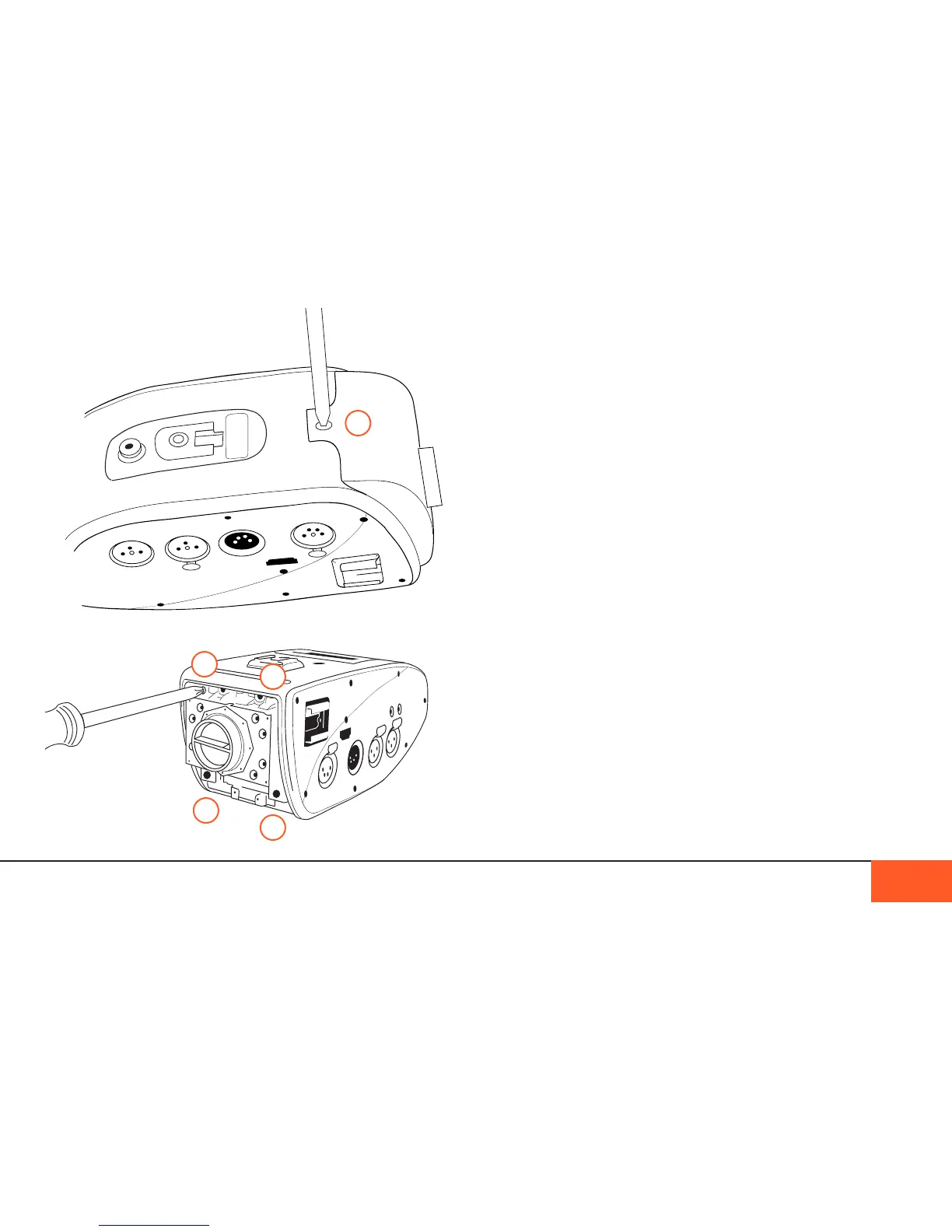
When these are removed, you will be able to remove the outer
shell of the C-mount to access the mounting block. There are
4 screws here (C), two on the top and two on the bottom, that
also need to be removed.
With the C-mount detached, you may now attach your preferred
mount to the camera. Each mount may have slightly different
instructions for installation, so consult the instructions that came
with your mount. When all screws are back in place, attach a
lens, and power on the camera. You are now ready to shoot.
Crop Factor
With a sensor plane similarly sized to a Sumer 16mm lm
plane, the D16 is designed for best use with Super 16mm (in
2K mode) and 16mm (in 1080p mode) cinema lenses.
Lenses designed for other popular formats, such as MFT (Micro
4/3) or 35mm can be used on the D16, but that may result in a
crop (slight to moderate zoom) or vignetting, depending on the
properties of that lens.
In Super16mm mode, using 35mm lenses on the D16 will result
in a 2x crop; MFT lenses will be an approximately 1.43x crop.
Using a 16mm lens on 2K mode may result in slight vignetting.
In 16mm mode, using 35mm lenses on the D16 will result in a
a 2.3x crop; MFT lenses will be an approximately 1.65x crop.
THE INTERCHANGEABLE LENS MOUNT 15
B
C
C
C
C



 To Next Page