DS5 Isolated Bipolar Constant Current Stimulator DS5 Operator's Manual 5.0
Menu & Tool Bar
File > Exit
Exits from the DS5UI Software.
Control Menu > Show Control Menu...
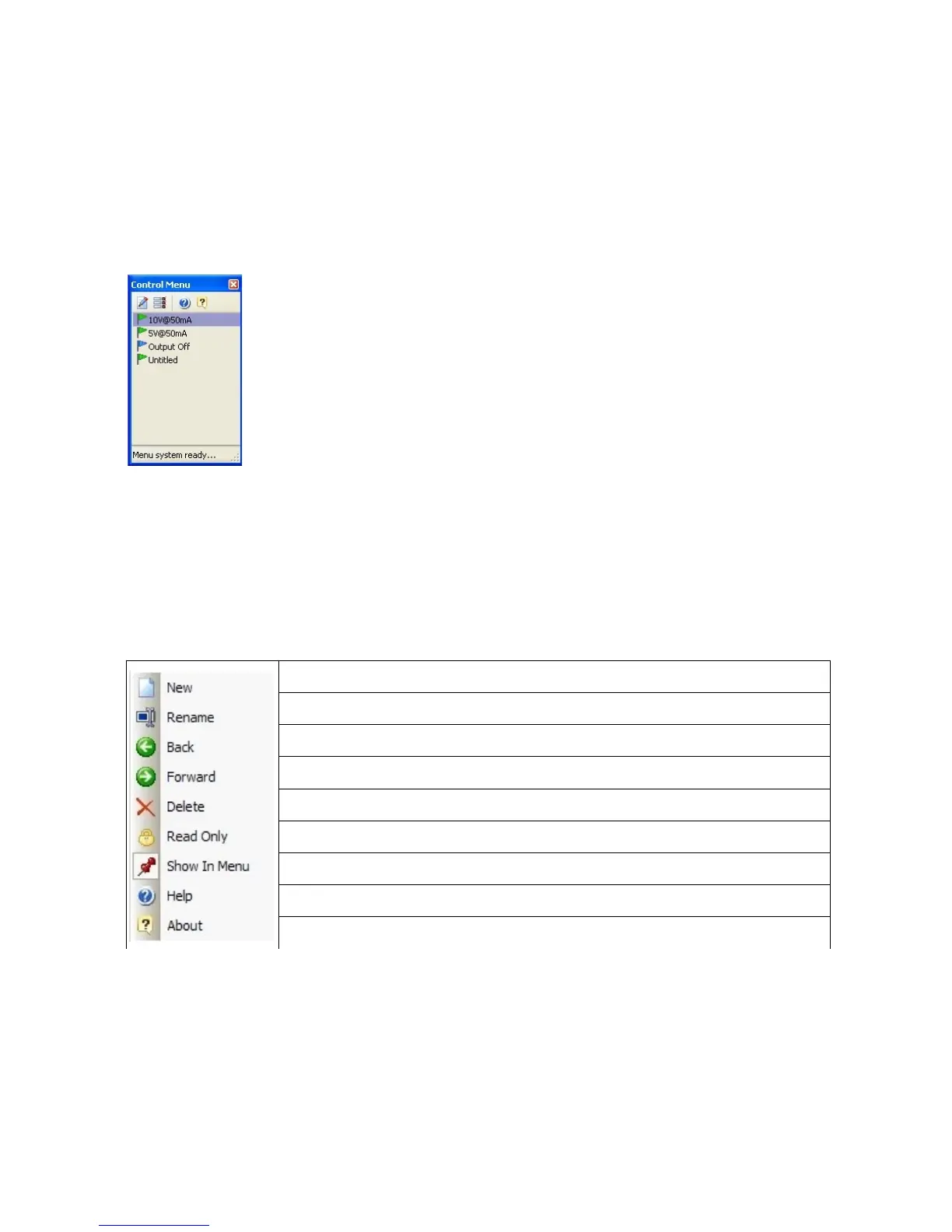
Right clicking on the Console window or selecting this menu item displays the
Control Menu. The Control Menu consists of an icon toolbar above a list of saved
profiles. Clicking on a profile will activate it, sending the appropriate commands to
the DS5 via the USB connection.
The toolbar commands are Control Menu Editor..., Menu Options, Help, About.
Each is discussed in more detail below.
Control Menu > Edit Control Menu...
When the DS5 UI is installed, the Control Menu includes one pre-defined profile, “Output OFF”, indicated by
a blue flag. Additional profiles can be added to the list from within the Menu Editor window and these will
be given green flags.
The Menu Editor window consists of an icon toolbar, a list of saved profiles and a tabbed pane that displays
the control settings and attributes of a selected profile. The toolbar items which are described below can
also be displayed by right-clicking anywhere within the Menu Editor Window.
Adds a new “untitled” profile to the list of profiles.
Opens the profile title for editing.
Move the highlight back (up) through the list of profiles.
Move the highlight forward (down) through the list of profiles.
Deletes the currently selected profile.
Makes the currently selected profile read-only.
Toggles display of selected profile in the Control Menu.
Opens a PDF copy of the DS5 Operators Manual.
Displays information about the DS5 UI software.
Selected profiles can be edited by changing the status of the various tick boxes and radio buttons within the
Control Tab. A green tick indicates that a particular state will be activated when the profile is loaded. An
empty tick box indicates that the state will be deactivated. If the box has a green square inside it, that state
will remain unchanged when the profile is loaded. The Attributes tab has a comment box for adding a more
complete description of the profile as well as tick boxes to alter the profile visibility and read-only status.The
stimulator settings available for modification within the DS5 UI software are the same as those found within
the DS5 front panel menu. Further information on the effects these settings have is provided within Chapter
Digitimer Ltd. 43 of 52 Copyright © 2009


 To Next Page