DS5 Isolated Bipolar Constant Current Stimulator DS5 Operator's Manual 5.0
Configuring the DS5
Configuration changes are made via the options menu which is accessed from the main operating screen by
pressing the F1 key, indicated by the icon. To access this menu the stimulator output must be
disabled using the orange toggle switch and it will be necessary to re-enable the output before another
stimulation protocol can commence. The options menu presents the operator with a scrollable list of menu
choices (F3 key for up and F4 key for down). When an item of interest is identified, it can be selected using
F1 ( ). When required, F2 ( ) allows the operator to exit to the main operating screen.
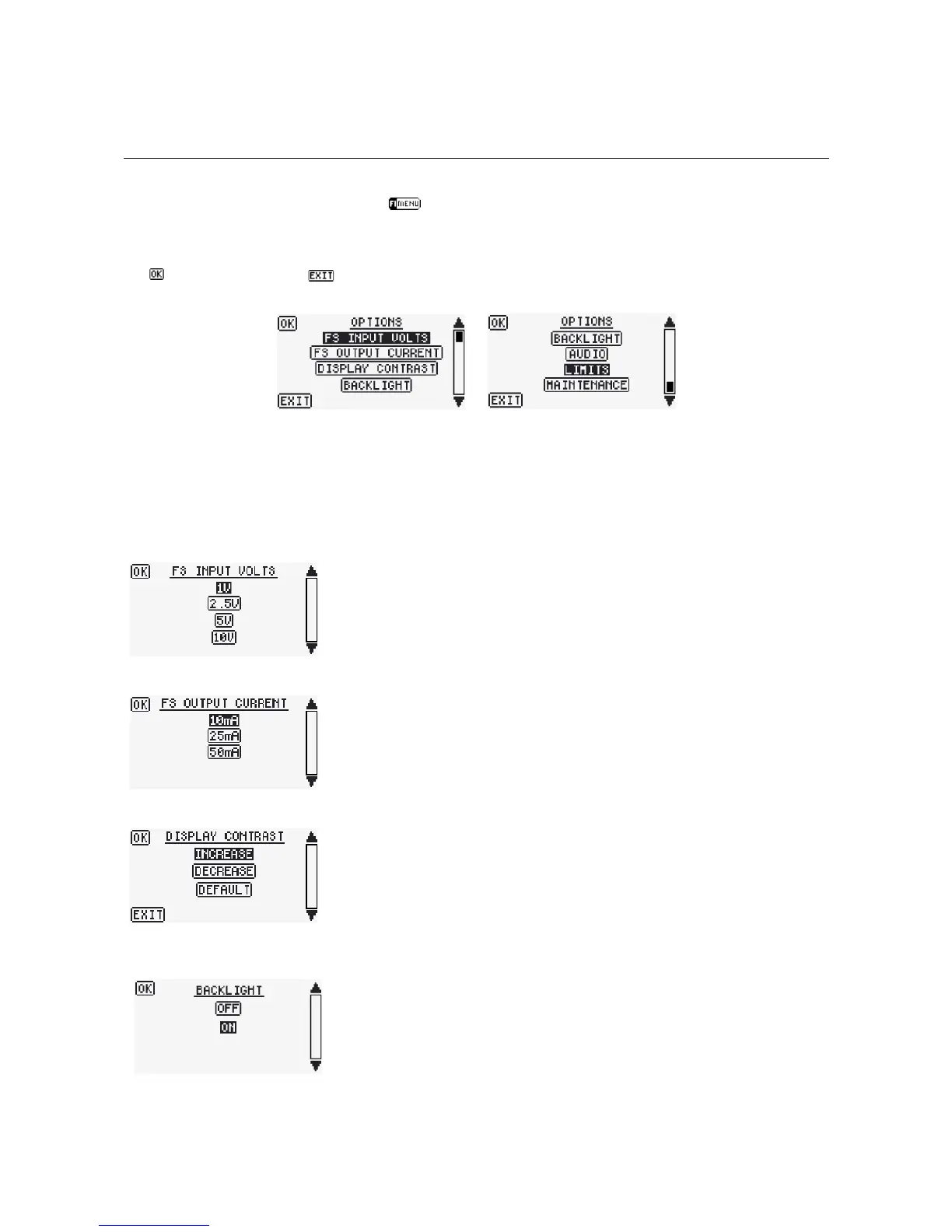
Figure 3.3 Typical DS5 Options Menu Displays
Most of the choices in the options menu provide the operator with an opportunity to modify the default
settings of the DS5. The various choices are further described below and should be carefully defined before
the DS5 is connected to any external devices or subjects.
Defining the Required Input Voltage Range
Full scale input voltage ranges are selectable between ±1V, ±2.5V, ±5V
and ±10V so that the DS5 can be configured to interface with a range of
signal generating hardware devices such as data acquisition interfaces
with D/A outputs. F3 and F4 scroll through the choices and F1 confirms
the selection and returns to the main Options Menu.
Defining the Required Output Current Range
The full scale output current ranges are selectable between ±10mA,
±25mA and ±50mA. This allows the operator to limit the output to a
lower range when carrying out studies which require a lower stimulus
amplitude. F3 and F4 scroll through the choices and F1 confirms the
selection and returns to the main Options Menu.
Adjusting the Display Contrast
The LCD screen display contrast can be increased or decreased to suit the
user. F3 and F4 are used to scroll through the choices, while repeated
pressing of F1 will increment a change in contrast. A default setting is
available if required. F2 confirms the choice and returns to the main
options menu.
Turning the LCD Backlight On and Off
This menu item allows the operator to turn off the LCD backlight if it is not
desired. F3 and F4 scroll through the parameter choices. F1 accepts the
hi-lighted setting and exits to the main options screen.
Digitimer Ltd. 27 of 52 Copyright © 2009


 To Next Page