OPERATIONAL MANUAL
- 64 - D03S THERMAL TRANSFER OVERPRINTER
4.7.2 Interface upgrading
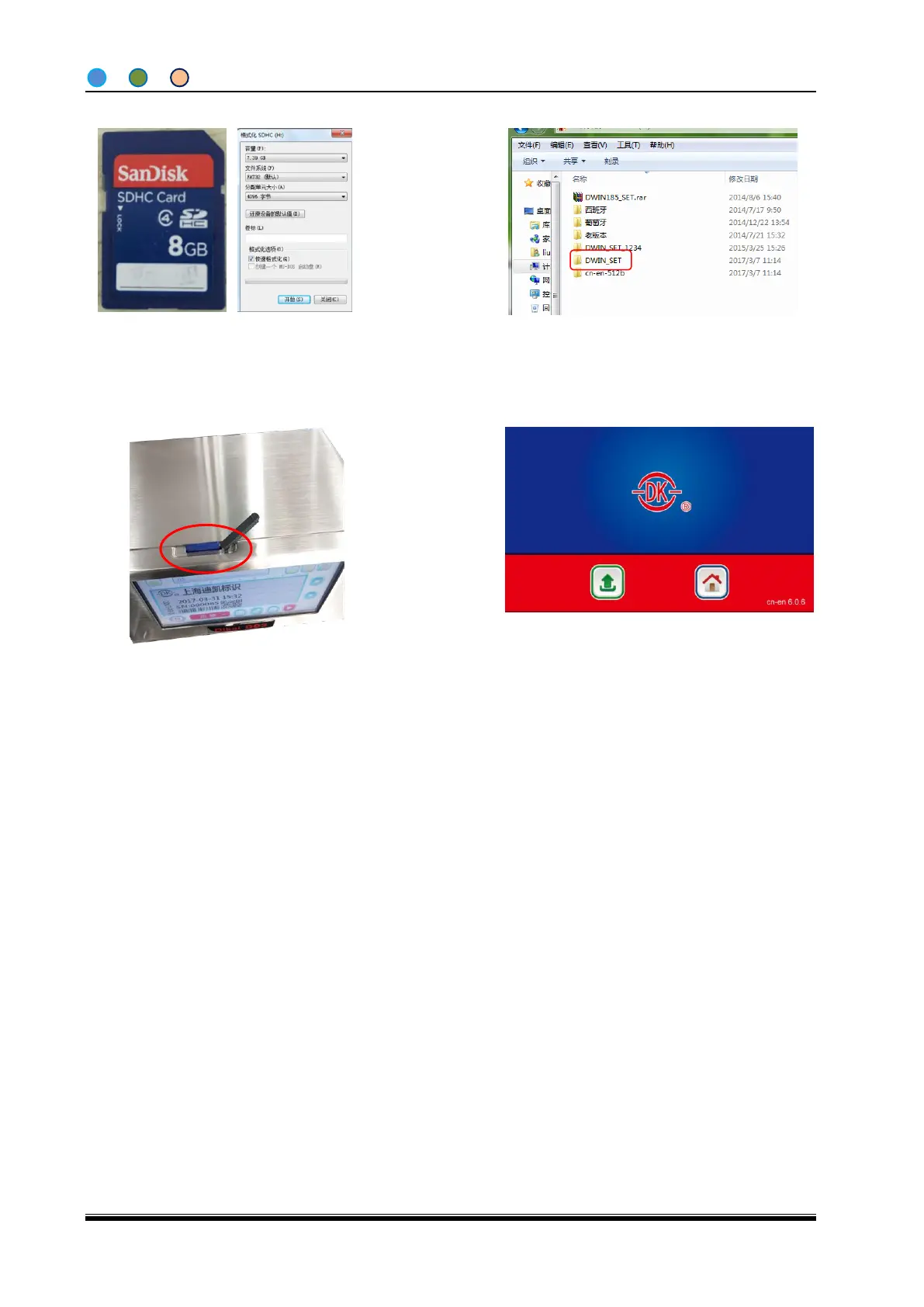
1, Use a SD card (Recommend Sandisk), and
format it with “FAT32”and “4096”like in the
picture.
3, Turn on the control box on and insert the SD
card into the control box.
4, The control box will do the upgrading
automatically. Pull out the SD card when
process completed and reboot the machine.
2, Copy the folder named ”DWIN_SET” into the
root directory of SD card.
Please do keep to machine connected with power and do not pull out the SD card during the
upgrading. Please do reboot the machine after the upgrading and check the version No. to make sure
the upgrading is successful.
Please format the SD card into: fat32/a: 4096 if the machine cannot recognize the SD card. Also the
control box can only recognize the SD card with 2~16G storage.



 To Next Page