Operation Manual
D0 3 S Thermal Transfer Overprinter
- 63 -
4.7 UPGRADING THE CONTROLLER BOX
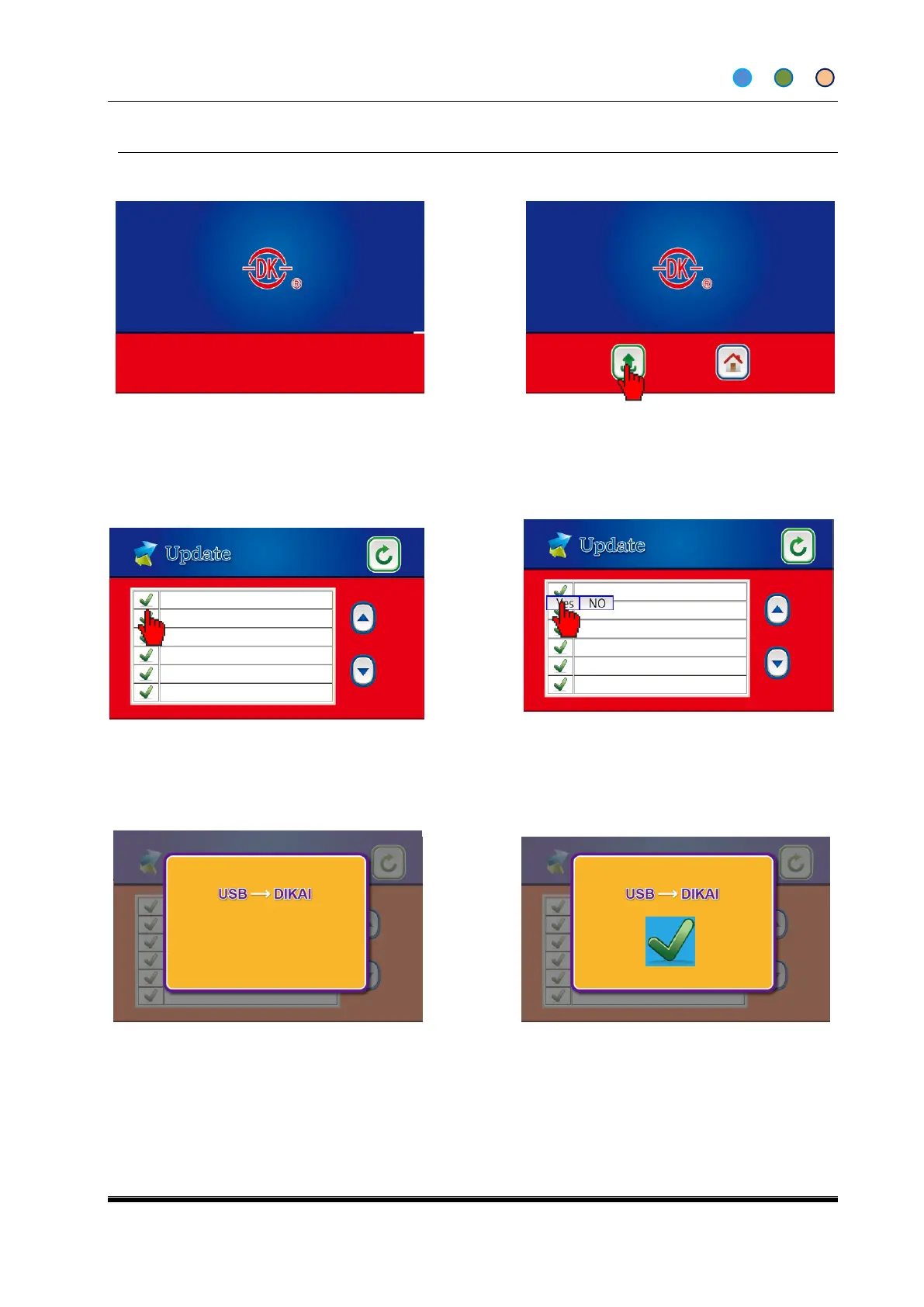
4.7.1 Main board software upgrading.
1. Save the upgrading program to USB with
folder named “dkupdate”. Insert the USB when
the printer is turned off.
3. Click the right upgrading program from
the screen.
4. Click YES to finish updating, and NO
back to the previous screen.
2. Enter into the upgrading screen by
clicking Update (It enters into the Home
screen if does not click update in 5
seconds).
5. Don’t unplug the machine or have other illegal operations;
× means the upgrading is failed and you need to reboot to do
it again
6. √means upgrading succeeds, reboot the
machine and finish.
Note: there are two types of program (ARM & MCU) need to be upgraded at the same time. At most 6
files can be shown on one screen. And please save the files into “dikai” folder, otherwise the printer
cannot read them



 To Next Page