EasyManua.ls Logo

Directed DBALL2 - User Manual

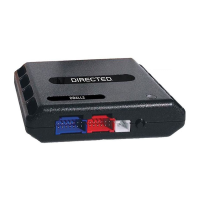
Directed DBALL2
36 pages
Print Icon
To Next Page IconTo Next Page
Loading...
Vehicle Application Guide......................................................................................................................................................................
Installation (Wiring Diagrams & Vehicle Wiring Reference Charts)
Type 1 - with CHTHD1 (R1-R7) /THCHD1 (R1) T-Harness............................................................................................
Type 1 - without T-Harness.............................................................................................................................................
Type 2 - with CHTHD1 (R1-R7) /THCHD1 (R1) T-Harness............................................................................................
Type 2 - without Tharness...............................................................................................................................................
Type 3 - with CHTHD1 (R1-R7) /THCHD1 (R1) T-Harness............................................................................................
Type 3 - without T-Harness.............................................................................................................................................
Type 4 - with CHTHD1 (R1-R7) /THCHD1 (R1) T-Harness............................................................................................
Type 4 - without T-Harness.............................................................................................................................................
Type 5 - with CHTHD2 (R9-R10) /THCHD2 (R1) T-Harness..........................................................................................
Type 5 - without T-Harness.............................................................................................................................................
Type 6 - with CHTHD2 (R9-R10) /THCHD2 (R1) T-Harness.........................................................................................
Type 6 - without T-Harness.............................................................................................................................................
Type 7...............................................................................................................................................................................
SmartStart/XL202 Installation Notes.....................................................................................................................................................
Programming
Module Programming for Installation (with Factory Keyless)...............................................................................................................
Module Programming for Installation (without Factory Keyless)..........................................................................................................
Module Reset........................................................................................................................................................................................
Hard Reset............................................................................................................................................................................................
Feature & Option List............................................................................................................................................................................
Feature Programming...........................................................................................................................................................................
LED Diagnostics & Troubleshooting.....................................................................................................................................................
Parking Light Error Codes....................................................................................................................................................
Limited One-Year Consumer Warranty..................................................................................................................................................
Quick Reference Guide.........................................................................................................................................................................
02
03
04
06
07
09
10
12
13
15
16
19
20
22
24
25
26
27
27
28
29
30
32
33
34
Index
Platform: DBALL2
Firmware: CHRYSLER Remote Start Ready (RSR) Installation
© 2017 Directed. All rights reserved.
Rev.: 20170214
® Chrysler, Dodge, Jeep, Mitsubishi and Volkswagen are registered trademarks and property of their respective companies.
Installation Guide
Update Alert: Firmware updates are posted on the web on a regular basis. We recommend
that you check for firmware and/or install guide updates prior to installing this product.
Important!
This product is NOT compatible with vehicles equipped with a manual transmission.
Remote Start Ready (RSR) is a function that enables the interface module to remote start the vehicle
completely on its own. Consequently, there is no need for an aftermarket or an OEM remote starter in order to
start the vehicle from a distance.
SmartStart Compatible
SmartStart is equipped with D2D, which means it can be connected to an interface module and used in Remote
Start Ready (RSR) mode without the use of a remote starter. See the Module Programming section for more
information.
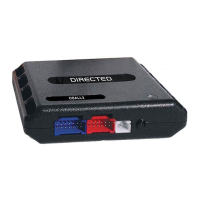
The CHRYSLER firmware for DBALL2 is an all-in-one door lock and override module compatible with
specific Chrysler, Dodge, Jeep, Mitsubishi and Volkswagen vehicles. This guide supports the
installation of a DBALL2 in Remote Start Ready (RSR) mode with or without a Plug & Play
(CHTHD1/THCHD1 or CHTHD2/THCHD2) T-Harness (optional). This solution offers three (3)
configuration options to control your system: 3x OEM Lock Remote Start Activation, RF System or
SmartStart (all sold separately).
This module can only be flashed and configured using XpressVIP at www.directechs.com or
using the Directechs Mobile application for smartphones. Refer to the Module Programming
section on pages 25-26 for more information.

Questions and Answers

  • J
    jeffery07Aug 29, 2025
    What does it mean if Directed DBALL2 says 'OBDII feature is not supported'?
    • J
      jeremy54Aug 29, 2025
      If the Directed Remote Starter system displays a 'OBDII feature is not supported' error, the diagnostic data bus was not detected, therefore the SmartStart features will be limited.
  • C
    Christine SalinasSep 5, 2025
    What to do if ISO 2 is not detected on Directed Automobile Accessories?
    • S
      Shane BrownSep 5, 2025
      If ISO 2 is not detected by your Directed Automobile Accessories, it means the Orange/Black wire did not detect the expected signal.
  • O
    oaguilarAug 28, 2025
    What to do if Directed DBALL2 Remote Starter shows 'ISO 2 not detected'?
    • A
      amandamorganAug 28, 2025
      If the Directed Remote Starter system displays a 'ISO 2 not detected' error, the Orange/Black wire did not detect the expected signal. Refer to "Installation (wiring diagrams & vehicle wiring reference charts)" to check the connections.
  • C
    cherylwhiteSep 23, 2025
    What to do if Directed Automobile Accessories displays 'J1850 not detected'?
    • J
      Joe Smith DDSSep 23, 2025
      If your Directed Automobile Accessories displays 'J1850 not detected', check the J1850 wire connection. Wake up the data bus by turning the ignition on and try again.
  • V
    Veronica KimSep 6, 2025
    Why were transponder functions skipped on my Directed Automobile Accessories?
    • J
      James KaneSep 6, 2025
      If transponder functions were skipped on your Directed Automobile Accessories (if compatible) when RXT mode is not desired or convenience features are needed, reset and reprogram the module.
  • E
    Erin MillerSep 8, 2025
    Why does my Directed Remote Starter fail when using 3x OEM Lock Remote Start Activation?
    • R
      Rebecca GonzalezSep 8, 2025
      When the 3x OEM Lock Remote Start Activation was attempted when RFTD feature is disabled, it can be activated from the Web automatically when using the RSR flash tool or manually. Refer to the feature programming section for more information.
  • E
    erodriguezSep 12, 2025
    What does it mean if ISO 1 is not detected on my Directed DBALL2 Remote Starter?
    • A
      Adam NguyenSep 12, 2025
      The Yellow/Black wire of your Directed Remote Starter did not detect the expected signal.
  • E
    erikamcclainSep 23, 2025
    What to do if Directed Automobile Accessories displays 'CAN2 not detected'?
    • A
      allenmichaelSep 23, 2025
      If your Directed Automobile Accessories displays 'CAN2 not detected', check the CAN2 Orange/Green and Orange/Brown wire connections. Wake up the data bus by turning the ignition on and try again. If your installation does not require this connection, skip this step by pressing the programming button 5 times.
  • J
    johnthomasAug 26, 2025
    What to do if Directed Remote Starter shows 'Bypass data not detected'?
    • J
      Julie JoyceAug 26, 2025
      If the Directed Remote Starter system displays a 'Bypass data not detected' error, check the bypass line connection. If more than one wire is used, make sure they are not inverted. Ensure the vehicle still operates correctly using the factory key.
  • Z
    Zachary LeeAug 25, 2025
    How to fix a CAN2 not detected error on a Directed DBALL2?
    • S
      Susan SinghAug 26, 2025
      If the Directed Remote Starter system has a CAN2 not detected error, check the CAN2 Orange/Green and Orange/Brown wire connections. Wake up the data bus by turning the ignition on and try again. If your installation does not require this connection, skip this step by pressing the programming button 5 times.

Summary

Installation Guide

Vehicle Application Guide

Lists vehicles compatible with the product and their installation types.

Installation Types and Wiring Reference

Details various installation types with specific wiring diagrams and reference charts.

SmartStart and XL202 Integration Notes

Provides installation notes for SmartStart and XL202 modules.

Module Programming

Programming with Factory Keyless

Step-by-step guide for programming the module with a factory keyless entry system.

Programming without Factory Keyless

Step-by-step guide for programming the module without a factory keyless entry system.

Module Reset and Hard Reset

Standard Module Reset

Procedure to reset module programming to previous steps without affecting firmware.

Hard Reset Procedure

Procedure to revert flashed firmware to default settings, requiring reconfiguration.

Feature and Option List

Feature Programming

LED Diagnostics and Troubleshooting

Module Programming LED Status

Interprets LED indications during module programming for status and errors.

Module Programming Error Codes

Lists and explains error codes indicated by LED flashes during programming.

LED Status Codes and Commands

Activation Status Codes

Describes LED patterns for vehicle activation status and commands.

Shutdown Codes

Explains LED flashes indicating reasons for unscheduled shutdown or takeover failure.

RSR System Codes

Interprets LED flashes related to Remote Start Ready (RSR) and feature errors.

Parking Light Error Codes

Limited One Year Consumer Warranty

Quick Reference Guide

Vehicle Takeover Procedure

Steps to safely transfer vehicle control from remote start to the driver.

Pit Stop Mode

Instructions to keep the engine running while stopping briefly.

Remote Start Features

Remote Start Ready (RSR) Explained

Explains the RSR function enabling remote start without an external starter.

3 x OEM Lock Remote Start Activation

Describes how to activate remote start using the OEM lock button three times.

SmartStart System Integration

What is SmartStart?

Overview of the SmartStart system, its features, and smartphone control.

Directed DBALL2 Specifications

General IconGeneral
Product TypeRemote Starter
Remote StartYes
Keyless EntryYes
Security SystemYes
LED FeedbackYes
Water ResistantYes
FunctionRemote start, keyless entry
FirmwareUpdatable
RangeUp to 1 mile
Smartphone ControlOptional (requires additional module)

Related product manuals