27
IP2368EN
EN
Display Description
Selections
available
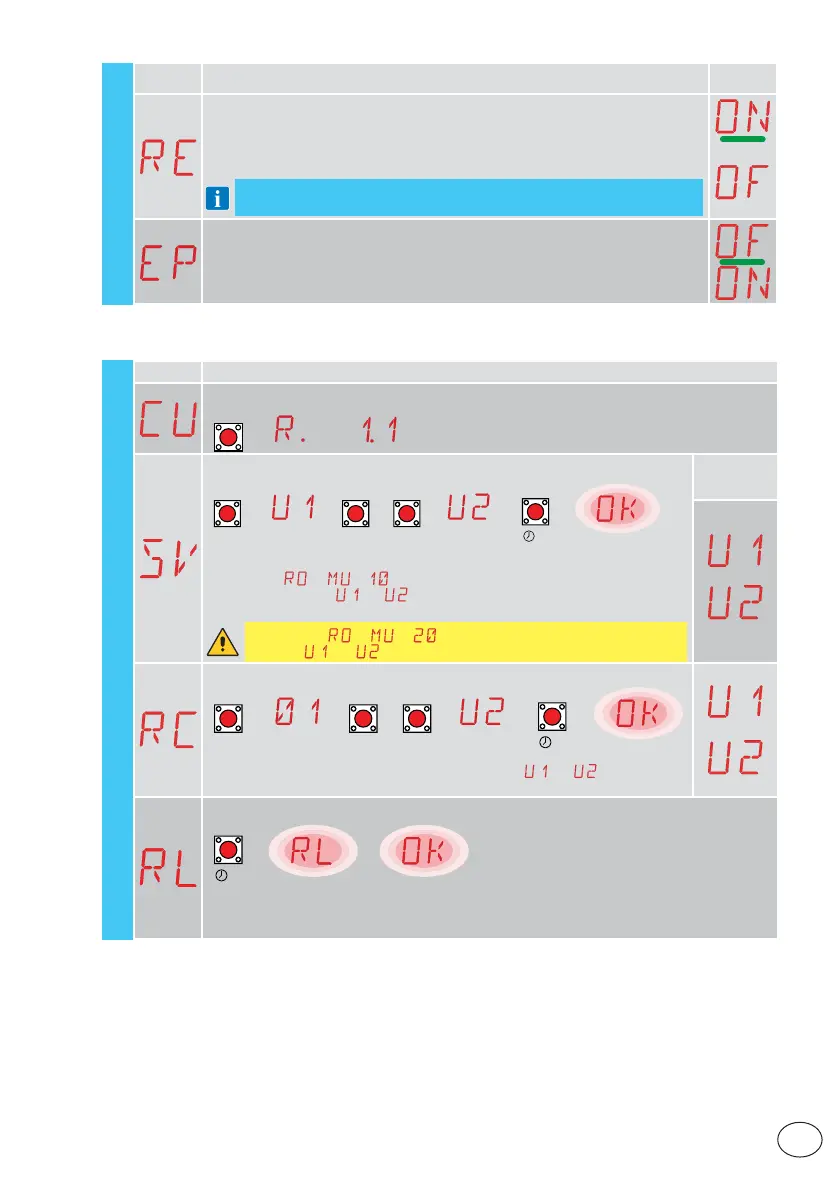
RE - Setting memory opening from remote control
OF - Disabled
ON - Enabled When enabled (ON), the remote programming is activated.
To store new remote controls without using the control panel, refer to the remote
control instructions.
NOTE: make sure you do not accidentally memorise unwanted remote controls.
EP - Setting coded messages
If the possibility to receive coded messages is enabled, the control panel will be
compatible with remote controls of the “ENCRYPTED” type.
RO
11.6 Second level menu - SF (Special Functions)
Display Description
CU - Displaying the control panel firmware version
→→→ Release 1.1 [esempio]
ENTER
SV - Saving user configuration on control panel storage module
ENTER UP DOWN
2”
ENTER
[esempio]
→→
/
→→→
By selecting → → you can save up to 2 personalised configurations
in memory positions
and only with the storage module present on the
control panel.
WARNING: if → → is selected, no user configuration can be
saved on
and .
Selections
available
RC - Configuration loading
ENTER UP DOWN
2”
ENTER
[esempio]
→→
/
→→→
You can load the previously stored user configurations and on the memory
module of the control panel.
RL - Loading of last configuration set
→
→
2”
ENTER
the control panel automatically saves the last configuration set, and keeps it memorised in the storage
module. In the event of a fault or the replacement of the control panel, the last configuration of the
automation can be restored by inserting the storage module and loading the last configuration set.
SF - Special functions
[example]
[example]
Release 1.1 [example]



 To Next Page