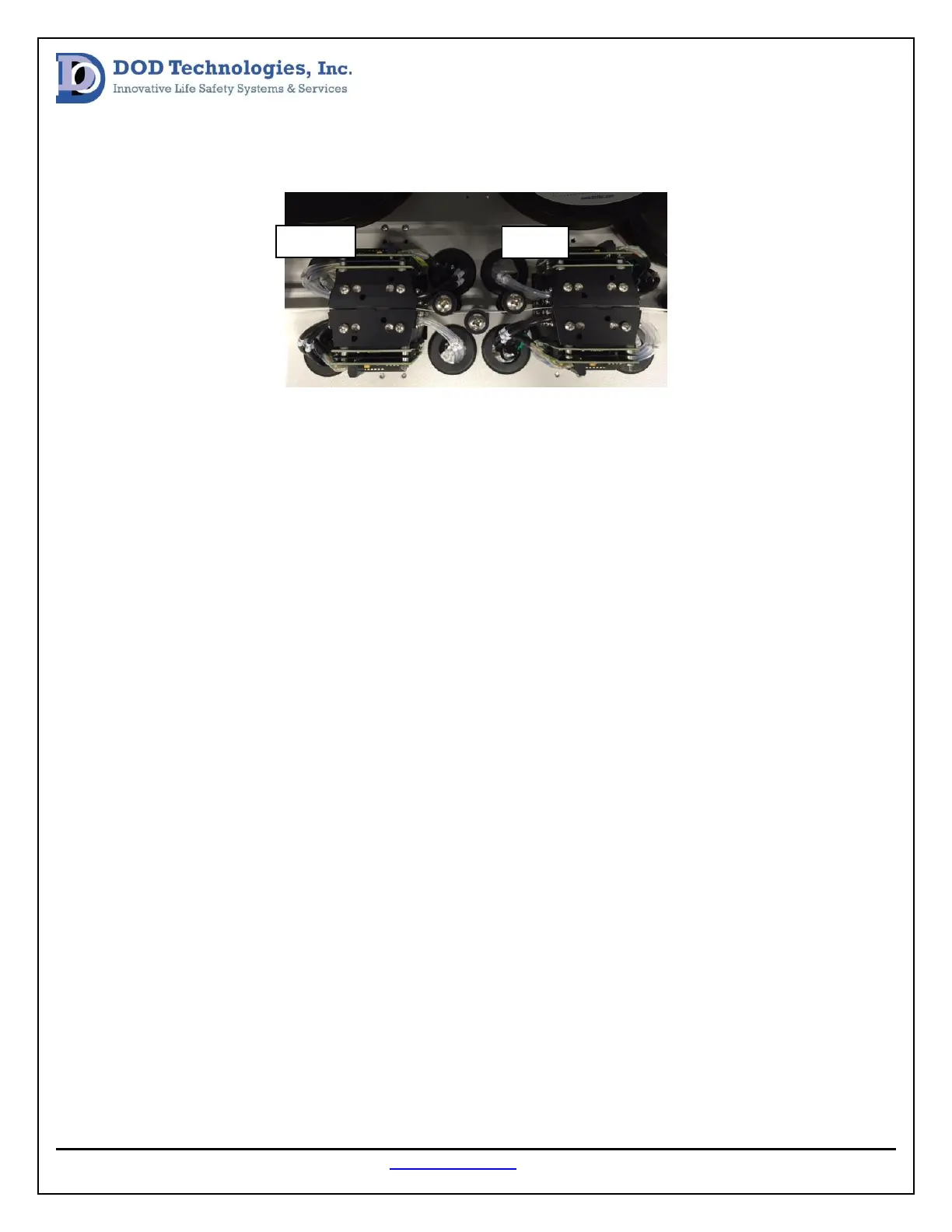
When standing in front of the analyzer the slave gate and micro switch are on the right and the master
gate and micro switch are on the left (see image below).
A normal tape advance will follow these steps:
1. Slave gate opens (output light on)
2. Slave micro switch closes (input light on)
3. Master gate opens (output light on)
4. Master micro switch opens (input light off)
5. Slave gate closes (output light on)
6. Slave micro switch opens (input light off)
7. Master gate closes (output light on)
8. Master micro switch closes (input light on)
A gate open fault indicates the gate did not open correctly and a gate close fault indicates that the gate
did not close correctly. To verify the gate and micro switch system is working corectly each step of the
tape advance process must be verified. This can be done by opening and closing the gate from the load
tape screen while verifying the corresponding lights are turning on and off in the correct sequence
(listed above).
If a micro switch light is not turning on or off verify all wiring at the input module in the control box and
at the micro switche connectors. The Micro switches can also be opened and closed manually while
checking the status of the lights to verfy the micro switches are working correctly. If a gate is not
opening or closing as it should verify the wiring between the motor and the output module in the
control box.
If the issue cannot be found or resolve using this method please contact DOD Technologies Inc. technical
additional support.


 To Next Page