DOD Technologies, INC • 675 Industrial Dr. Bldg. A • Cary, IL 60013 • Phone (815) 788-5200 • Fax (815) 788-5300
Flow Path Verification Procedure:
For a Low Flow, High Flow and Verify Tray Insertion Fault follow these steps:
1. Enter the Setup Menu
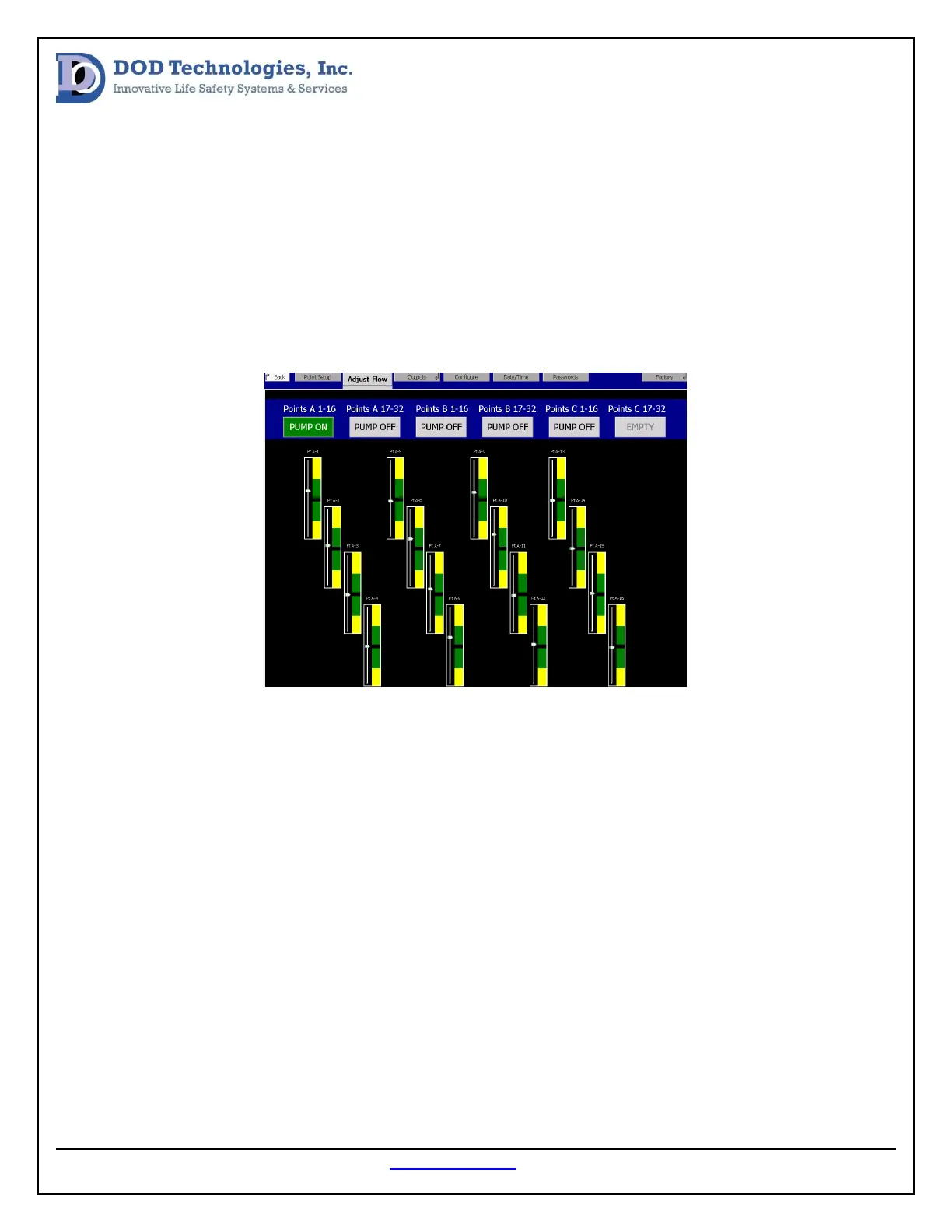
2. Select the Adjust Flow tab
3. Select the related points that indicate a flow issue. (see image below)
4. Locate points that are outside of the target range (green).
If the system is warning low flow on all points verify that the pump is on. This can be done by feeing the
top of the pump to check if it is vibrating.
If the pump is running verify that the related analyzer is fully inserted. The best way to do this is to
slowly push the analyzer in until it stops then push with both hands to insert the fittings into the
manifold located behind the analyzer.
If flow is still low, locate the filter at the end of each sample line and verify that it’s not clogged.


 To Next Page