Operation Section
-61-
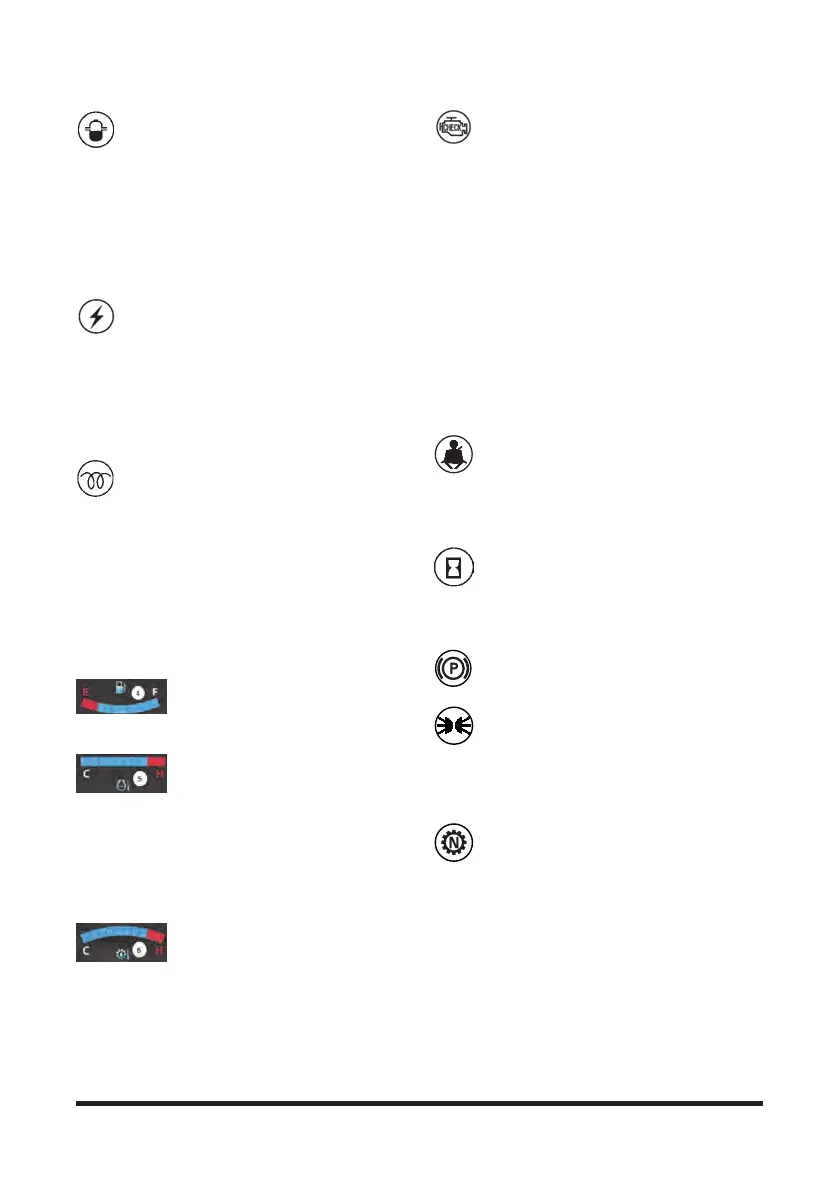
1. Diesel Engine Water in Fuel Filter
Indicator Light - Indicates when the engine
is running, there is water in the fuel filter
exceeds 100cc.
The light will come ON when the ignition switch is
turned to the ON position. The light should go off after
the engine is started. If the light turns on with the
engine running, park the lift truck and stop the engine.
Drain some fuel (and any water) until clean fuel flows
from the filter which approximately takes 5 to 6
seconds
2. Alternator Indicator Light - Indicates if
the battery charging system is operational.
The light will come on when the ignition
switch is turned to the ON position.
The light should go off after the engine is started,
indicating the alternator is producing sufficient
voltage to charge the battery. If the light turns on with
the engine running, check the alternator charging
system for a malfunction.
3. Diesel Engine Start Preheat Indicator
Light - The light will come ON when the key
is turned to the ON position from the OFF
position. This indicates that the glow plugs are
preheating the pre-combustion chambers for easier
starting.
The amount of time needed to preheat the pre-
combustion chambers is approximately seven
seconds, depending on the surrounding air
temperature. When the light goes OFF the maximum
pre-combustion chamber temperature has been
reached and the key can be turned to the START
position to start the engine.
4. Fuel Level Gauge - Shows
current level of the fuel in the fuel
tank. Replenish fuel when the Level
Gauge indicates "E" during the forklift operation.
5. Engine Coolant Temperature
Gauge - Indicates coolant
temperature. Shows current
temperature of the engine coolant. If the gauge
pointer moves beyond the red band during the
operation, the engine is overheated. Park the lift truck
and stop the engine.
Check the cooling system for any defect. The pointer
will be in the red band when the coolant temperature
reaches approximately 110 °C on all engines.
6. Transmission Oil Temperature
Gauge - Shows transmission oil
temperature If the gauge pointer
moves beyond the red band during operation, the
engine is overheated. Park the lift truck and stop the
engine.Check the system for any defect. The pointer
will be in the red band when the transmission oil
temperature reaches approximately 125 °C.
7. Engine Malfunction Indicator Light (MIL)
- Engine control system is equipped with
built-in fault diagnostics. Detected system
faults can be displayed by the Malfunction Indicator
Lamp (MIL) as Diagnostic Fault Codes (DFC) or flash
codes, and viewed in detail with the use of service
tool software. When the ignition key is turned ON the
MIL will perform a self-test, illuminate once and then
go OFF. If a detected fault condition exists, the fault
or faults will be stored in the memory of the engine
control unit (ECM). Once a fault occurs the MIL will
light up and remain ON. This signals the operator that
a fault has been detected by the SCEM.
To check the problem, hold the mode switch pressed
for 3 seconds. When the display shows the main
menu, select Check. Refer to topic “Operation
Section - After Staring the Engine - Electronic
Controlled Diesel Engines”.
8. Seat Belt Warning Light (If Equipment)
Indicates when the seat belt dose not
fastened by operator.
The light will come on when the ignition switch is
turned to the on position.
The light should go off after engine is started.
9. Service hour Meter - Indicates the total
number of hours the engine and the lift truck
have operated. The hour meter will operate
when the ignition switch is in the ON position, whether
the engine is running or not. The hour meter is used
to determine lubrication and maintenance intervals.
10. Parking indicator light - The light will
come ON when the parking switch is applied.
11. Front Floodlights - Push down on the
switch (14), to the first step, to turn the front
floodlights on.
Front and Rear Floodlights – Push down on
the switch (14), to the second step, to turn both the
front and rear floodlights on. The floodlights are
optional.
12. Transmission Neutral Position Light -
Indicates the neutral position of transmission.



 To Next Page