Operation Section
-82-
Lift Truck Controls
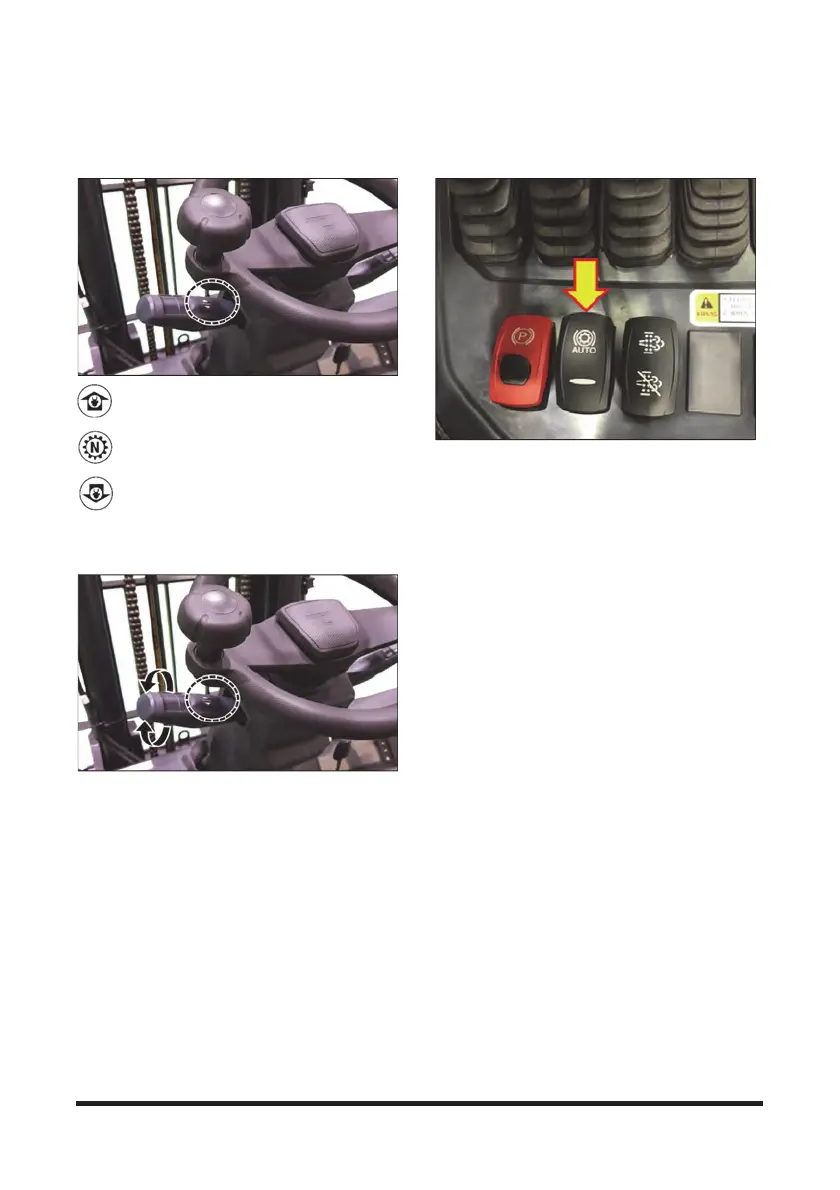
Direction Control Lever
1. Forward - Push the lever forward for
FORWARD direction travel.
2. Neutral - Move the lever to center position for
NEUTRAL.
3. Reverse - Pull the lever back for REVERSE
direction travel.
Transmission Speed Range Lever
1. High - Rotate the lever counterclockwise for HIGH
speed range.
2. Low - Rotate the lever clockwise for LOW speed range.
Auto Shift (AUTO) Selector Switch
This switch is used to select auto/manual shift on the
gearshift.
1. When pressing the “AUTO” position on this switch,
the blue light is illuminated on the switch, and the
word “AUTO” is displayed above the gear indication
on the instrument panel screen. Then, if you turn the
gearshift lever to the “2nd gear” position, the auto
gearshift status can be used. In the auto gearshift
condition, the vehicle starts in the first gear,
automatically changes to the second gear as the
vehicle speeds up, and automatically changes to the
first gear if the speed is reduced.
2. When pressing this switch in the opposite direction,
the blue light turns OFF, and the word “AUTO” above
the gear indication on the instrument panel screen
disappears. In this condition, the vehicle is operated
according to the gear selected on the gearshift lever.
* In the auto gearshift (AUTO) mode, if the gearshift lever
is turned to and kept in “1st gear,” the vehicle can only be
driven in the first gear without auto gearshift.



 To Next Page