Operation Section
-70-
Weight Scale Option (Load Cell Type)
With this weight scale option, the operator can
measure and limit the load's weight using a display
panel. Using the key , you can start settings.
1. Entering the Calibration Mode
To perform initial settings for the load cell, enter the
calibration mode as follows:
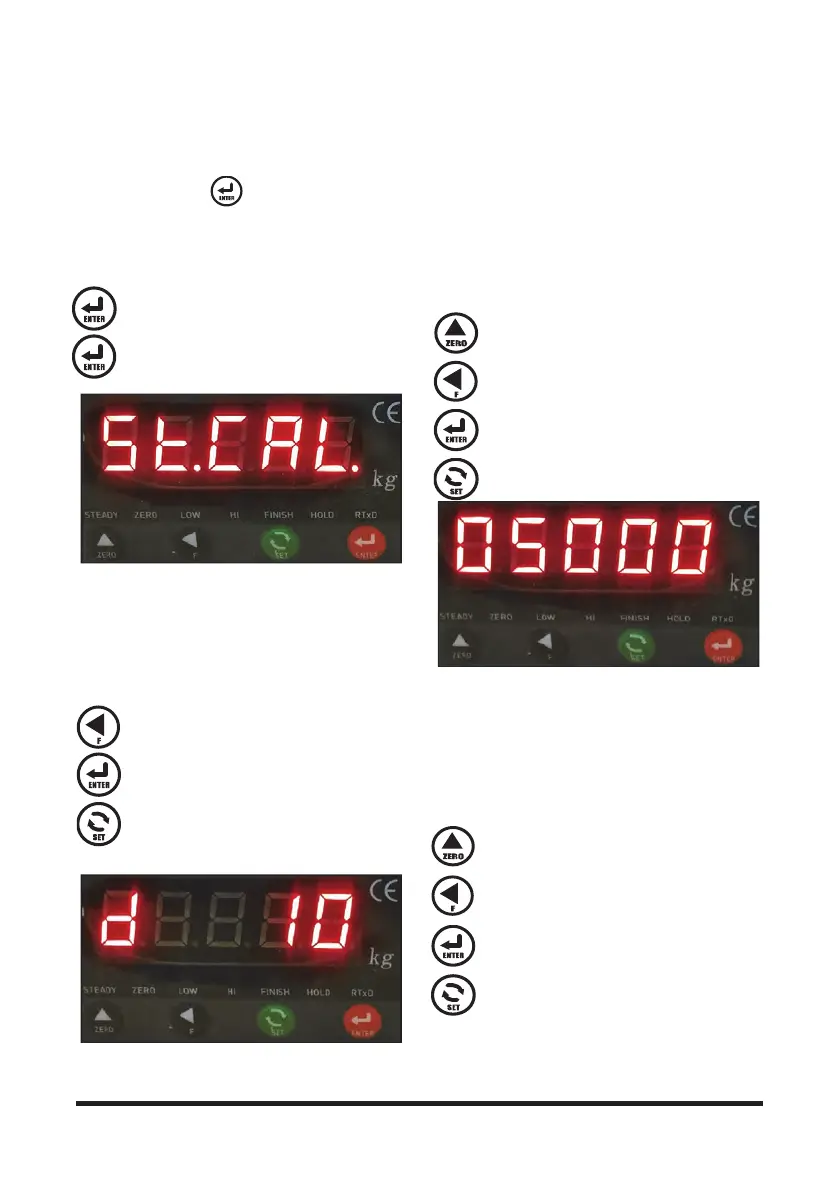
Press this key when “ST.CAL” is displayed
to start calibration mode.
Press this key once again.
2. Specifying a Minimum Scale
You can select a minimum scale on which the load
cell displays the weight from among 1 kg, 2 kg, 5 kg,
10 kg, 20 kg, and 50 kg (for example, 1235 kg is
displayed with a 5 kg minimum scale and 1250 kg
displayed with a 50 kg scale). The default value is "10
kg."
Each time you press this key, the setting
increases in the order of 01, 02, 05, 10, 20,
and 50.
Press this key to save the minimum scale
setting and proceed the subsequent step.
Press this key to move to the previous step.
3. Specifying a Maximum Measuring Scale
This step is to specify the rated capacity of the vehicle
on which the load cell is installed.
Since the device does not weigh a load heavier than
the set capacity (determins to be overloaded), it is
recommended to set the capacity to be 5% higher
than the actual value taking into consideration the
safety factor.
Each time you press this key, the number (0
to 9) at the cursor position increases by 1.
Each time you press this key, the cursor is
moved to the left by one point.
Press this key to save the set value and
proceed the subsequent step.
Press this key to move to the previous step.
4. Inputting a Reference Load
This step is to input the weight of a reference load
needed for weight setting.
If the weight of the reference load is 3,000 kg, input
"3000" and proceed the next step (reference load lift).
The initial setting value should be set to 50% to 60%
of the rated capacity (for a 7 ton capacity model for
example, use a 3.5 to 4 ton load).
Each time you press this key, the number (0
to 9) at the cursor position increases by 1.
Each time you press this key, the cursor is
moved to the left by one point.
Press this key to save the set value and
proceed the subsequent step.
Press this key to move to the previous step.



 To Next Page