Vigor2960 Series User’s Guide
88
4
4
.
.
1
1
.
.
3
3
.
.
2
2
M
M
i
i
r
r
r
r
o
o
r
r
C
C
o
o
n
n
f
f
i
i
g
g
u
u
r
r
a
a
t
t
i
i
o
o
n
n
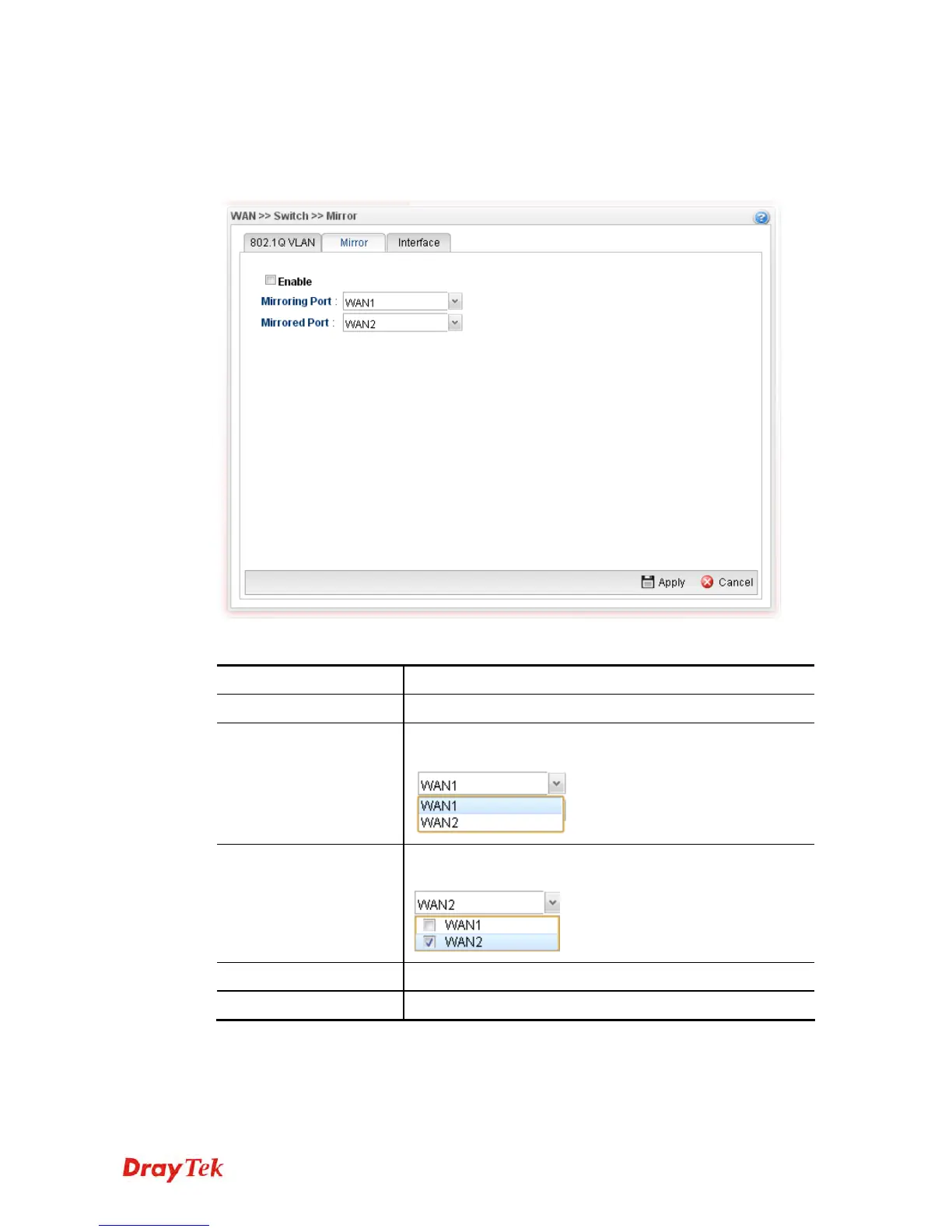
The administrator can monitor all the packets passing through mirrored port with the
mirroring port. It is useful for the administrator to analyze the troubles on Network.
Available parameters are listed as follows:
Item Description
Enable This Profile
Check the box to enable the Mirror function for the switch.
Mirroring Port
Select a port for the administrator to use for viewing traffic
sent from mirrored ports.
Mirrored Port
Select a port to make the packets passing through it
monitored by the administrator.
Apply
Click it to save the configuration.
Cancel
Click it to discard the settings configured in this page.














 To Next Page