14/57
Connect it all to the Internet
Set up a system
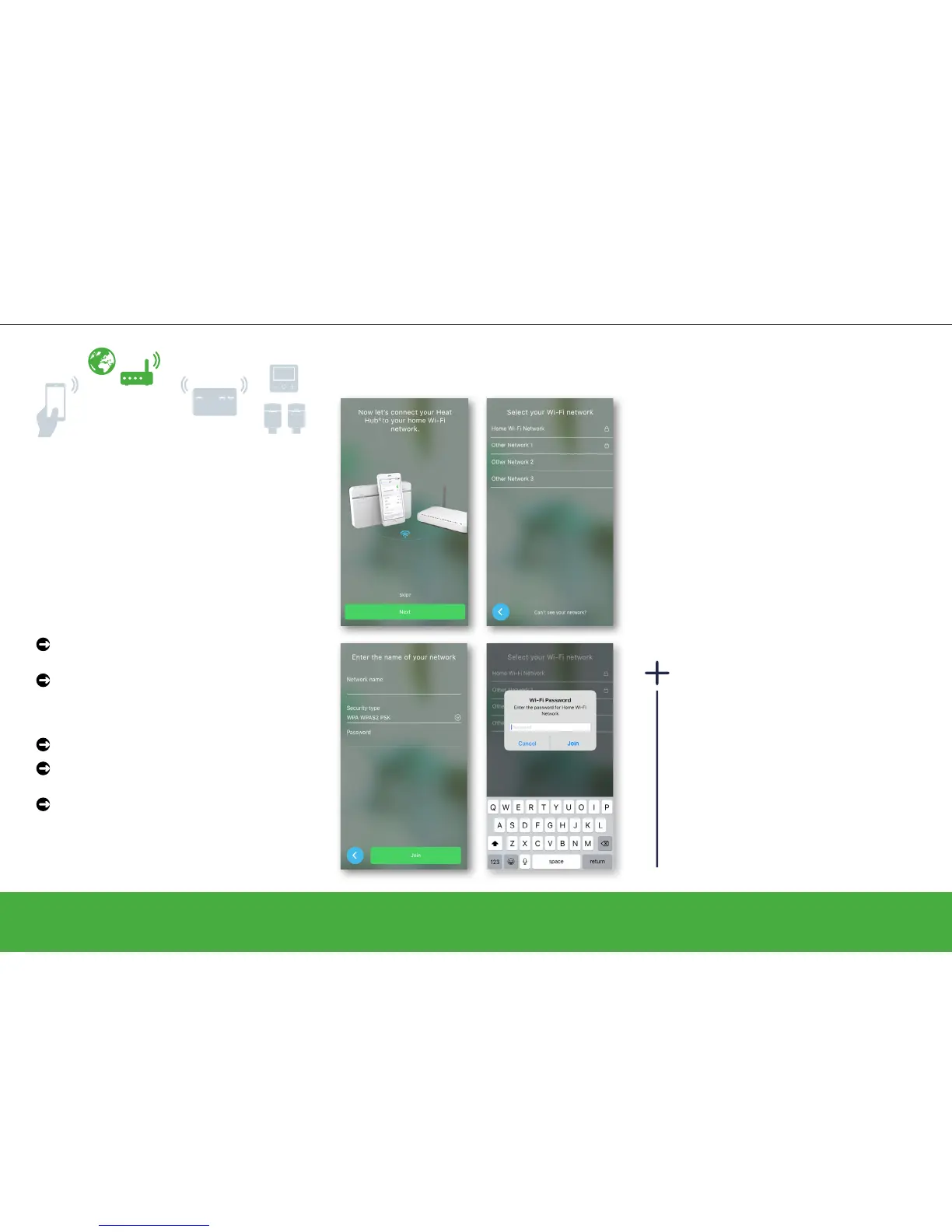
Step 4: Join the Heat Hub
R
to your
home Wi-Fi
This step connects the Heat Hub
R
to your home
Wi-Fi network so the heating system can be
controlled from any mobile device over the
Internet.
Note: All information entered on the following
screens is required to enable remote control
from your mobile device.
Select your home Wi-Fi network and enter
the password.
Tap Join.
If your Wi-Fi network is not displayed:
Tap Can’t see your network?
Type your network-related information on
the displayed screen.
Tap Join
Change the home Wi-Fi
If you change broadband providers, you
can switch to another Wi-Fi network
at any time. When the Wiser system
detects an existing connection, you are
asked if you want to change the Wi-Fi
network.
Have a look here: How to change the
Wi-Fi network -> page 46


 To Next Page