21/57
If the boost is active, you can adjust the
set-point temperature at any time.
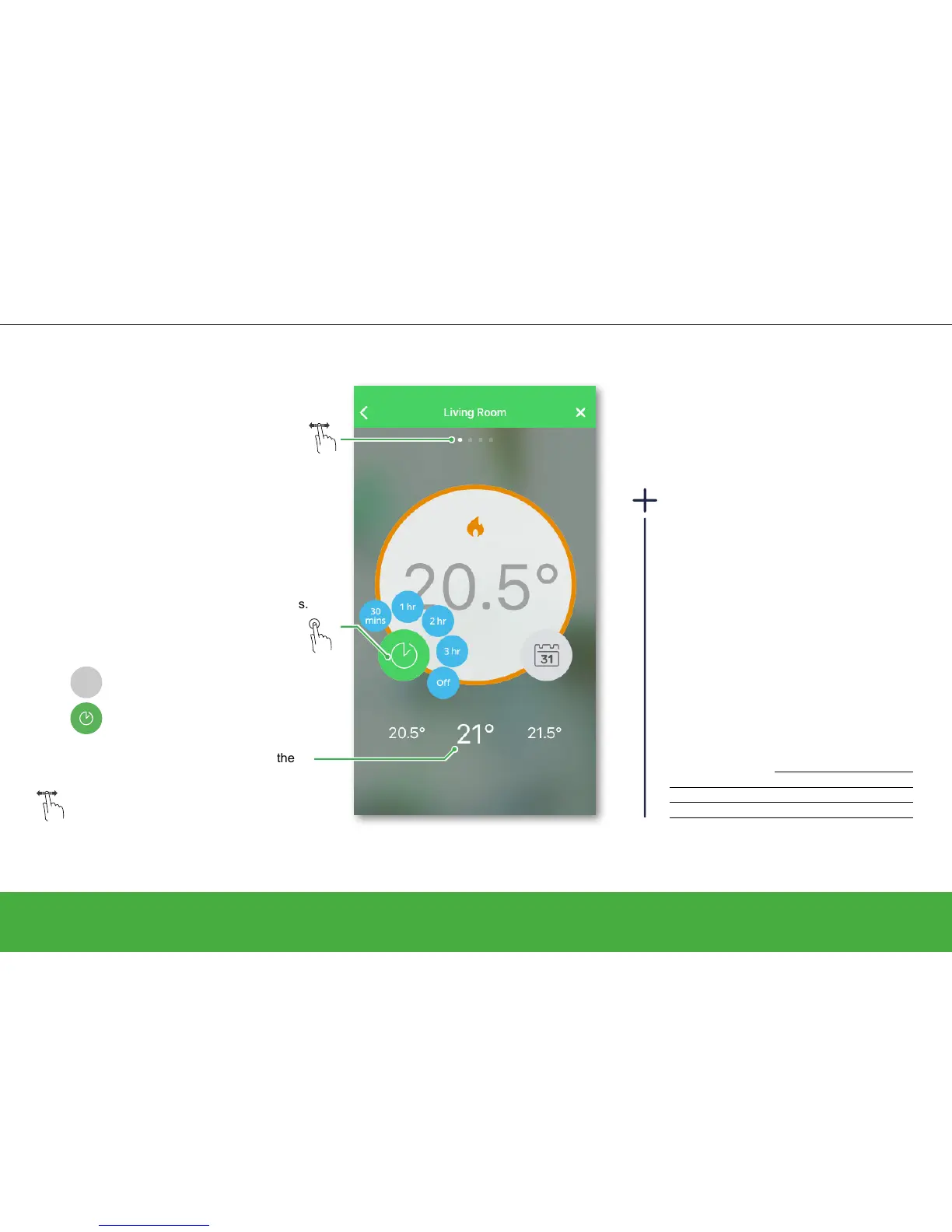
Slide to the left/right to manually
increase/decrease the current set-point
temperature.
Control your heating
Operate
Boost the room temperature
There are three ways to change the room
temperature:
From your Room Thermostat
• By setting a new set-point temperature
• By boosting you can increase the
temperature and choose the time
From your radiator Thermostat
• By boosting you can increase or
decrease the temperature. The boost
time is always 1 hour.
Overview of boosts
Temperature Time
Wiser Heat app + 2°C Selectable
Room Thermostat + 2°C Selectable
Radiator Thermostat + / - 2°C Fixed, 1 hour
Select the room in which you want to set
a new room temperature.
Tap to open the boost menu.
With the boost feature you can temporarily
increase the room temperature by 2°C. Choose
between 30 minutes, 1 hour, 2 hours or 3 hours.
Boost can be stopped at any timeby tapping
the time icon again.
Boost
OFF
Boost = OFF
Boost = ON


 To Next Page