18/57
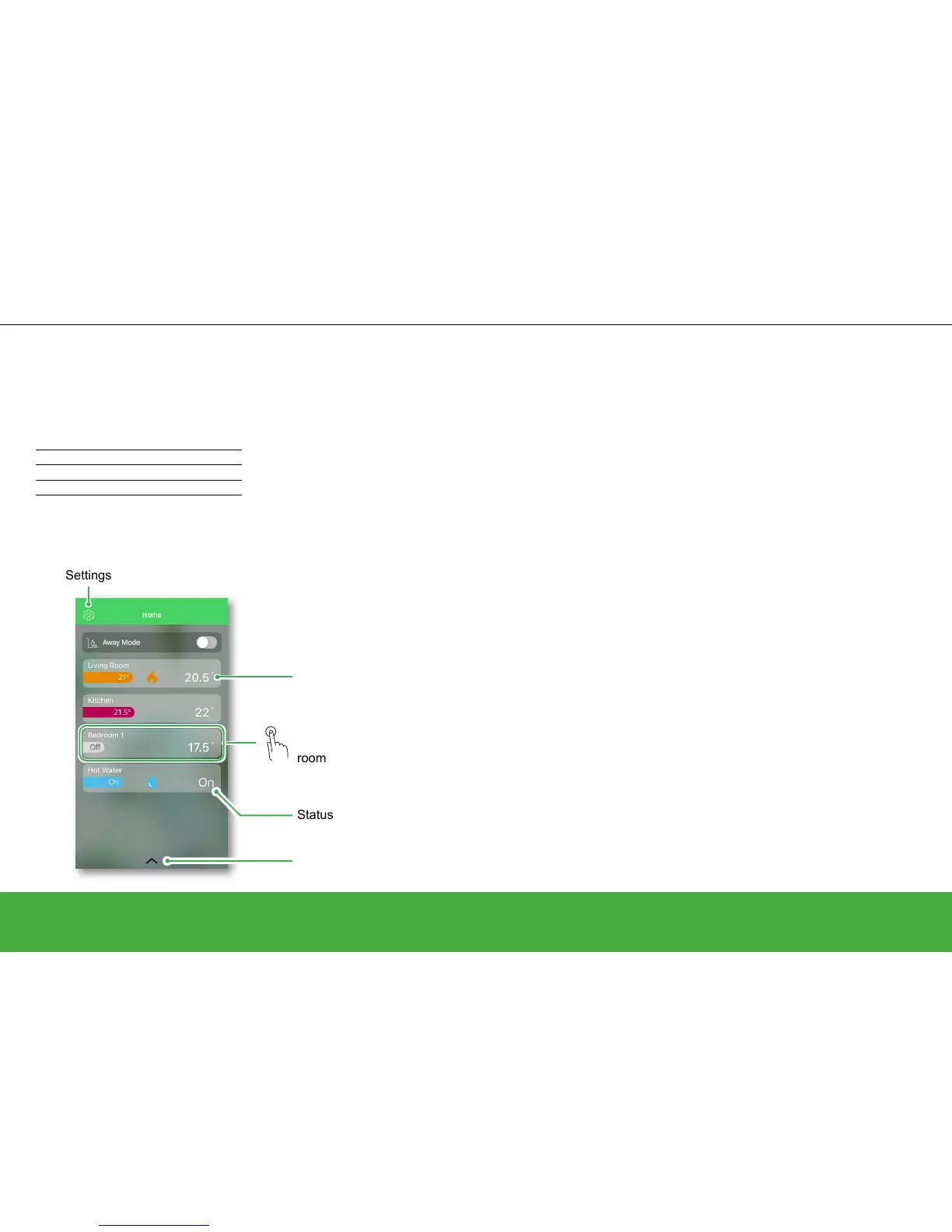
Home view and what it displays
Overview of rooms, set-point temperatures and
heating status.
Control your heating
Open and start
Tap anywhere in this area to switch to the related
Room view. In the Room view, you can change the
room schedule or boost the room temperature, etc.
Current room temperature
Tap here to pull up smart plug menu
Settings
Away Mode
The default temperature and hot water
status for Away Mode can be modied under
Settings/Away Mode.
Once activated, all rooms return to the Away
temperature (default 16°C), the Away Mode
toggle will change from grey to green and the
rooms and hot water will display their Away
mode values. If you have a two or three-
channel Heat HubR, the hot water will be turned
OFF if you have activated this option on the
Away Mode screen.
Meaning of the colours:
Red Warm 21.5 – 30 °C
Orange Comfort 17.5 – 21 °C
Yellow Cool 5 – 17 °C
Grey Heating Off
Status of hot water
When Away mode is active, only rooms that
have set-point temperatures higher than the
Away mode temperature will be affected. For
example, if a given room is set to 5°C, Away
Mode will not force it to the Away temperature.
While Away Mode overrides Boost, Auto and
Manual Mode, it is still possible to manually
change the set-point temperature and boost
individual rooms after activating Away Mode. It
is also possible to boost or manually turn the
hot water ON.
If one or more rooms have an active Boost at
the time Away Mode is activated, the Boost will
still remain active but Away Mode will limit the
temperature of these rooms to the Away Mode
value if Boost temperatures are higher than the
Away Mode temperatures. Upon deactivating
Away Mode, if any given Boost is still active,
each respective room will resume observing the
Boost temperature until expiry.
Note: The default Away temperature can be
changed under Settings -> page 27
From here you can also select whether or not
hot water should be turned OFF when Away
mode is active.
Tap at the bottom of the Home screen to bring
up the smart plug menu. To couple a smart plug
to Away Mode, have a look at Operate smart
plug -> page 41.


 To Next Page