11
Remote Control (RC)
Remote Control (RC)
Chapter2
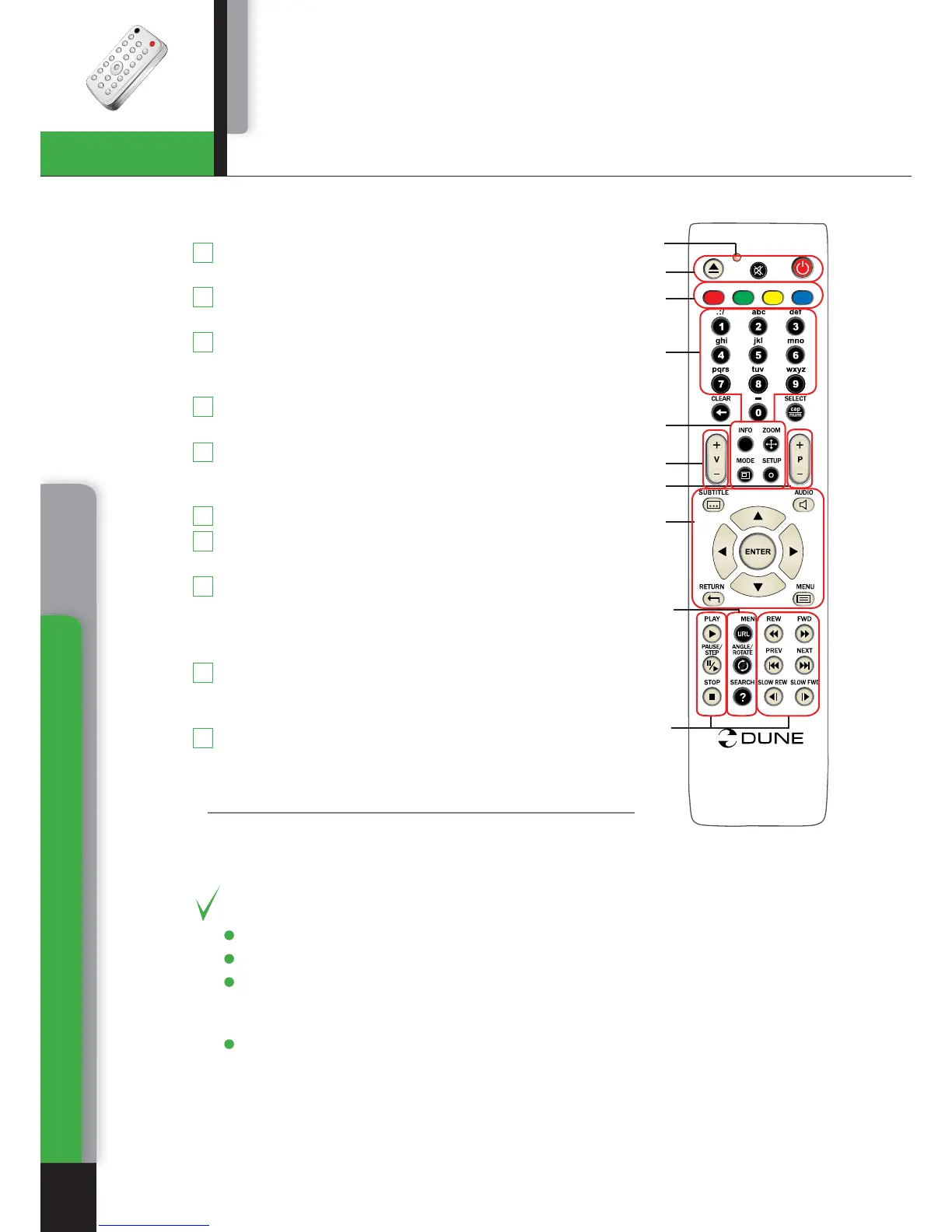
Command indicator (i.e. indicator of remote control
response to button pressing)
EJECT, MUTE, POWER – opening/closing of disk tray,
sound on/off and standby mode on/off, respectively
A (Red) - INFO, B (Green) - ZOOM, C (Yelow) - MODE,
D (Blue) - SETUP – control menu buttons for setting of
internal functions, as well as some playback modes.
0 - 9 – numeric buttons. Allow controlling of player in
playback mode, as well as text entry.
INFO, ZOOM, MODE, SETUP – control menu buttons,
allow setting of internal functions, as well as some
playback modes.
Vol+ / Vol- – volume adjusting
Page Up / Page Down – for scrolling up and down to
see and change settings.
SUBTITLE, AUDIO, RETURN, POP UP/MENU,
ENTER
and control menu buttons UP, DOWN, RIGHT,
LEFT
– to control main player modes and cursor motions
through file browser.
PLAY, PAUSE, STOP, REW, FWD, PREV, NEXT,
SLOW REW, SLOW FWD
– media file playback control
buttons.
TOP MENU/URL, ANGLE/ROTATE, SEARCH – control
menu buttons, allow setting of internal functions, as well
as some playback modes.
*Some buttons may have several functions, depending
on mode. For more details, please refer to Text entry with Remote control, System
adjustments and Playback sections.
Note:
● Use alkaline AA batteries.
● Observe polarity when inserting batteries.
● Direct the remote control to the player. There must be no obstacles between the
RC and the player. If the player is installed inside a desk with tinted glass, the
manufacturer may not guarantee an undisturbed functioning of RC.
● If RC functions only at short distances or stopped functioning, make sure to replace
batteries to new ones.
.
.
.
.
.
.
AB
C
D
T
O
P
i
O
PP
U
P
/
1
2
3
4
5
6
7
8
10
9
1
2
3
4
5
6
7
8
9
10
Chapter 2



 To Next Page