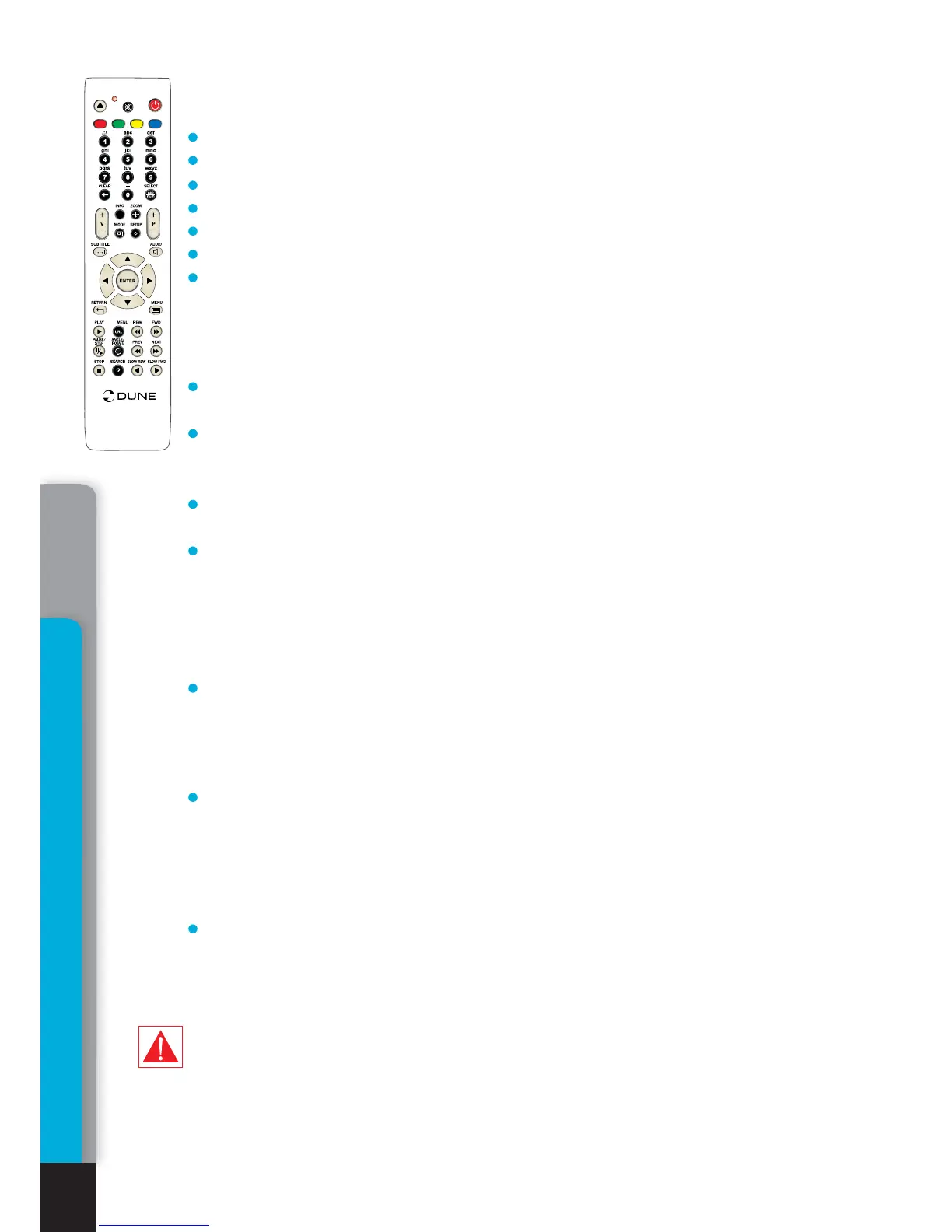
.
.
.
.
.
.
AB
C
D
T
O
P
i
O
PP
U
P
/
Vol+ / Vol- – volume control
INFO – information on current status of media player.
• current operation:
PLAY, PAUSE, etc.
• type of optical media used currently: BD-ROM, BD-R, etc.
• type of sound track: Stream type DD, DD+, DTS, etc.
• type of content and current playback time: HDMV 00:25:53
• current disc chapter: Title 1/11
• current disc episode: Chapter 8/27
• current bit rate: Bit rate 34.43 Mbp
ZOOM – first pressing: switch to picture zoom mode, display information on current
zoom settings.
Subsequent pressings: switch to subsequent zoom setting: 2X, 4X, 8X, 16X,
ZOOM
OFF
.
•
Left/Right/Up/Down – navigation through the frame enlarged in ZOOM mode.
SETUP – picture parameters setting mode (Contrast, Brightness, Hue, saturation)
•
Left/Right – adjusting of selected parameter.
0 - 9 – digit buttons. Disabled when playing a BD-ROM disc.
SUBTITLE: first pressing: display information on current subtitles.
• Subsequent pressings: switch to subsequent subtitles.
AUDIO: first pressing: display information on current sound track.
• Subsequent pressings: switch to the next sound track.
RETURN – return to preceding disc/menu status.
POP UP/MENU – displays an interactive menu of BD-ROM disc (selection of scenes,
switching between episodes, additional materials, etc.)
PLAY, ENTER: start the playback.
PAUSE/STEP: first pressing: switch to the pause mode.
• Subsequent pressings: frame-by-frame playback (switching to the next frame). To exit
the pause mode, press
PLAY.
STOP: end the playback, return to the Main page of the file browser.
FWD (>>) REW (<<) – switch to rapid forward/backward playback mode, increase speed
(switching between acceleration modes: 1x, 2x, 4x, 8x, 16x).
• To return to normal playback, press
PLAY.
PREV (<<|): start playing back the current episode from the beginning or switch to
playback of the previous episode.
NEXT (>>|): move to playback of the next episode on the disc.
SLOW FWD (|>) / SLOW REW (<|): switch to slow-motion playback forward/backward.
Decrease the speed (switching between modes: 1x, 1/2x, 1/4x, 1/8x, 1/16x).
• To return to normal playback, press
PLAY.
TOP MENU – switch to the root menu of the disc.
ANGLE/ROTATE – picture rotation.
SEARCH – switch to the preset playback time.
If after pressing of a RC button, the INVALID KEY indication is displayed, it shall
mean that the procedure assigned to this button is currently disabled and/or
disabled on this disc in general. Cf. ‘Notes on discs’.
Playback
30
Chapter 6



 To Next Page