UFM2/UBT User Manual
Page 16 Issue 1.1b July 20
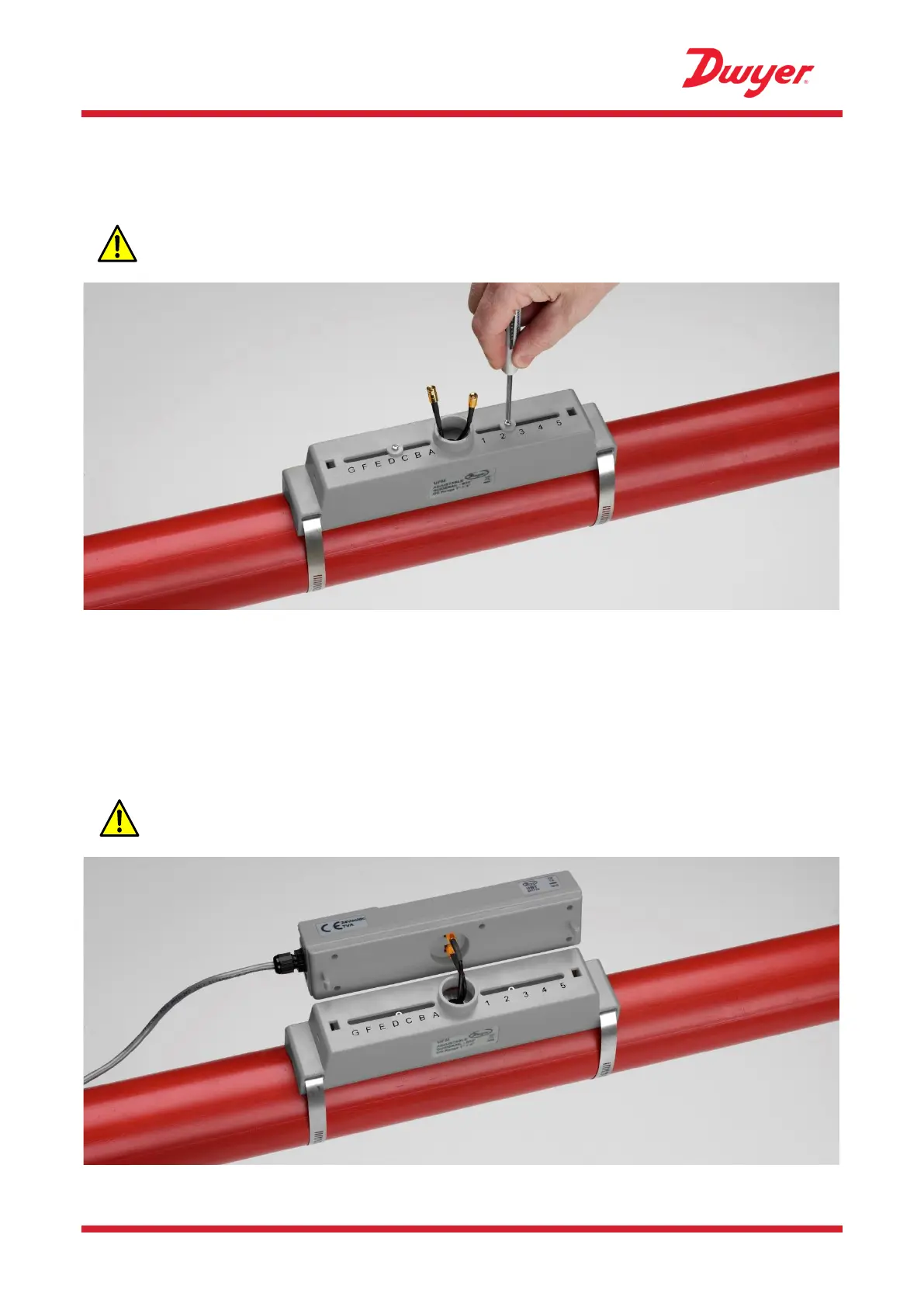
2.7 Remove Sensor-Holding Screws
Release and remove the sensor-holding screws. The flow sensors are spring-loaded to ensure good
contact with the pipe surface.
NOTE: THE SENSOR-HOLDING SCREWS AND WASHERS SHOULD BE KEPT IN A
SAFE PLACE IN CASE IT IS NECESSARY TO RELOCATE THE UNIT (SEE PAGE 28).
Figure 17 Removing sensor-holding screws
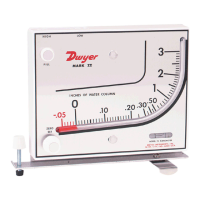
2.8 Connect Electronics Module
1. Ensure that the power is switched off.
2. Connect the Electronics Module (wired as described on page 7). The two leads can be
connected either way round.
IMPORTANT: DO NOT CLIP THE ELECTRONICS MODULE ONTO THE SENSOR
ASSEMBLY UNTIL YOU HAVE CHECKED OPERATION.


 To Next Page