. .
Dyadic Systems – Mechatronics Cylinder Manual MF-005500-EN-15/63
SCN6 Model SCL Models
* SCL actuators with amp built-in do not use the PM1, PM2, PM4 and PM8 outputs.
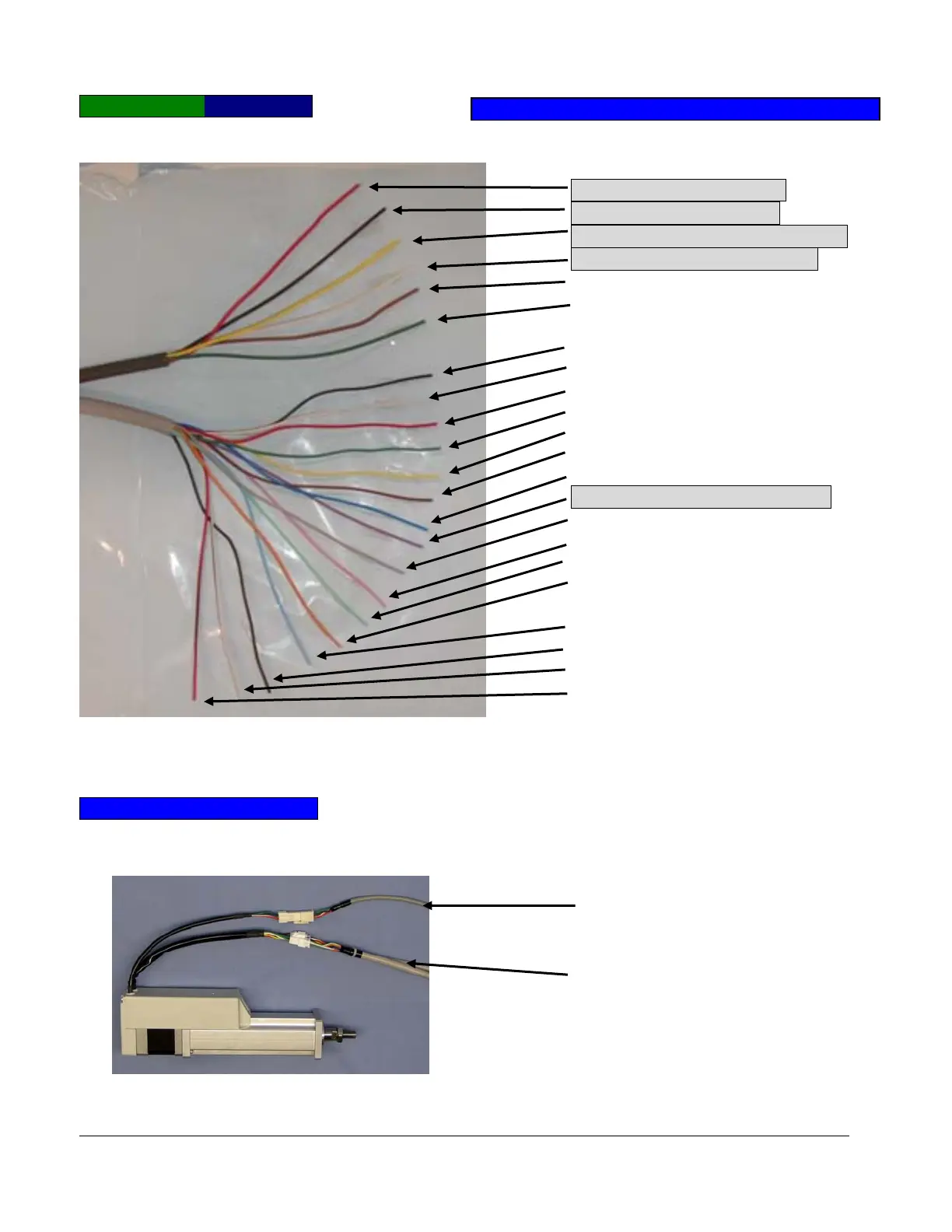
3.2.4. Connect Parallel cable and ADP Cable with Mechatronics Cylinder
SCN5 Models (10Kgf Type)
The ADP Cable is supplied with your Programming Tool (PC Tool Software, Teach Pendant Tool).
Please connect the ADP cable with the Mechatronics Cylinder after the 24VDC power is supplied.
Connect
arallel cable
Connect ADP Cable
(Included with Programming Tool)
Red: +24V, Motor Power
Black: 0V, Motor Power
Yellow: +24V, Controller Power
White: 0V, Controller Power
Brown: NC, please do not connect
Green: FG (ground)
Black: PC1
White: PC2
Red: PC4
Green: PC8
Yellow: CSTR
Brown: NC (No connection)
Blue: NC (No connection)
Purple: ILK, (E-Stop) +24VDC
Grey: PM1 *
Pink: PM2 *
Light green: PM4 *
Orange: PM8 *
Light blue: PFIN
Dark brown: ZFIN
White&Black: Zone
Red&Black: ALM
PNP T
e



 To Next Page