. .
Dyadic Systems – Mechatronics Cylinder Manual MF-005500-EN-21/63
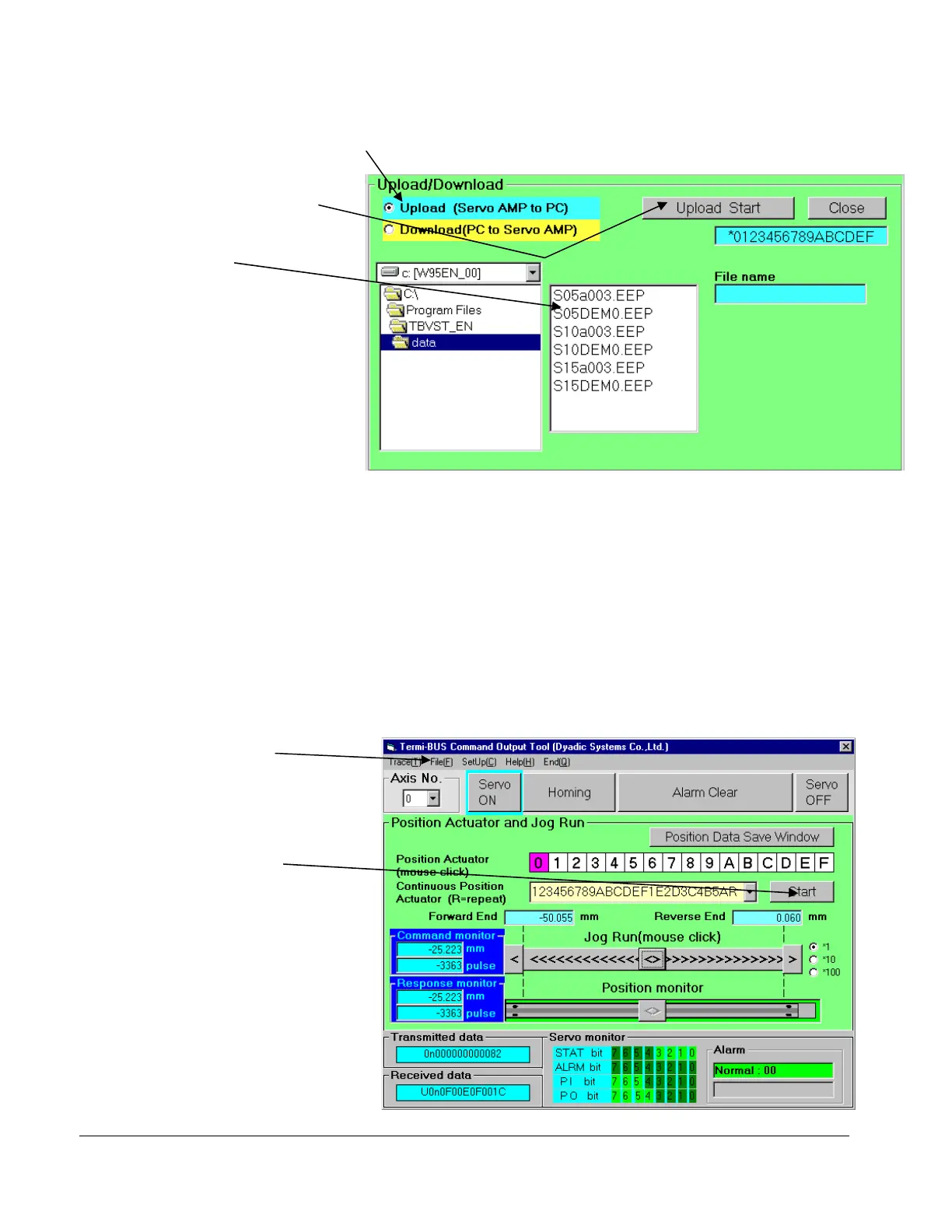
①
Select
【
Download (PC
⇒
Amp.)
】
②
File Selection
(6) Please click
【FILE】at left top on the screen, so that following Menu will be displayed.
(7) ① Please select【Download (PC→SERVO AMP)】and select the file which is suitable for the stroke
of the Mechatronics Cylinder being used. Click the【Download start】button, so that the demo
program will be copied to the Mechatronics Cylinder controller.
(8) Click【Close】at the top right of the screen to return to the previous menu. Click the【Start】button
to initiate the sequence entered in the text box to the left of the Start button. The Mechatronics
Cylinder will repeat this sequence of moves from the downloaded demo program if there is a letter
“R” at the end of the sequence.
Please click the【STOP】button to stop the demo movement.
(9) Please refer to 【HELP】
for details.
Click
【
START
】
so that the
Mechatronics Cylinder
will run the selected
demo program.
Click
【
FILE
】
so that
the File Menu will
appear on the screen
Click
Download Start



 To Next Page