Dymax BlueWave® 200 Version 3.0 User Guide
Follow the instructions in “Turning the BlueWave 200 On” (Page 12). The BlueWave 200 will power up in Manual,
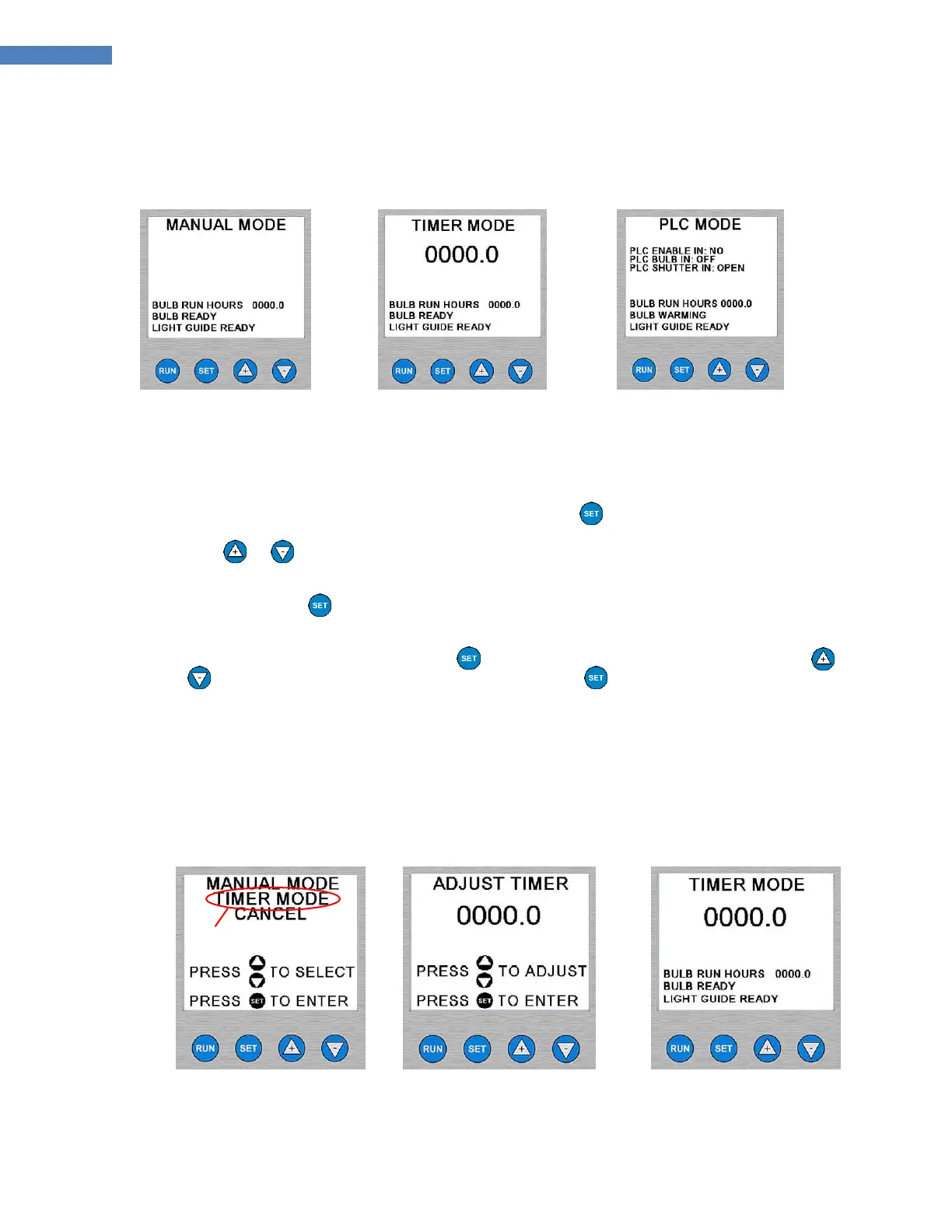
Timer, or PLC Mode (Figure 11).
Figure 11. Mode Start-up Screens (Left to Right: Manual Mode, Timer Mode, PLC Mode)
NOTE: If the BlueWave 200 powers up in PLC Mode, you cannot change modes from the front panel controls.
Refer to the instructions on Page 17.
To Change from Manual Mode to Timer Mode:
1. From the Manual Mode Menu (Figure 11), press and release the Button.
2. Use the or Arrows to select “TIMER MODE”. “TIMER MODE” will flash when it has been selected.
(Figure 12)
3. Press and release the Button.
4. The BlueWave 200 will show the Adjust Timer Menu with the last used timer value (Figure 11). If the value
on the timer is correct, then simply press the Button. If the value needs to be changed, press the
or Arrows to correct the Timer’s value. Press and release the Button after the correct value is on
the display.
NOTE: Holding either key down changes the value quickly. Single presses of either key adjust the timer in
0.1 second steps.
5. The system is now in Timer Mode (Figure 14).
Figure 12. Switching To
Timer Mode
Figure 13. Adjust Timer
Mode
Figure 14. Timer Mode
Screen



 To Next Page