2388-MANUL-V10.00.00-UTP2 Operating Manual
Page 43 of 74
3.16.7 Reading an Asset Tag
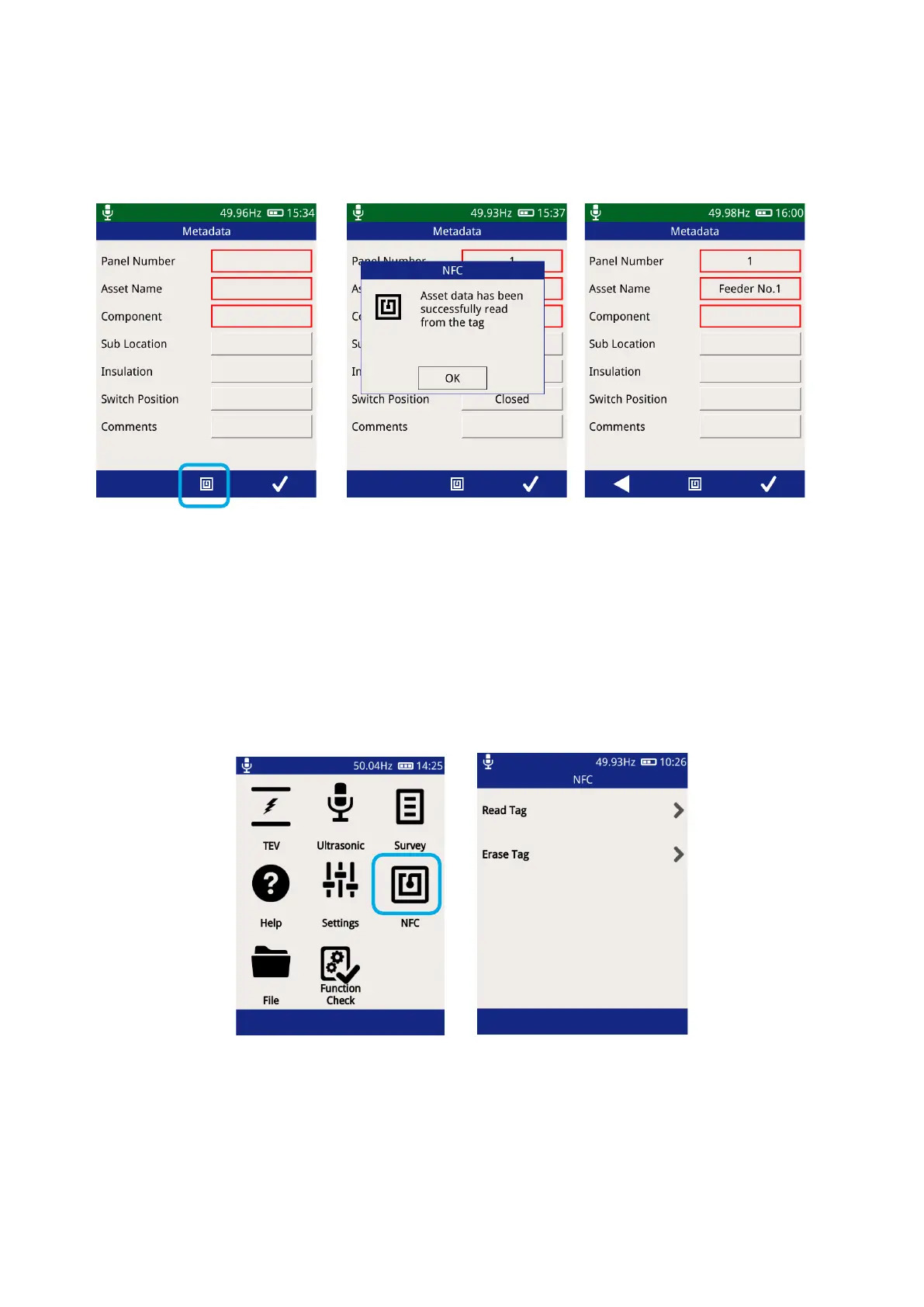
Whenever the record option is used in Survey mode and the measurement ‘Metadata’ screen is displayed, a tag
read is possible.
Press the centre button or NFC
icon to trigger a scan
The UTP2 will beep once to
indicate a tag has been
detected, followed by another
beep to indicate a successful
tag read
Data will populate asset
information
Measured values are stored on the tag. Past results can now be viewed in the html file on the UTP2 SD Card,
for trending purposes, as long as the reading was taken in the same location.
3.16.8 Reading an NFC Tag from the Main Menu
NFC tags which have previously been written to, can be read or erased from the Main Menu.
3.16.9 NFC Tag Trouble Shooting
‘blank tag detected, no data read’
Attempting to read substation data from an asset tag
Re-position the UTP2 in contact with the NFC tag and try
again



 To Next Page