27
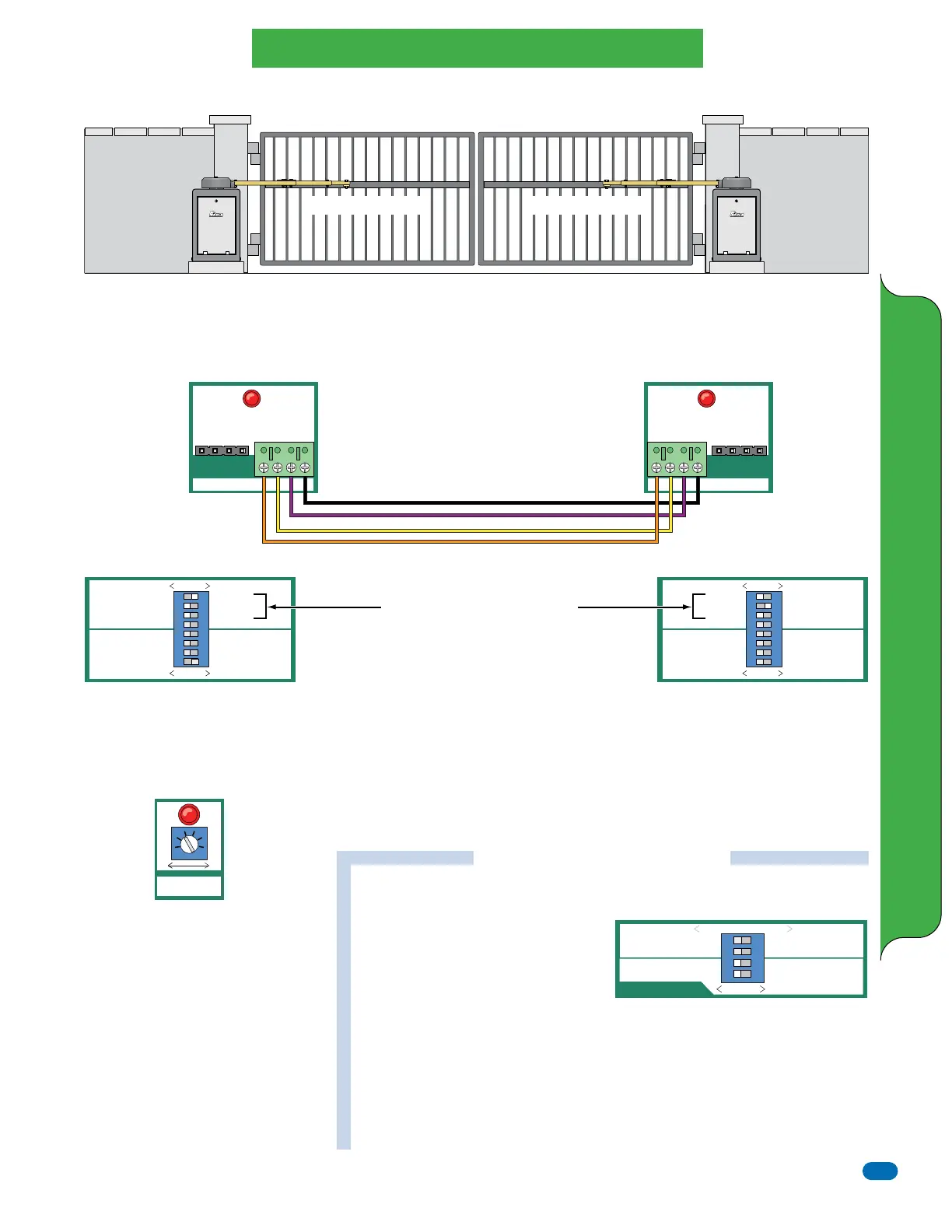
Diamond DC Board Master / Slave
SLAVE MASTER
+ –
#14#13
COMM PORT
+ –
GND
CLK
GND
CLK
Diamond DC Board Master / Slave Setup
BY EAGLE ACCESS CONTROL SYSTEMS, INC. BY EAGLE ACCESS CONTROL SYSTEMS, INC.
IMPORTANT: The 115 VAC power for the master and slave operators MUST be on the same circuit
breaker. It is recommended that each gate operator’s initial set-up is completed (Direction of gate travel,
limit switches, reverse sensor and feature selector switches #1 - #4) before connecting the operators
together. After each operator functions individually, proceed to Master/Slave connection and operation.
NOTE: #1 & #2 switch settings are
based on the illustration above.
Switch #3 MUST be OFF.
MASTER
OPEN RIGHT
BRAKE ON
REVERSE LOOP NC
ONE PASS ON
STOP-REVERSE ON
ALARM-RESET ON
CLOSE TIMER ON
OFF—ON
SLAVE
OPEN LEFT
BRAKE OFF
REVERSE LOOP NO
ONE PASS OFF
STOP-REVERSE OFF
ALARM-RESET OFF
CLOSE TIMER OFF
1
ON
2 3 4 5 6 7 8
SELECT
MASTER
Operator
SLAVE
Operator
MASTER
OPEN RIGHT
BRAKE ON
REVERSE LOOP NC
ONE PASS ON
STOP-REVERSE ON
ALARM-RESET ON
CLOSE TIMER ON
OFF—ON
SLAVE
OPEN LEFT
BRAKE OFF
REVERSE LOOP NO
ONE PASS OFF
STOP-REVERSE OFF
ALARM-RESET OFF
CLOSE TIMER OFF
1
ON
2 3 4 5 6 7 8
SELECT
Connect Master and Slave Operators Together
Choose your board type and use 20 GA stranded wire.
Correct polarity is VERY important. DO NOT cross
polarity. Operators will NOT function properly if not
wired correctly.
Use the feature selector to choose #2 - #8
options for the master operator. Switch #1
MUST be ON. Refer to page 20 for more
information about each of the features.
Use the Close Timer (#8 ON) to set the
gates closing time 1 - 60 seconds.
Use the feature selector to choose #2 - #3
options for the slave operator. Switch #1
MUST be OFF. Switch #4 is not used.
Refer to page 20 for more information
about each of the features.
If NO gate delay is needed:
Switches #3 - #4 MUST be OFF.
Setting the OPEN Delay for Master or Slave operator:
Switch #3: Open Delay Master ON: Master starts opening 1.5 seconds after slave.
Master starts closing 1.5 seconds before slave. Switch #4 MUST be OFF.
Switch #4: Open Delay Slave ON: Slave starts opening 1.5 seconds after master.
Slave starts closing 1.5 seconds before master. Switch #3 MUST be OFF.
ACCESSORIES NOTE: The Diamond DC Board
allow you to connect accessories to the master
or slave boards.
See page 26 for accessory wiring connections.
Opens to the Left Opens to the Right
Feature Selector (Master Operator)
Close Timer (Master Operator)
Feature Selector (Slave Operator)
Open Delay Functions
For overlapping bi-parting gates
Diamond
DC Board
ONLY
(Master Operator)
Diamond
DC Board
ONLY
(Slave Operator)
TIMER
MIN
MAX
SLAVE MASTER
+ –
#14#13
COMM PORT
+ –
GND
CLK
GND
CLK
1
ON
2 3 4
AUTO OPEN OFF
POWER FAIL OPEN
OPEN DELAY MASTER OFF
OPEN DELAY SLAVE OFF
AUTO OPEN ON
POWER FAIL CLOSE
OPEN DELAY MASTER ON
OPEN DELAY SLAVE ON
OFF—ON
PWR FAIL OPERATION
Set either Master or Slave operator
Diamond DC Board ONLY



 To Next Page