152
152
Audio Operations
Using USB Music File Player
This receiver can play music files stored in a
USB memory. Only MP3/WMA playback is
available.
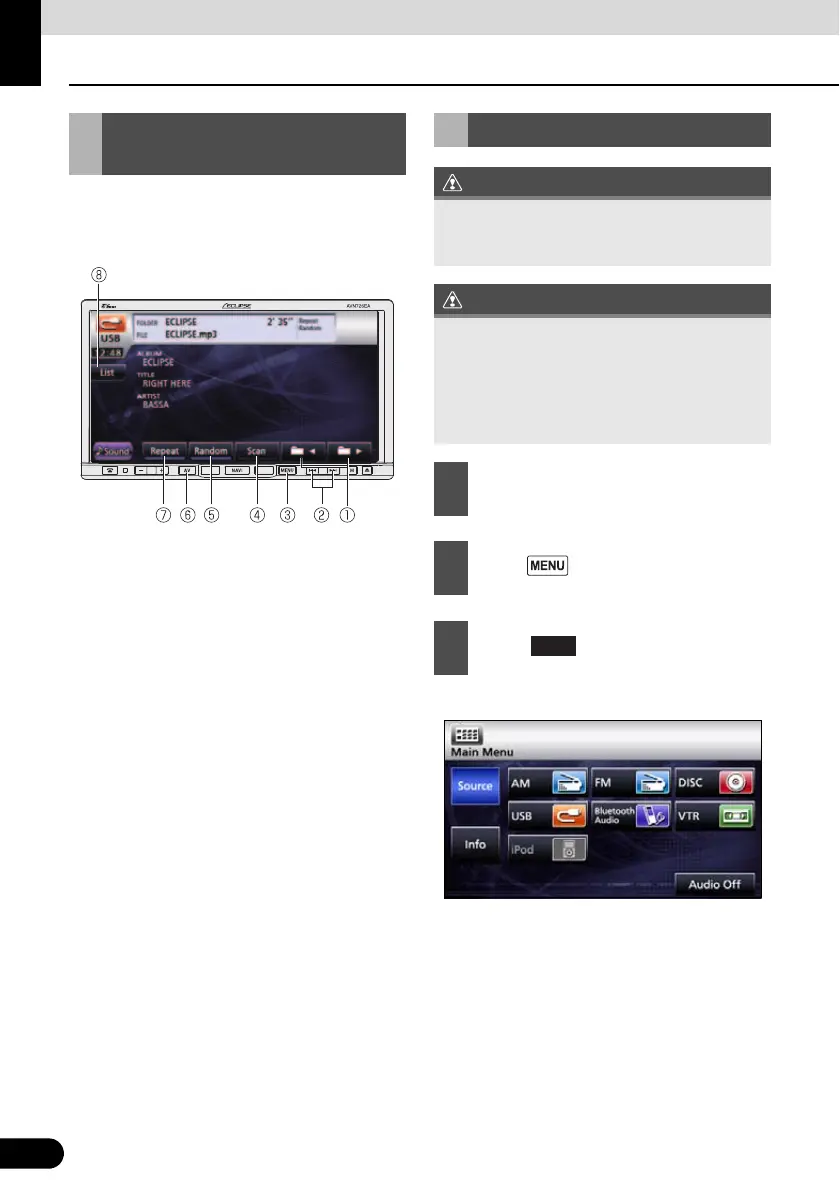
a Folder/file selection switch
b File UP/DOWN, Fast UP/DOWN button
c MENU button
d Scan switch
e Random switch
f AV button
g Repeat switch
h List switch
● Playback will begin.
Using USB Music File
Player
Playing USB Music Files
Connect the USB cable correctly so that it
does not interfere with safe operation of the
vehicle.
When a USB memory device is attached, the
receiver may take time to scan and read the
file tag information. To shorten this scan
time, try to store only MP3/WMA files in the
USB memory and reduce the number of
folders in the USB memory.
1
Connect the USB memory to the USB
connector.
2
Press .
3
Touch .
USB



 To Next Page