ECP2010 / ECP2010H
19 / 68
4.7. Connections on Unit Rear Panel
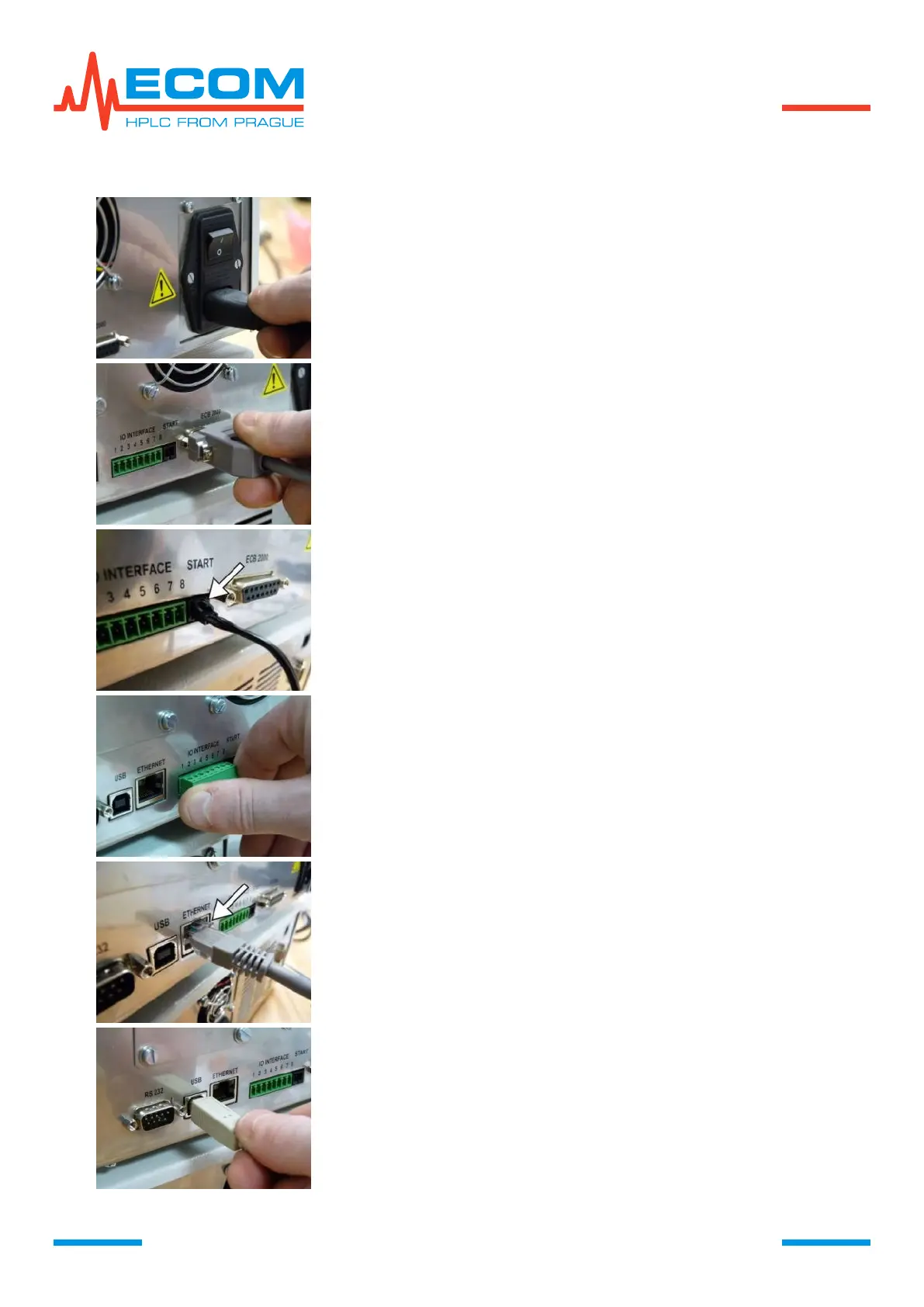
Plug the power supply cord into the instrument socket on unit rear
panel. The cord is among unit accessories.
Plug the interconnecting cable between pump and box into
connector ECB2000. Cable is among box accessories.
Connector can be fixed by two screws using cross tip screwdriver.
Plug injection valve cable into START connector. Plug it all the
way in until it snaps in.
In order to unplug the connector, press the safety pin (see arrow
on right picture) and pull out.
Insert terminal block into connector INTERFACE, it is among the
pump accessories. If there is no signal connected to the terminal
block, it is not necessary to connect it.
Plug LAN network cable into connector ETHERNET, it is among
the pump accessories. Press the connector in until the safety pin
snaps in. In order to unplug the connector, press the safety pin
(see arrow on the right picture) and pull out.
The other end of network cable shall be plugged into PC or
computer network element.
Connector USB serves for plugging USB cable for interconnection
with PC.
Cable is not among the unit accessories.


 To Next Page