ECP2010 / ECP2010H
23 / 68
5. CONTROL FROM PC
During unit control from PC communication proceeds through serial line RS232, USB or
through LAN. Communication protocol can be supplied upon request.
Unit may be controlled with SW Clarity or ECOMAC.
When using program Clarity for pump control, use last upgraded program version, including
drivers for this unit. Help regarding the control of this unit can be found in installation directory of
Clarity (C:\Clarity; C:\Clarity\Bin) in file: CswEcomECP2000.chm. Doubleclick on the file opens it
for reading.
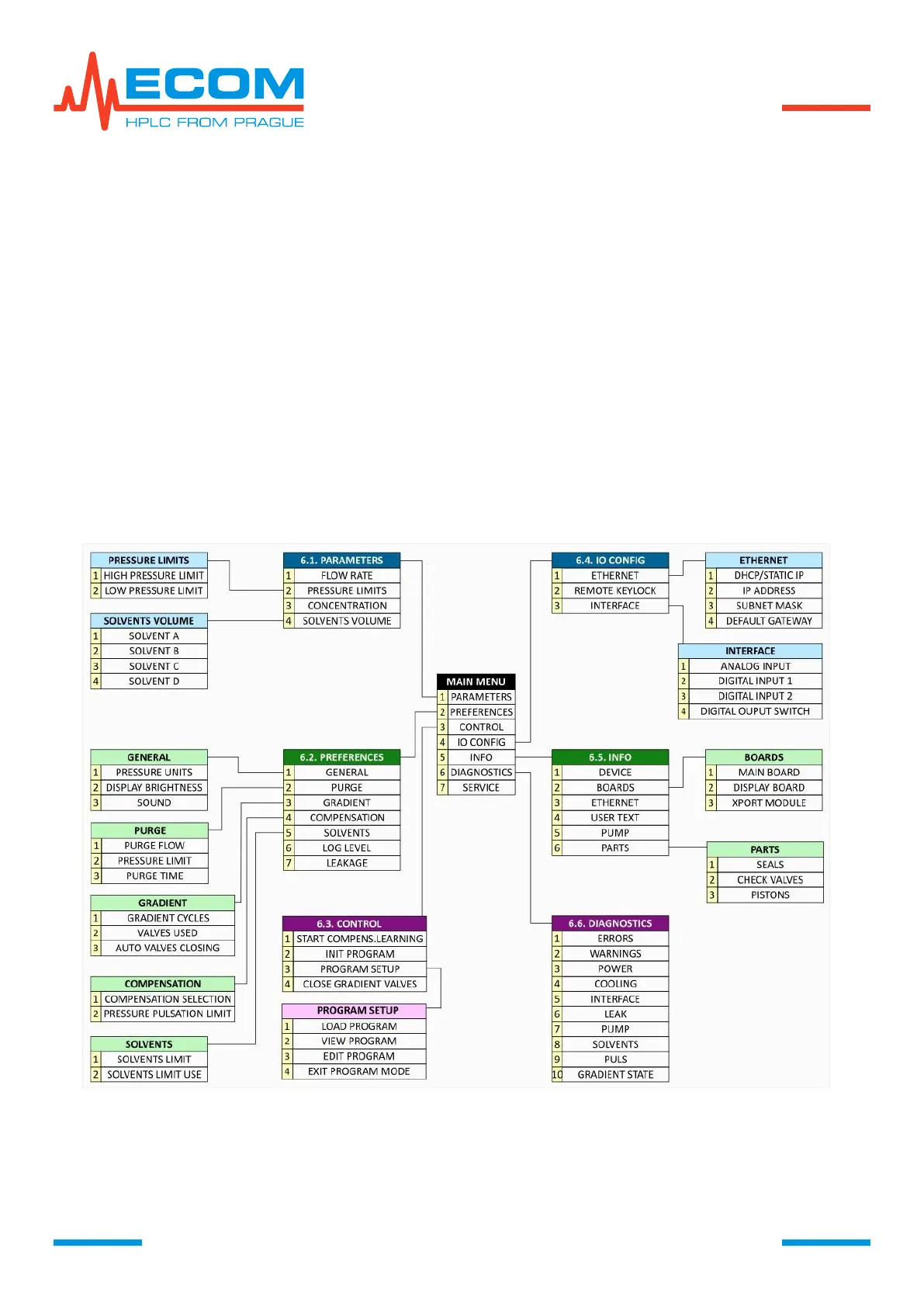
6. WORKING WITH MENU
Menu enables setting all parameters and functions of the unit, its diagnostics and service.
MAIN MENU is entered by pushing key MENU. In the menu you can move using arrows,
ENTER and ESC. Any part of the menu can be abandoned by pressing key MENU.
MENU FLOW DIAGRAM
6.1. Parameters
For setting basic parameters of the pump, such as flowrate, pressure limits, concentration
and volume of remaining mobile phase.


 To Next Page