ECP2010 / ECP2010H
30 / 68
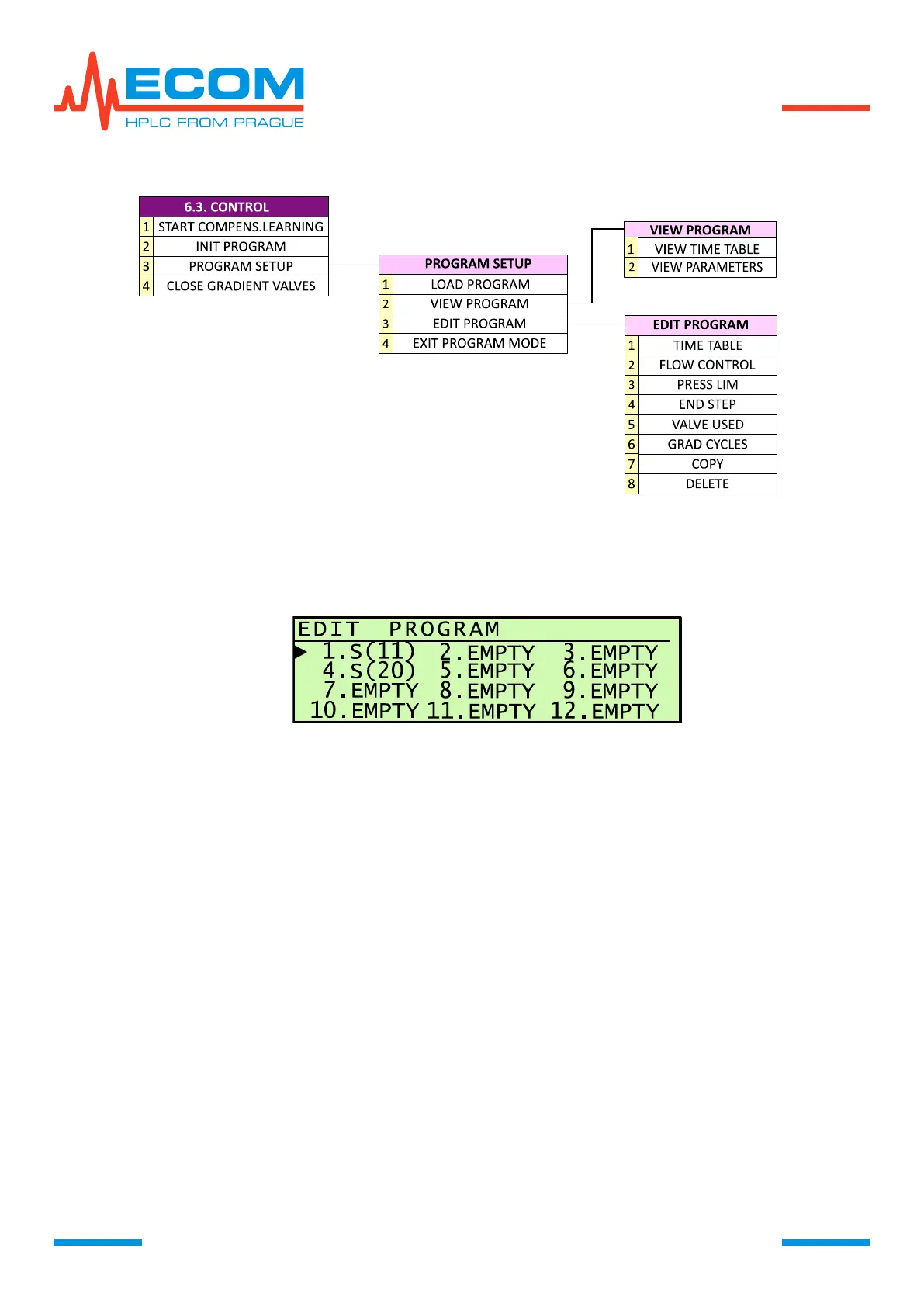
FLOW DIARAM FOR MENU ITEMS CONTROL A PROGRAM SETUP
Steps from Program Creating to Leaving Program Mode.
a) Creating program in EDIT PROGRAM (see 6.3.4.3).
X. …program sequence number, S…Step, xx…total number of steps, EMPTY…empty.
b) Saving program. Then the program is available in VIEW PROGRAM (see 6.3.4.2) and
LOAD PROGRAM (see 6.3.4.1).
c) Uploading a program into unit memory using LOAD PROGRAM. Unit turns into status of
control by program, which is called program mode. Screen switches to menu item INIT
PROGRAM.
d) Program initialization INIT PROGRAM (see 6.3.3). The unit sets default program
parameters = initialization phase. Mobile phase is stabilizing as well as flowrate and
pressure. In this phase is a sample injected into loop.
e) Program start – by turning injecting valve from position LOAD to position INJECT (sample
gets to column); pressing key D or external signal, set in menu item Menu/IO
Config/Interface/Digital input 1(2)/Program start.
f) Program termination – automatically according to setting in menu item END STEP (final
step) - RUN (program ends, pump is running), STOP (program ends, pump stops),
REPEAT (program ends, pump runs, program reinitiates for restart) – or during running
probram by evoking menu item Menu/Control/Reinit program and subsequently
Menu/Control/Stop program.
Programming mode remains saved after turning unit off and on. After restart it is in status
STOP. If it is necessary to exit the program mode, it can be proceeded by EXIT PROGRAM
MODE (see 6.3.4.4).


 To Next Page