ECP2010 / ECP2010H
58 / 68
7. WORKING MODES
The unit may be in different working modes regarding to requested actions. It passes to
some modes after command of staff or PC, others are evoked automatically in order to execute a
sequence of operations.
WORKING MODES
Mode
EN name
Abbreviation
Initialization
INITIALIZATION
INI
Temporary mode after unit start. Initial screen of unit type
displays. Basic unit initialization is executing.
Transitive status after pumping start, when motor is prepared
before start.
Mode after stopped pumping. It enables to reconfigure
operating parameters. Unit is waiting for command to start
pumping.
Unit has several other modes, used only for special reasons.
8. RS232
The unit enables communication via line RS232. On the unit is connector Canon DB9 male
and on the cable must be Cannon DB9 female connector. For connecting must be used shielded
cable, containing on both sides connectors Canon DB9 female. Parameters for connection are
115 200 Baud, 8 data bit, 1 start bit, 1 stop bit, no parity. Unit communicates based on
communication protocol, available upon request.
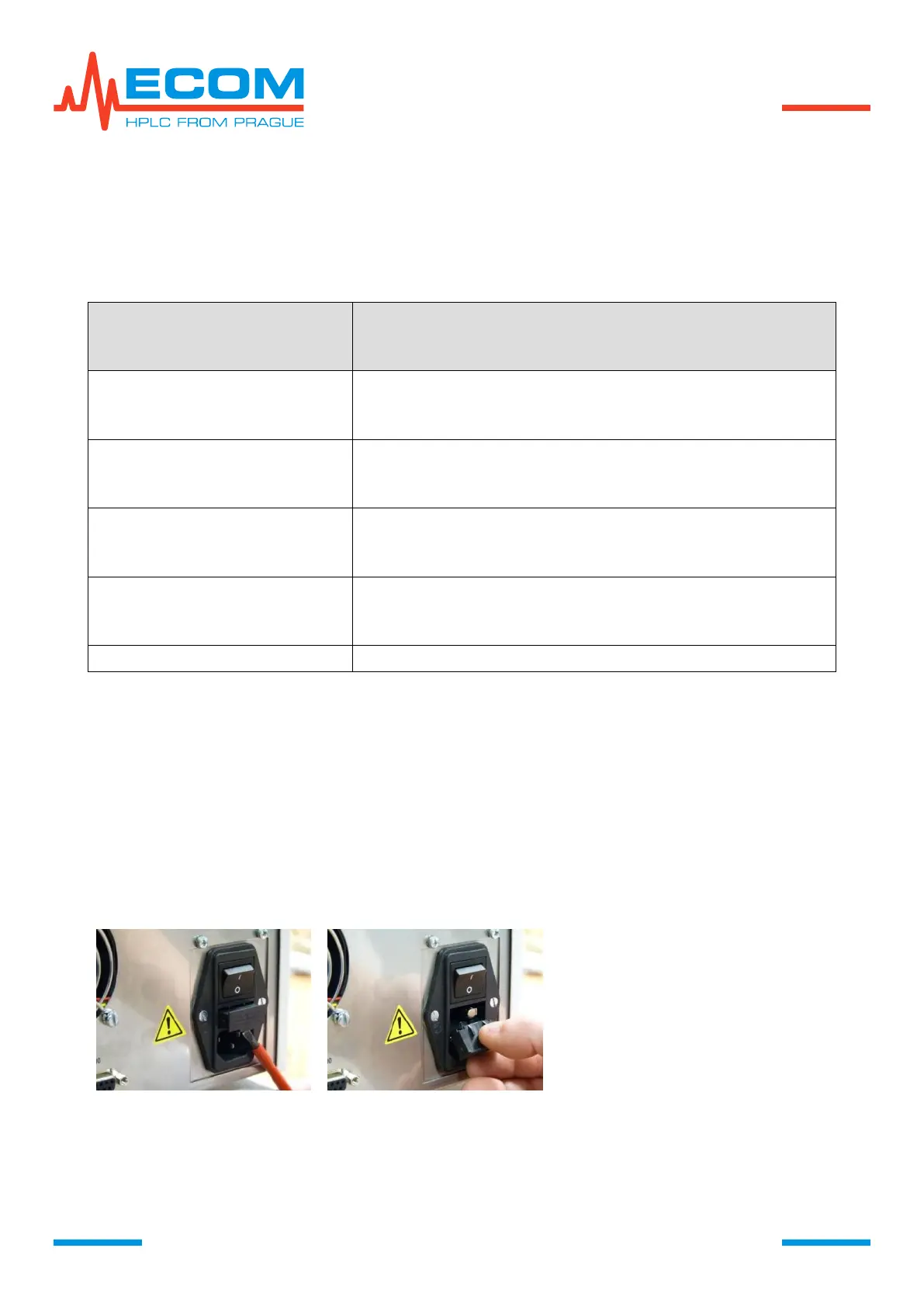
9. REPLACEMENT OF LINE FUSE
Disconnect the unit from power
source!!!
Using a flat-tip screwdriver relase
the fuse holder from its bottom.
Take out the fuse holder.


 To Next Page