Program initialization. Displays in menu after loading program from menu
item LOAD PROGRAM (see 6.3.4.1) and after program termination.
Press ENTER to proceed selected action.
6.3.4. Program Setup
Here can be uploaded, viewed, created and eventually edited gradient programs and
program mode is abandoned. System enables to create and save 12 programs. Default status is
EMPTY.
6.3.4.1. Load Program
By uploading a program into unit memory is the unit prepared for initialization by INIT
PROGRAM. System allows to upload only one program.
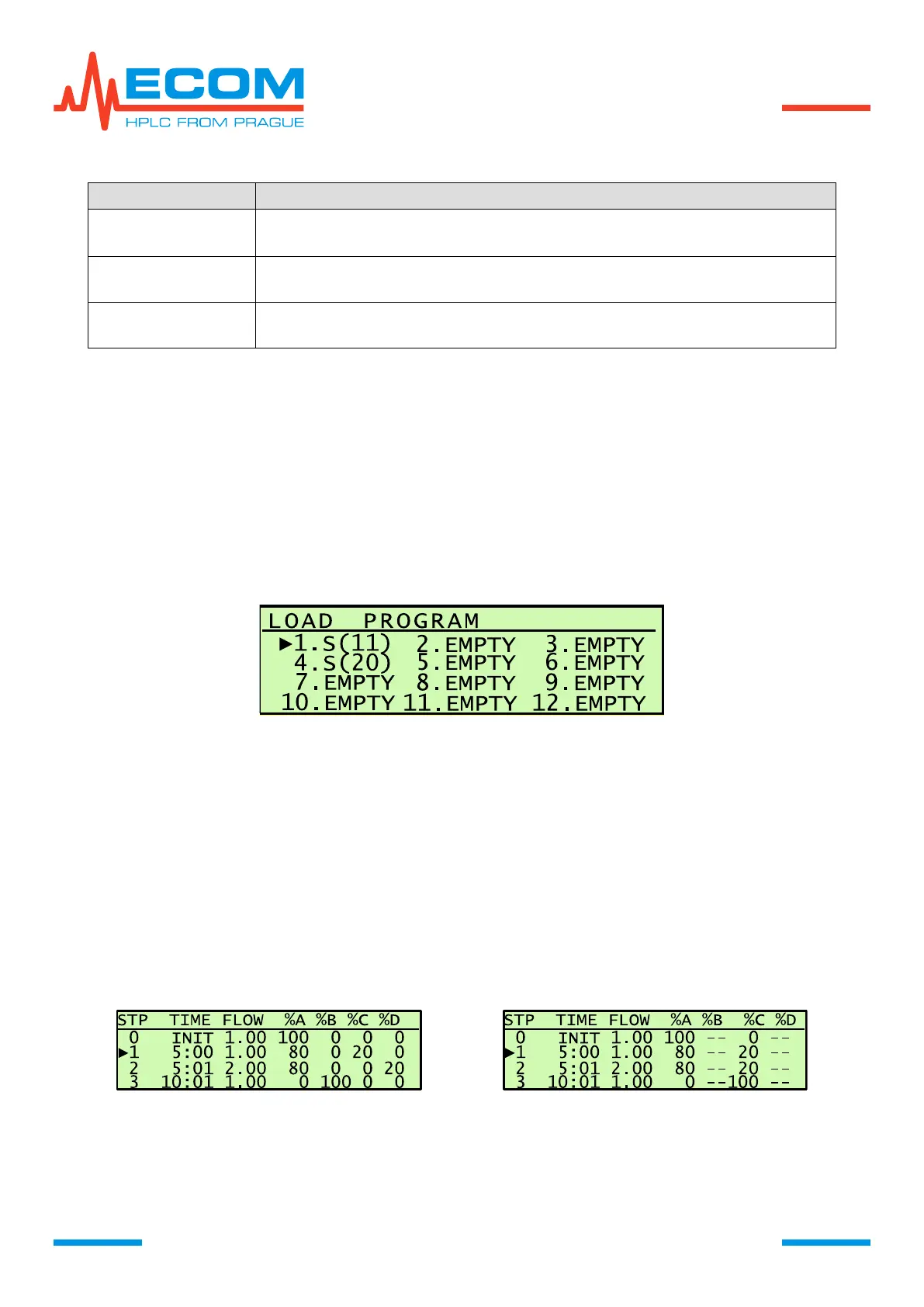
Use arrows to select desired program, press ENTER to upload the program and then is the
menu item automatically abandoned. Cursor on the screen points at menu item INIT PROGRAM.
Press key ENTER again to set initialization phase parameters.
6.3.4.2. View Program
Viewer of created programs enables viewing set parameters. The screen when entering an
item is similar to LOAD PROGRAM. In heading is written VIEW PROGRAM.
View Time Table
Sequence number of step, time (min:s) of step start, flowrate (ml/min), mobile phase
concentration A, B, C, D in % of volume. Use arrows up and down to move between table pages.
An unadjusted valve is marked with - -.


 To Next Page