ECP2010 / ECP2010H
56 / 68
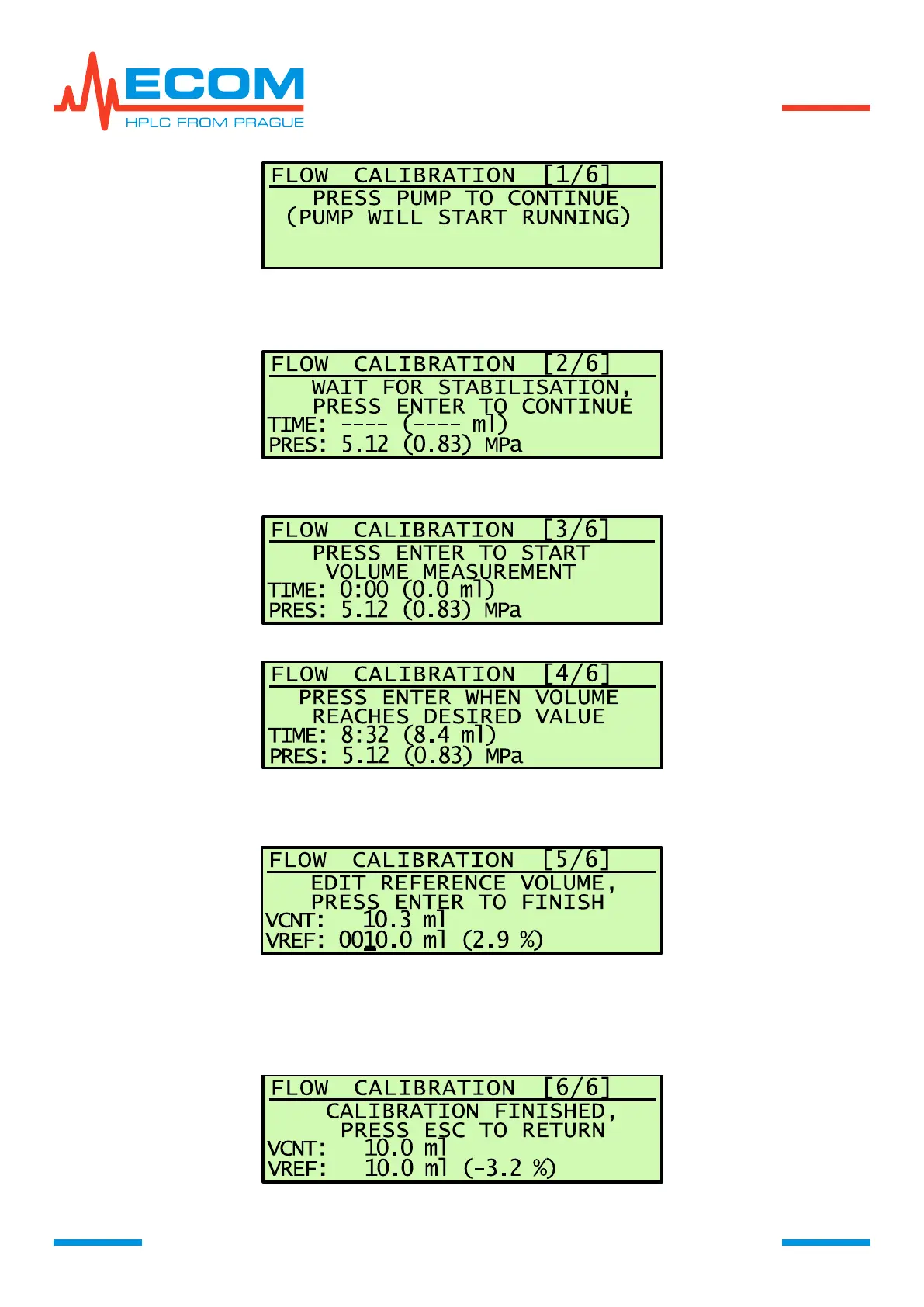
2/6) Parameters measured by the unit are displayed – time, volume, pressure. Let the unit to
stabilize for approximately 1 minute. Press ENTER to continue.
TIME --- ( --- ml); PRES xx (yy) MPa (xx…actual pressure, yy…pulsation)
3/6) Unit is prepared for start by pressing ENTER. At the same time start capturing mobile
phase in the volumetric flask.
4/6) Time and volume start countdown. After filling volumetric flask, press ENTER.
5/6) Pumping stops, time and volume countdown stops. Display shows VCNT…volume
measured by the unit during measuring (ml); VREF…reference volume (ml), filled in
according to used volumetric flask; (xx %) …deviation from previous calibration.
After pressing ENTER is calibration of flowrate (FLOW AUTO) finished. After pressing ESC
it does not finish.
6/6) Unit calculates new deviation based on measured and submitted parameters and corrects
VCNT compared to VREF and records new deviation.


 To Next Page