Chapter 5
| Port Connections
How to Connect to the Twisted-Pair Copper Management Port
– 37 –
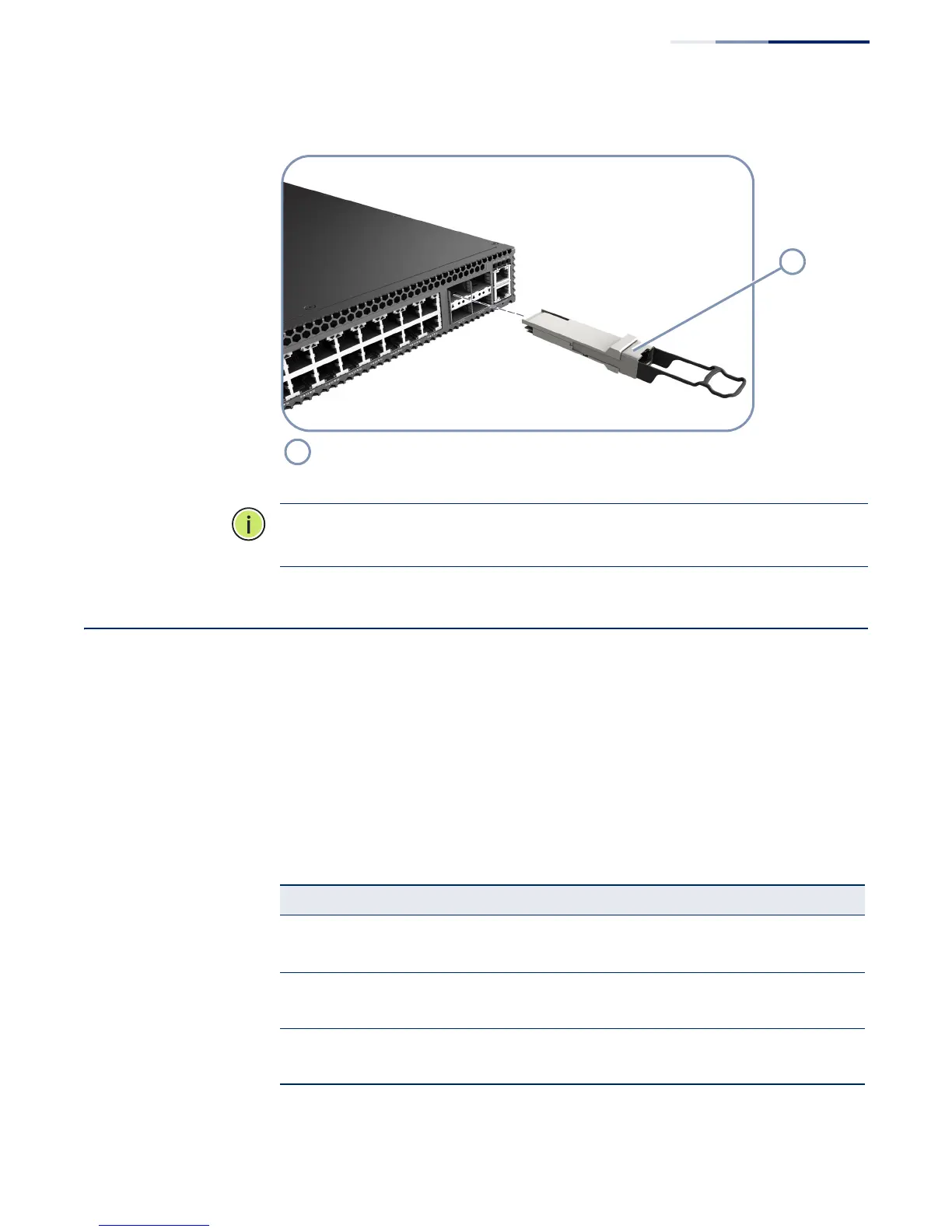
Figure 21: Inserting an SFP/SFP+/QSFP+ Transceiver into a Slot
Note:
To uninstall a transceiver: First disconnect the network cable, then release
and pull the wire bail to remove the transceiver from the slot.
How to Connect to the Twisted-Pair Copper Management Port
The RJ-45 management port on the switch supports automatic MDI/MDI-X pinout
configuration, so you can use standard straight-through twisted-pair cables to
connect to any other network device (PCs, servers, switches, routers, or hubs).
The connection requires an unshielded twisted-pair (UTP) cable with RJ-45
connectors at both ends. Use Category 5, 5e or 6 cable for 1000BASE-T connections,
Category 5 or better for 100BASE-TX connections, and Category 3 or better for
10BASE-T connections.
QSFP+ Transceiver
Table 4: Maximum Twisted-Pair Copper Cable Lengths
Cable Type Maximum Cable Length Connector
1000BASE-T
Category 5, 5e, or 6 100-ohm UTP or STP 100 m (328 ft) RJ-45
100BASE-TX
Category 5 or better 100-ohm UTP or STP 100 m (328 ft) RJ-45
10BASE-T
Category 3 or better 100-ohm UTP 100 m (328 ft) RJ-45











 To Next Page