Home
Edimax
IP Camera
IC-9000
Page 44 (Camera Management)
Edimax IC-9000 - Camera Management
118 pages
Manual
Save Page as PDF
To Next Page
To Next Page
To Previous Page
To Previous Page
Loading...
44
4-3 Managing CamView
Camera I
P cameras
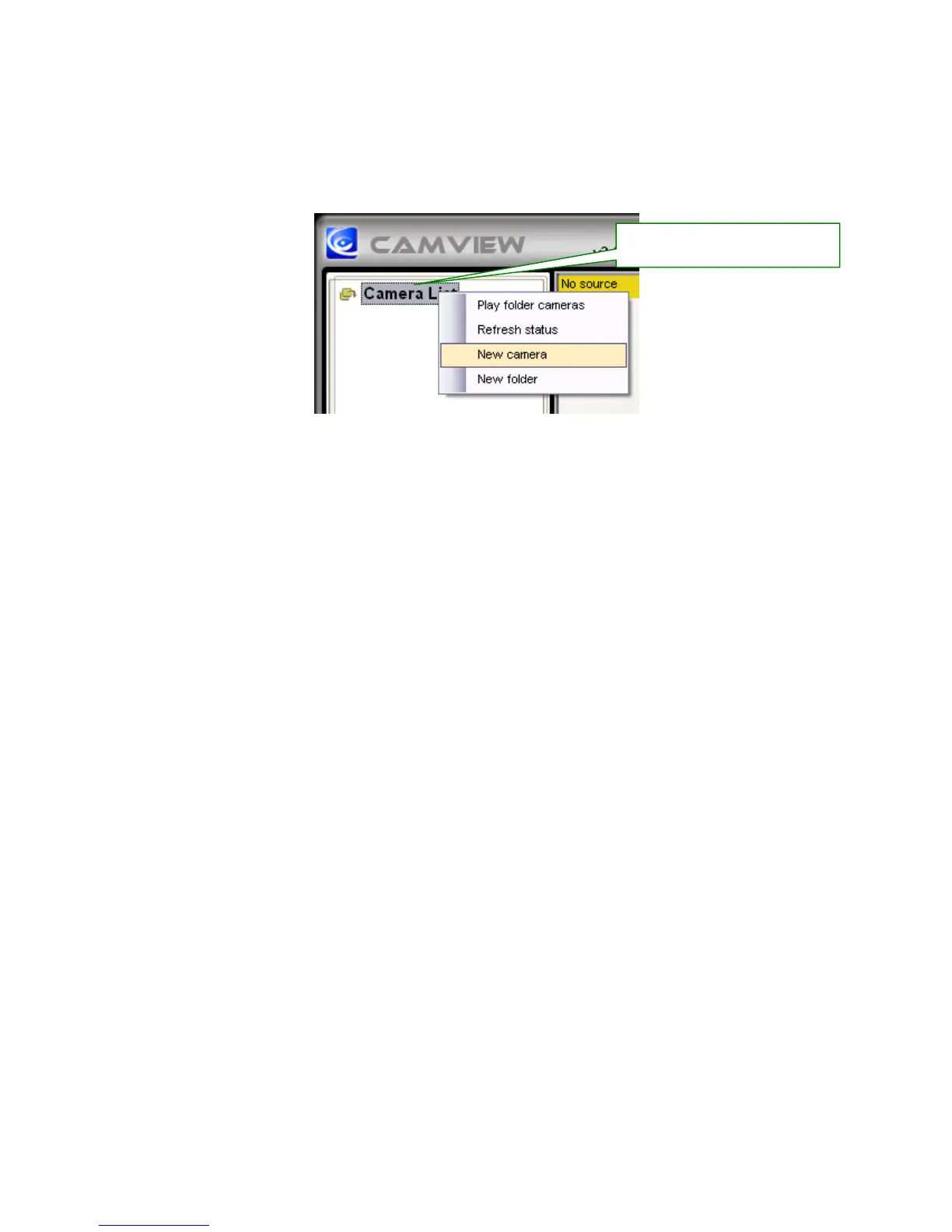
Right click the “Camera List
” .Y
ou can add a new IP cam, create a new folder
,
rename the
IP cam or the folder
, and
delete any IP cams or any folder
.
Right Click “Camera List”
, and
choose N
ew Camera
43
45
Table of Contents
Main Page
Table of Contents
3
Chapter I Product Introduction
7
Package Contents
7
System Requirements
8
Highlights of the DDNS-Free Outdoor IP Camera
9
Familiar with the IC-9000
10
Install the IC-9000
11
Hardware Installation
11
Software Installation
12
Chapter II Start Using the DDNS-Free Outdoor IP Camera
13
Use Camview Software to See the Video
14
Seeing the Video in a Remote Location
14
Chapter III Start Using Web Configuration Page
15
Information
16
Video Display
17
Network
18
Advanced Network
20
Video Settings
21
3GPP/RTSP Settings
23
Night Mode Control
24
Email/Ftp Alarm
25
DI/DO Settings
27
NAS Settings
28
Scheduling
30
Date/Time
32
Admin
33
Upgrade
34
Reboot
36
Safe Mode
37
Set to Factory Default
38
Chapter IV Start Using Camview
39
Install Camview Program
39
Startup and the Layout of Camview
42
Startup Camview
42
Layout of Camview
42
Display Mode
43
Managing Camview Camera IP Cameras
44
New Camera
45
New Folder
46
Rename
47
Delete
48
Refresh Status
48
Camera Adjustment
49
Play on Selected Window
50
ID / Password Settings
50
Video Settings
51
Quality Function Tab
52
Video Function Tab
52
Control Function Tab
54
Camera Info Tab
54
3GPP Setting
55
Firmware Upgrade
56
Delete Camera
56
Displayed Video Control
57
Camview Software Functions
63
Setting
63
Camplay
65
Scheduling
65
Continuous Recording
66
Language
68
All Functions
68
Uninstall Camview
69
Chapter V Start Using Camplay
70
Camplay File Tree
71
Camplay Functions
72
Language
73
Headline Explanation
73
Convert to "AVI
74
Playback Function Bar
75
Snapshot
75
Zoom in and Zoom out
75
Chapter VI Start Surveillance Software
76
Installing IP Camera Surveillance Software
76
Using IP Camera Surveillance Software
80
Configure IP Camera Surveillance Software
83
Configure Cameras
83
Camera' Tab
84
Schedule Recording
86
Audio
89
Motion Record
90
General Settings
92
General' Tab
92
E-Mail Setting' Tab
94
Security
96
About
98
Change Display Layout
99
Full-Screen Modes
102
Scan
103
Zoom-In / Zoom-Out
104
Ptz
105
Snapshot
106
Recording
106
Video Playback
107
Appendix A. Features
108
Appendix B. Specifications
109
Appendix C. Maximum Allowed Video Users
111
Appendix D. Performance Information
112
Appendix F. 3GPP/ISMA Operation
115
Related product manuals
Edimax IC-3030
129 pages
Edimax IC-3010
114 pages
Edimax IC-1500
42 pages
Edimax IC-3030i
127 pages
Edimax IC-7010PT
136 pages
Edimax IC-7000PT
16 pages
Edimax IC-5160GC
133 pages
Edimax IC-7000PTn
70 pages
Edimax IC-7010PTn
136 pages
Edimax IC-7000PT V2
78 pages



 To Next Page