PhaseTrakker AP30 Setting Up the Field Unit
11
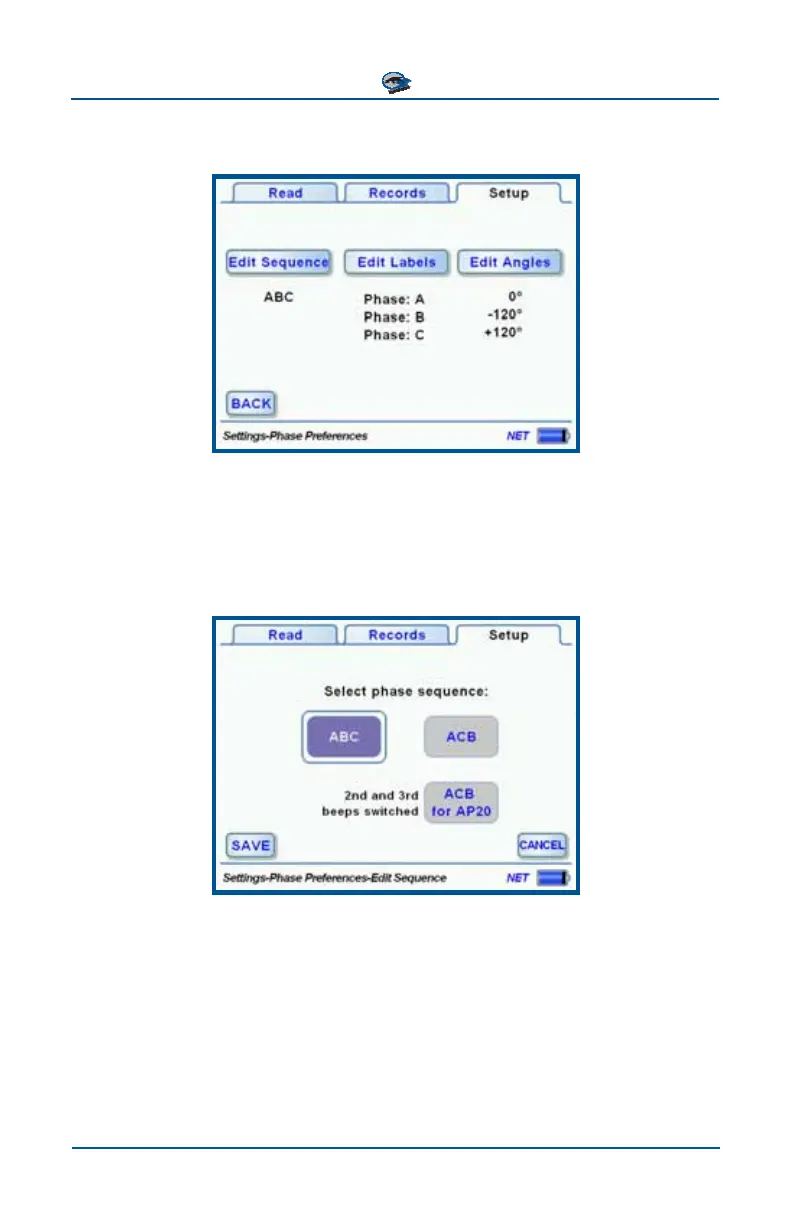
The Phase Preferences menu displays the current settings with buttons to edit
changes.
Setting Phase Sequence
The Edit Sequence menu allows a convenient way to exchange the labels as-
signed to the 2
nd
and 3
rd
Phases. The Angles assigned to these phases remain
unchanged. The default labels A B C are shown in this example, but the menu
will display the actual phase labels configured.
If ”ACB” is selected, the AP30 Field Unit displays A in the top position, C in the
middle, and B at the bottom, reflecting their order in time sequence. The unit
sounds 1 beep for A, 2 beeps for C, and 3 beeps for B, also reflecting their or-
der in time sequence. The previous Field Unit model, AP20, had a fixed front
panel display that could not be changed to reflect the configured phase se-
quence. If “ACB for AP20” is selected in the screen above, the AP30 sounds 1
beep for A, 3 beeps for C, and 2 beeps for B, as the AP20 did.
Changing the phase sequence does not affect records already stored in the Field
Unit.



 To Next Page