AD DRYER
NP-DK50 2V-A-4_10-2022-AD 44 10/2022
Symbol for chamber pre-filling – equalisation of pressure in chambers.
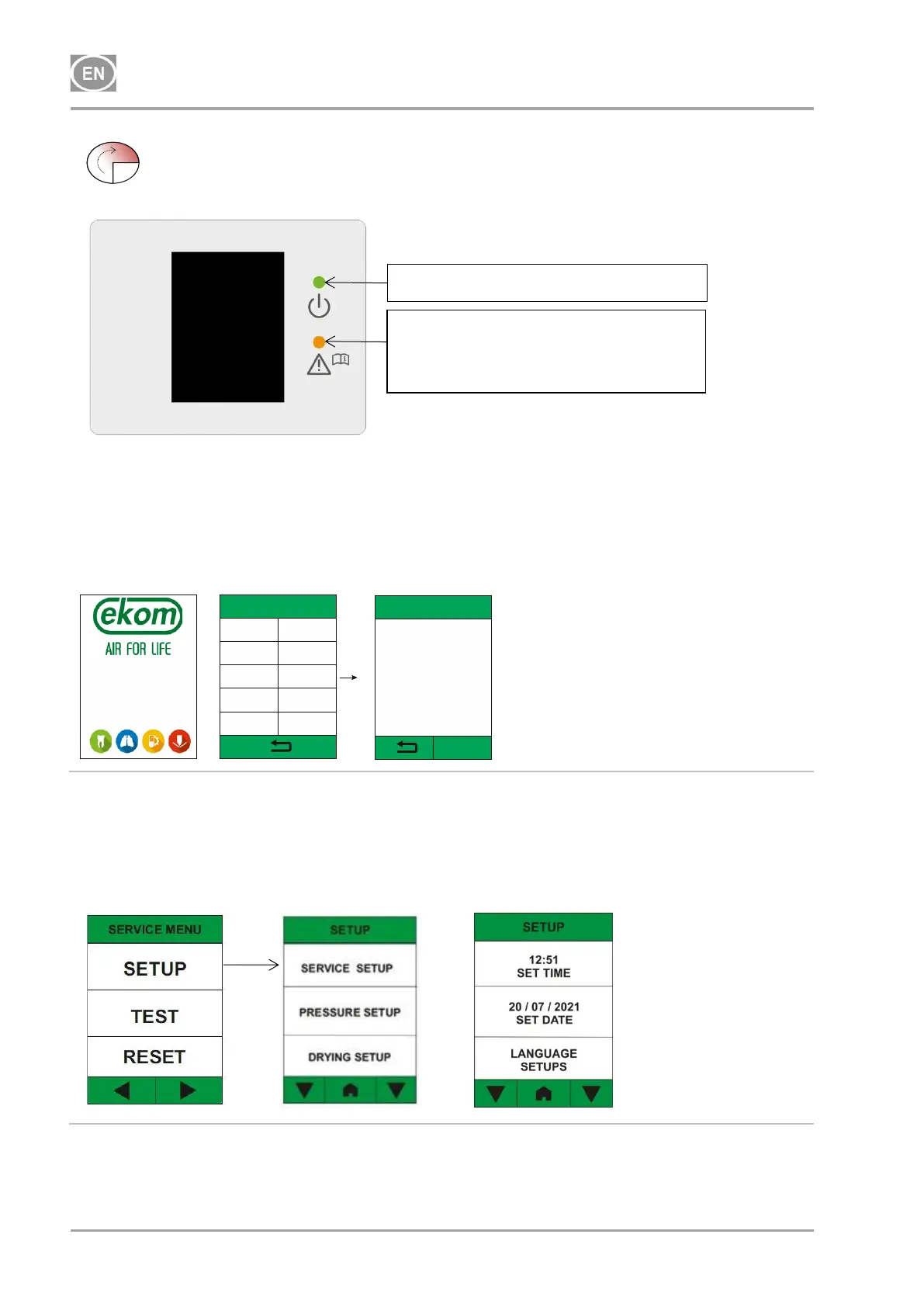
19.2. Initial language settings for the user interface
The option to select a language appears when the program is first launched. The service technician
selects the given language during installation based on the geographic location of the dryer
installation. The program saves and remembers this setting. The option does not appear when the
program is restarted.
LANGUAGE SETUP
CZ SK
GER UK
RUS
HUN
FR
ADSORPTION DRYER
IS ON
RUN
E N T E R
CONFIRM THE
LANGUAGE:
CZECH
LANGUAGE SETUP
19.3. Setting the date and time during commissioning
It is recommended to set the date and time during commissioning. These settings are changed in
the service menu in the SETUP section. Access to the service menu is protected by a code (1992).
In SETUP you have to tap down arrow to set date and time. In the same way, it is possible to
reset the user interface language via LANGUAGE SETUP.
19.4. Setting the drying mode during commissioning
It is recommended to set the air-drying mode during commissioning. These settings are changed in
the service menu in the SERVICE SETUP section. Access to the service menu is protected by a
Indication the device is operating
Indication of an alarm state
(on until the alarm state no longer
exists)


 To Next Page