AD DRYER
NP-DK50 2V-A-4_10-2022-AD 46 10/2022
- Basic information and measured parameters are shown on the dryer home screen. The dryer
operating hours indicator is located at the top of the screen. The home screen has 4 main
tiles that display the following information:
- Dryer operating mode (see chap. 19.1)
- Current pressure in the dryer (min. working pressure to activate dryer regeneration is 3 bar)
- Current pressure dew point value (only for compressors equipped with dew point sensors)
- Remaining time to the next service interval (see chap.21.1, 21.2 – service intervals).
20.2. Dryer operation screen
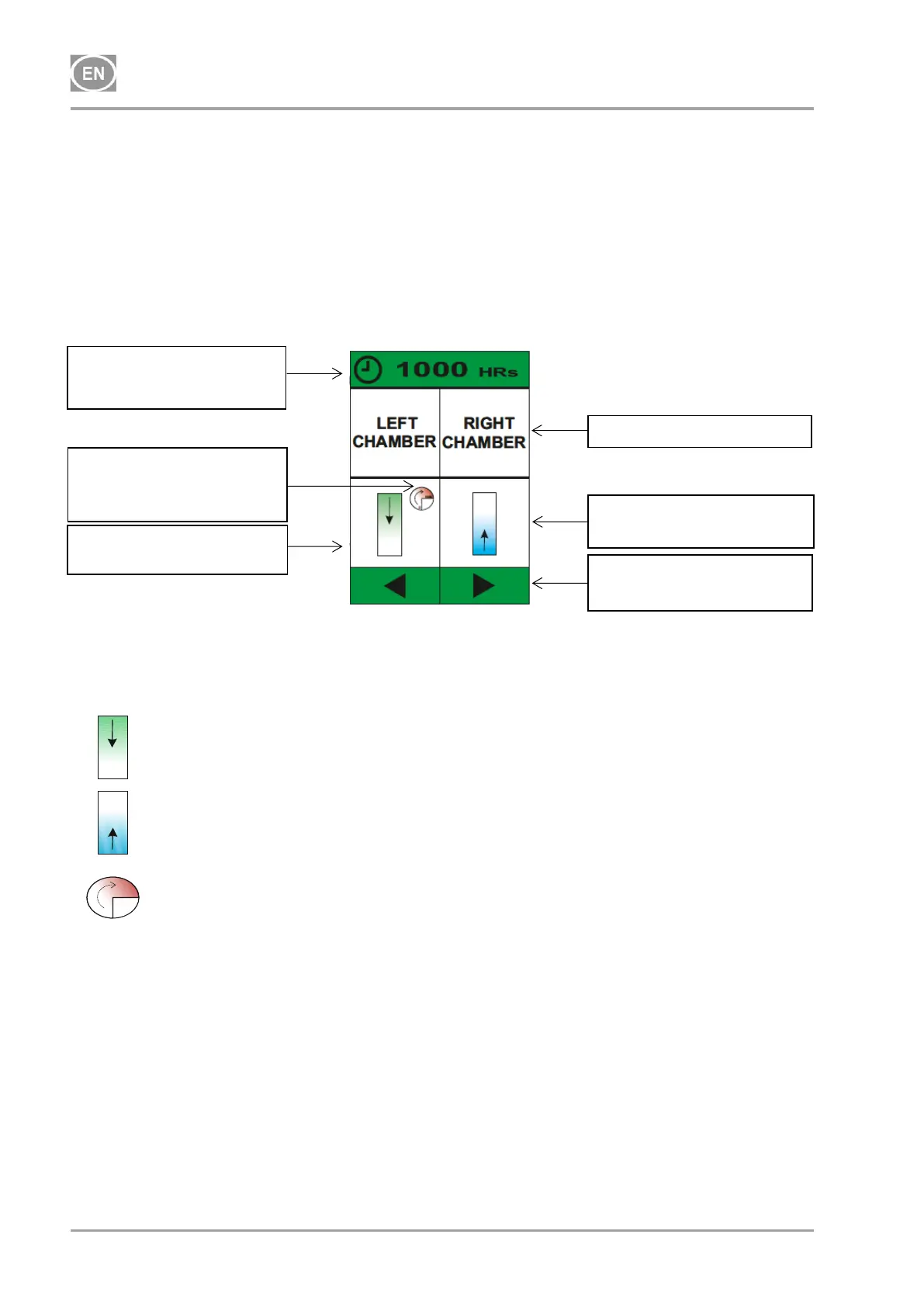
The dryer operating hours indicator is located at the top of the screen. The dryer operation screen
is also divided into 4 sections, which describe the dryer chamber working cycles using a graphical
depiction of the operating states of each chamber.
Symbol for when the dryer chamber is currently in regeneration.
Symbol for when the dryer chamber is currently drying.
Symbol for chamber pre-filling – equalisation of pressure in chambers.
Operating hours indicator
Hour meter
Symbol for chamber
pressure equalisation
phase
Status icon for the left
chamber
Status icon for the right
chamber
Arrow to navigate back to
the home screen


 To Next Page