E L A N H O M E S Y S T E M S
© ELAN Home Systems 2009 • All rights reserved. Page 33
D12 INSTALLATION MANUAL
Applications
Stereo Input with Stereo Output
Standard application
Prerequisites:
Factory defaulted
Normal mode
See
"Restore Defaults" on page 20
"Operating Mode" on page 13.
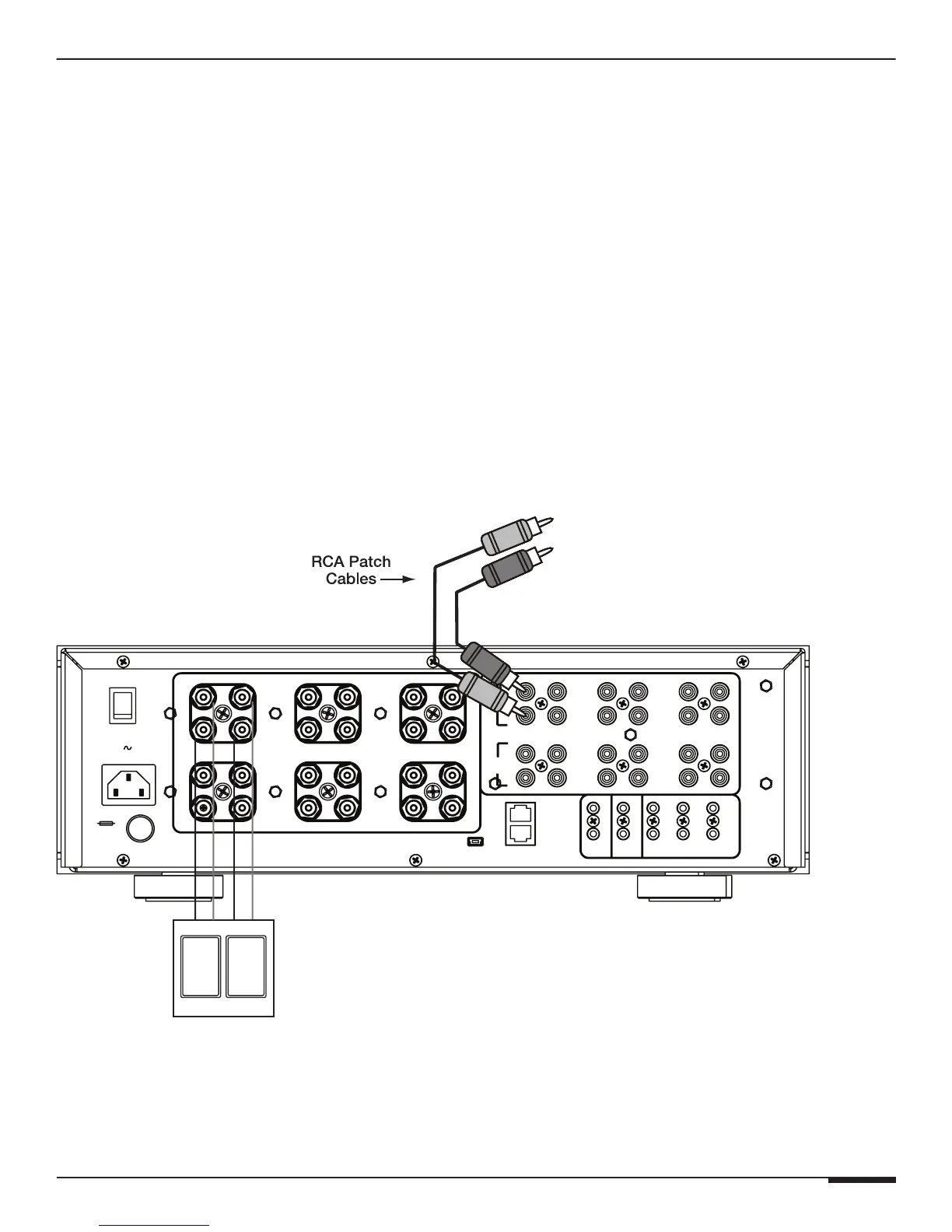
This example displays a basic stereo setup. Stereo from a source device is connected to audio inputs 1 and 2.
Audio input 1 is routed to channel 1 and audio input 2 is routed to channel 2.
Volume is adjusted by the ELAN System Controller or by the other Audio Device.
D12
O
I
BUS
B
+
8
_
+
8
7
OUT
OUTIN
6
5
IN
12
11
OUT
IN
IN
9
10
VIA!NET
IR
7/8
5/6
+12VDC
TRIGGER
OUT
SPREAKER OUTPUTS (CLASS 2 WIRING) 75 W/CH @ 8 ohms
IN
OUT
IR
OUTPUT
INPUT
11/12
9/10
3/41/2
ALL
ON
+12V TRIGGER INPUTS
Model D12
Digital Power Amplifier
BUS
A
IN OUT
4
1
3
OUTIN
2
+
_
2
+
_
1
+
POWER
_
7
OUT
OUT
+
+
3
+
_
_
109
_
4
+
+
_
_
+
+
+
_
6
+
_
_
+
12
5
11
USB
From
ELAN System Controller
or
Audio Device
REPLACE WITH
SAME TYPE AND
RATING ONLY.
120V 60 Hz
1440W
T12.5 AL
Spkr Spkr
Stereo Input



 To Next Page