E L A N H O M E S Y S T E M S
© ELAN Home Systems 2009 • All rights reserved. Page 37
D12 INSTALLATION MANUAL
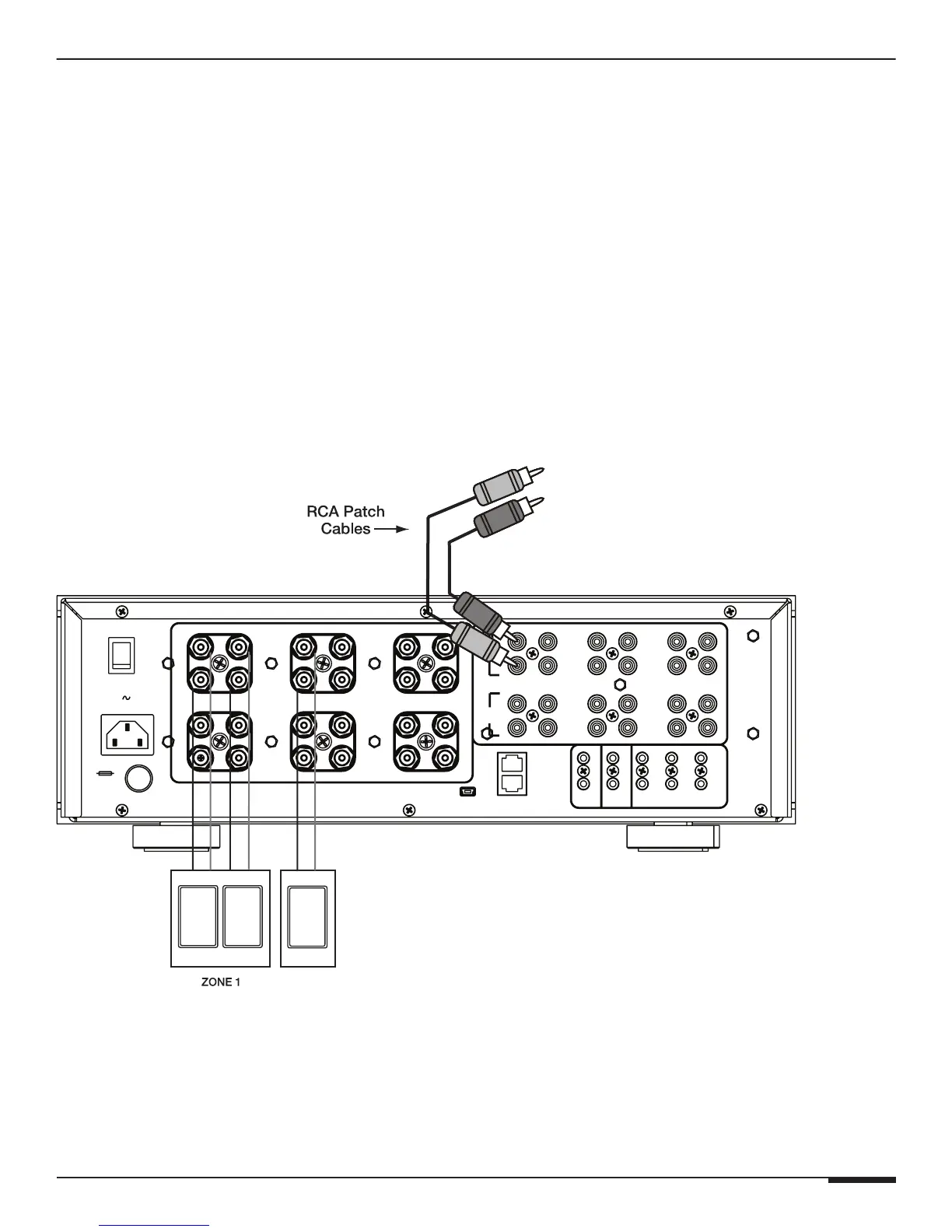
ELAN Special Application
Prerequisites:
Factory defaulted
Normal or ELAN mode
Input Select Menu:
Channel 3 with Input set to 1 + 2 Mono Bus A
See:
"Restore Defaults" on page 20
"Operating Mode" on page 13
"Input Select Menu" on page 8
With the Input Select Menu set to the above settings, the D12 sums audio input 1 and 2 (Mono) and routes it to
channel 3. The Y cable used in the previous example is not needed.
Volume is adjusted by the ELAN System Controller or by the other Audio Device. Increasing or decreasing the
volume increases stereo channels 1 and 2 and mono channel 3.
D12
O
I
BUS
B
+
8
_
+
8
7
OUT
OUTIN
6
5
IN
12
11
OUT
IN
IN
9
10
VIA!NET
IR
7/8
5/6
+12VDC
TRIGGER
OUT
SPREAKER OUTPUTS (CLASS 2 WIRING) 75 W/CH @ 8 ohms
IN
OUT
IR
OUTPUT
INPUT
11/12
9/10
3/41/2
ALL
ON
+12V TRIGGER INPUTS
Model D12
Digital Power Amplifier
BUS
A
IN OUT
4
1
3
OUTIN
2
+
_
2
+
_
1
+
POWER
_
7
OUT
OUT
+
+
3
+
_
_
109
_
4
+
+
_
_
+
+
+
_
6
+
_
_
+
12
5
11
USB
ELAN System Controller
or
Audio Device
REPLACE WITH
SAME TYPE AND
RATING ONLY.
120V 60 Hz
1440W
T12.5 AL
Spkr Spkr
Spkr
Stereo/Mono Using D12 Settings



 To Next Page