EasyManua.ls Logo

Electrolux T5675 - Page 98

Electrolux T5675
174 pages
Print Icon
To Next Page IconTo Next Page
To Previous Page IconTo Previous Page
Loading...
98
Controlpanel
MountthenewcontrolsystemCPU
StartbymountingthecontrolknobunitonthecontrolsystemCPU.Fastenthescrew(A).
Mountthetwogroundingbrackets(B)onthenewcontrolsystemCPU.
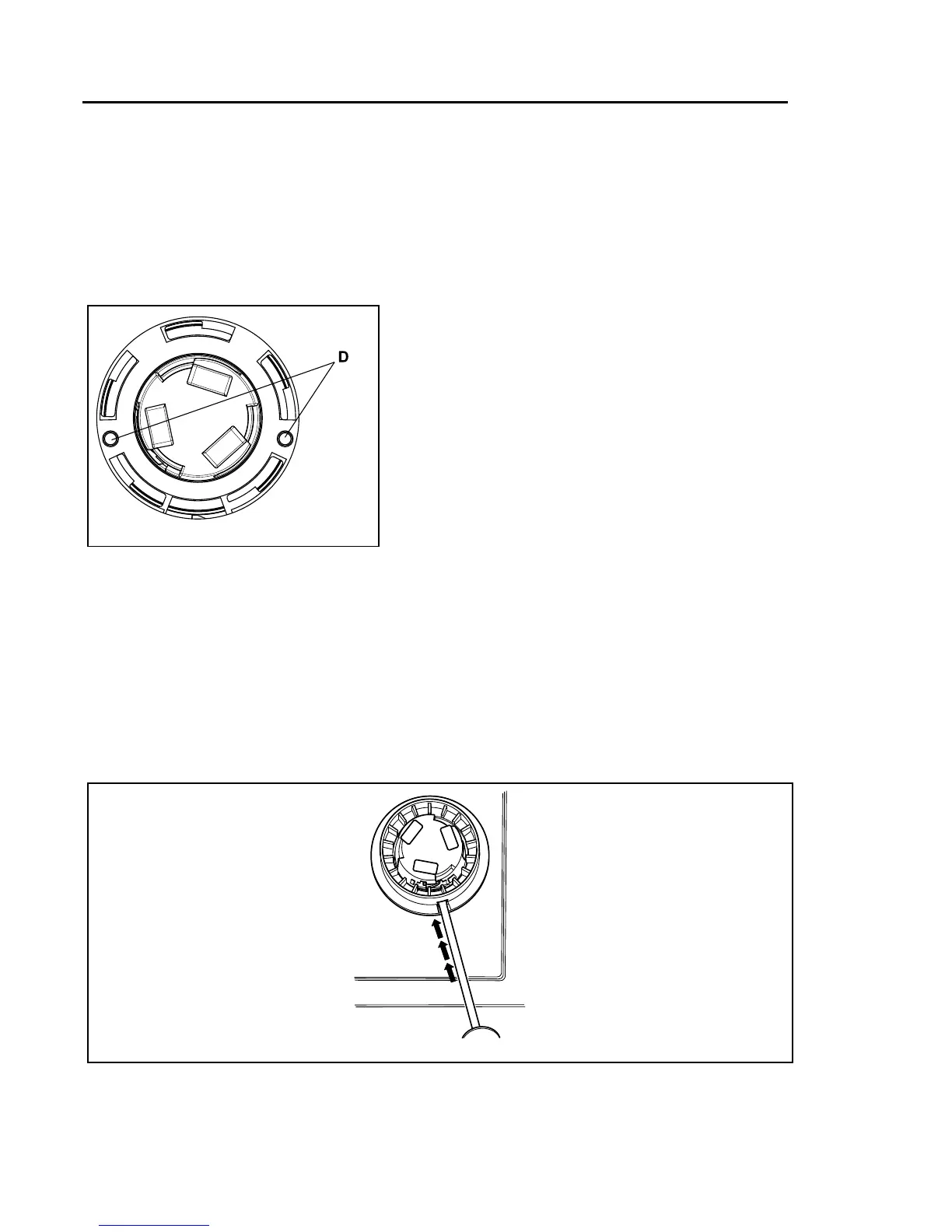
MountthecontrolsystemCPUinupperposition.Insertthecontrolknobunitandmakesurethatthe
guidepins(D)areinposition.PullthecontrolsystemCPUdownwards.Fastenthenutstothepanel.
151
D
g.7511
ConnectthecablesandremountthecovertothecontrolsystemCPU.
Mountthecoverringandthecontrolknob
Mountthecoverringandrotateitclockwiseuntilitisinposition.
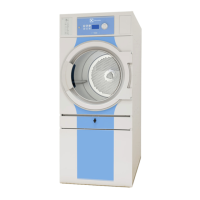
Rotatetheinnerknobuntilthelockingdeviceispointingdownwards.
Insertthescrewdriverandpressthelockingdevice.
152
g.7494

Table of Contents

Other manuals for Electrolux T5675

Related product manuals