SOI/DT 2010-03 dmm 35/78 599 72 84-41
8.3 Rapid reading of alarms
The last three alarms can be displayed even if the programme selector is not in the tenth position (diagnostics)
or if the appliance is in normal operating mode (e.g. during the execution of the washing programme):
→ Press the START/PAUSE button and the nearest option button simultaneously (as if you were entering
DIAGNOSTIC mode) for at least 2 seconds: the LEDs initially switch off, and then display the flashing
sequence indicating the last alarm.
→ To display the previous alarms, press the button to the left of the START/PAUSE button in sequence.
→ To return to the last alarm, press the START/PAUSE button.
→ The alarm continues to be displayed for the amount of time required, and then the display returns to its
normal operation.
→ The alarm reading system is as described in para. 8.2
→ While the alarm is being displayed, the appliance continues to perform the cycle or, if in the programme
selection phase, it maintains the previously selected options in memory.
8.4 Deleting the last alarm
It is good practice to cancel the alarms stored:
• after reading the alarm codes, to check whether the alarm re-occurs during the diagnostic cycle.
• after repairing the appliance, to check whether it re-occurs during testing.
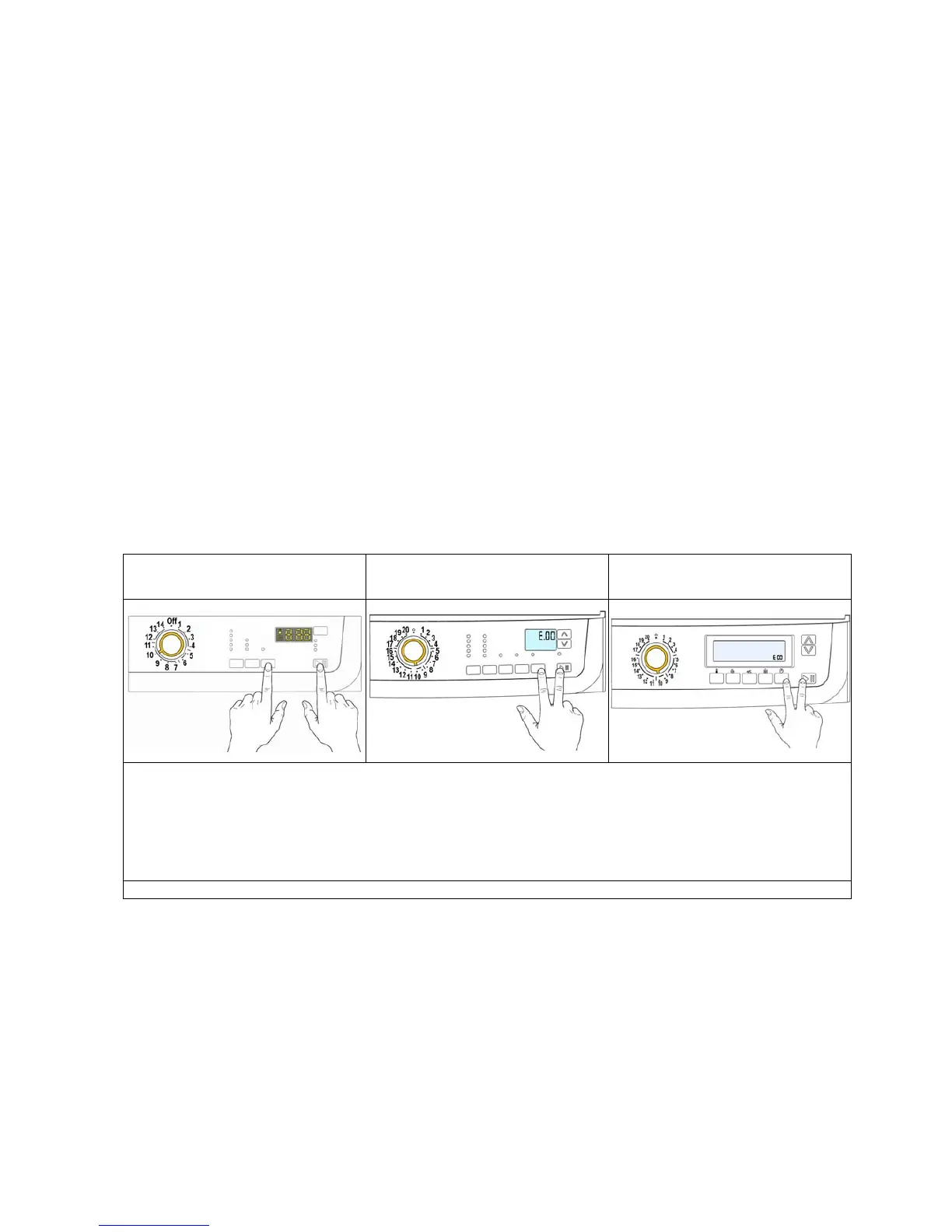
Version TC4
Version TC3
“Time Manager” “Proportional”
Version TC2
“Time Manager” “Proportional”
1. Select diagnostic mode and turn the programme selector to the tenth position (reading of alarms)
2. Press the START/PAUSE button and the nearest option button simultaneously (as shown in the
figure).
3. Hold down the buttons until the LEDs stop flashing and the LCD display shows “E00” (at least 5
seconds).
N.B. With this operation all the alarms stored are deleted.



 To Next Page