SOI/DT 2010-03 dmm 36/78 599 72 84-41
9 OPERATING TIME COUNTER
Using a specific procedure, the operator can display the total operating time for the appliance, which is counted
from the moment it is first switched on.
The unit can count up to a maximum of 6,550 hours of operating time.
only the operating time of normal programmes
(and not diagnostic cycles) is counted
the actual operating time
for the cycle is counted (which does not include pauses, delayed start time, rinse
hold time and soaking phases)
the precision of the counter is 30 seconds per programme
only whole hours of operation
are counted (1 hr and 59 min = 1 hr)
9.1 Reading of operating time
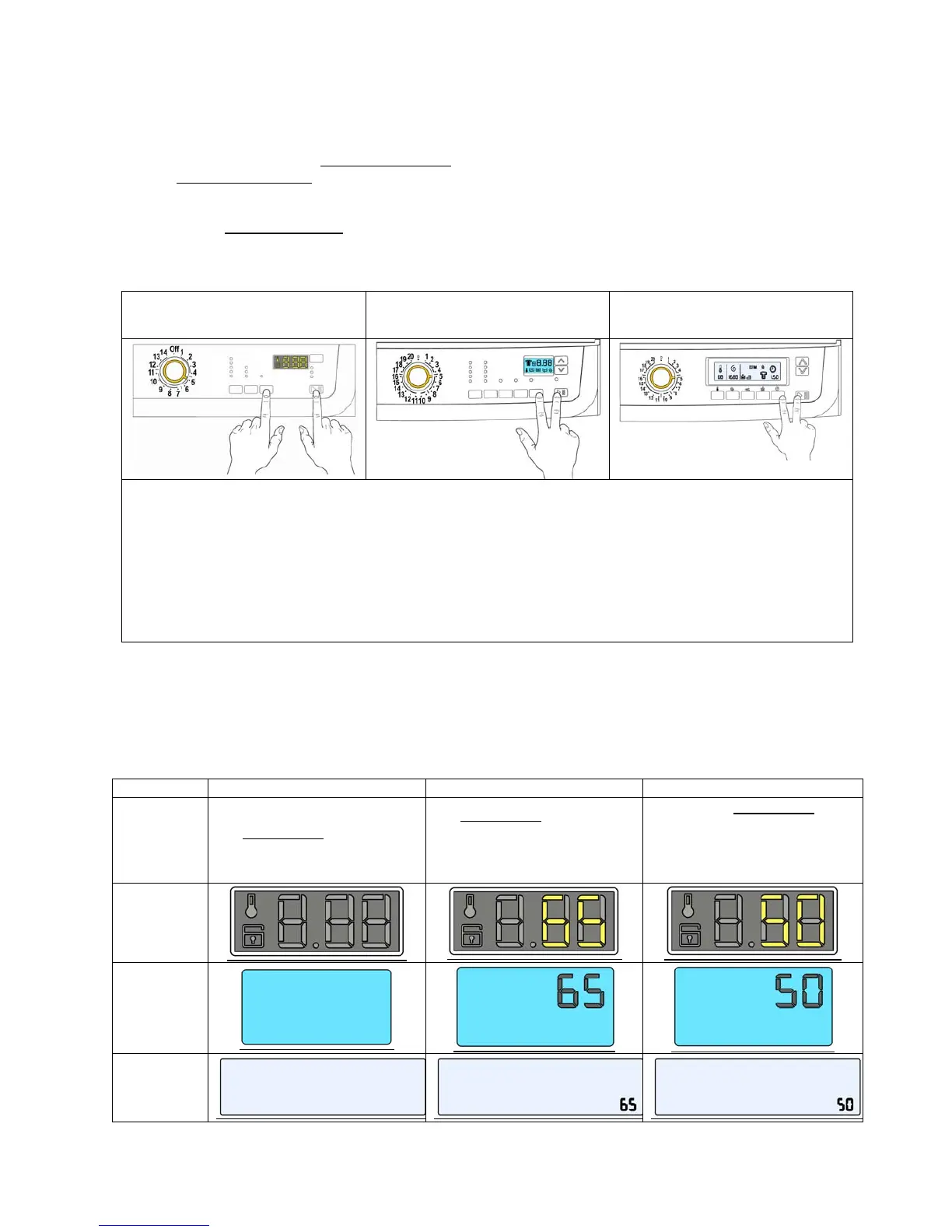
Version TC4
Version TC3
“Time Manager” “Proportional”
Version TC2
“Time Manager” “Proportional”
1. Switch off the appliance
2. Press the START/PAUSE button and the nearest option button simultaneously (as shown in the
figure).
3. Holding down both buttons, switch the appliance on by turning the programme selector by five positions
clockwise.
4. Hold down the buttons until the hours of operation appear on the display or LCD display (at least 5
seconds).
9.2 Display of total operating time
This time is displayed with a sequence of two digits at a time: the first two digits indicate the thousands and
hundreds, the second two digits indicate the tens and units.
For example, if the operating time is 6,550 hours, the display will show the following sequence:
Phase 1 → Phase 2 → Phase 3 →
Styling
For two seconds
, nothing
is displayed
For two seconds
, the following
digits are displayed:
ª thousands (6)
ª hundreds (5)
For the next two seconds
the
following
digits are displayed:
ª tens (5)
ª units (0)
TC4
TC3
TC2
At the end of phase three (after the tens and units are displayed), the cycle is repeated. To return to normal
mode, either: switch the appliance off or press a button or turn the selector knob.



 To Next Page