Electrolux
EFS - Dishwashing Systems Platform
Electrolux Professional
DOC. NO. 5956.573.05 P. 4 / 88
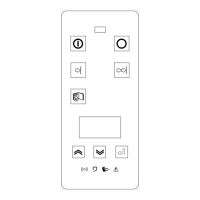
A FUNCTION KEYS
BUTTONS USED
Figure 1 Menu access keys
A1 DISPLAY OF AUXILIARY VALUES
From the normal machine operation mode it is possible to see several screens not accessible to the user.
These screens give various machine values, and are accessed by pressing at the same time the combinations
of buttons displayed. (Figure 2).
A1.1 MODULAR MACHINES
Press the Speed1 - “E” (Figure 1) - and Increase buttons - “A” (Figure 1) - at the same time for a few seconds
to access the screen displaying the levels of the various tanks and airgap.
Figure 2 Accessing current, temperatures and levels display mode
A
B
C
D


 To Next Page