(((ELKRON))) - MP110
Adding/Eliminating series-connected devices
• If connection with a series-connected device is lost (expansion,
connector, keypad), the unit generates a tamper alarm that will be
signaled at each total or partial arming of the system (a tamper
alarm will occur at each arming).
• To eliminate a device from the serial line, it is necessary to
disconnect the series of the device to be eliminated and reset the
unit. To add a new series-connected device, the user must
connect the series of the device to be added and reset the
system.
• The unit must be reset by short-circuiting the reset (RST) pin-
strip with dip-switch 1 OFF. (ATTENTION: With dip-switch 1 ON,
the unit is reset to factory parameters and loses all its
programmings).
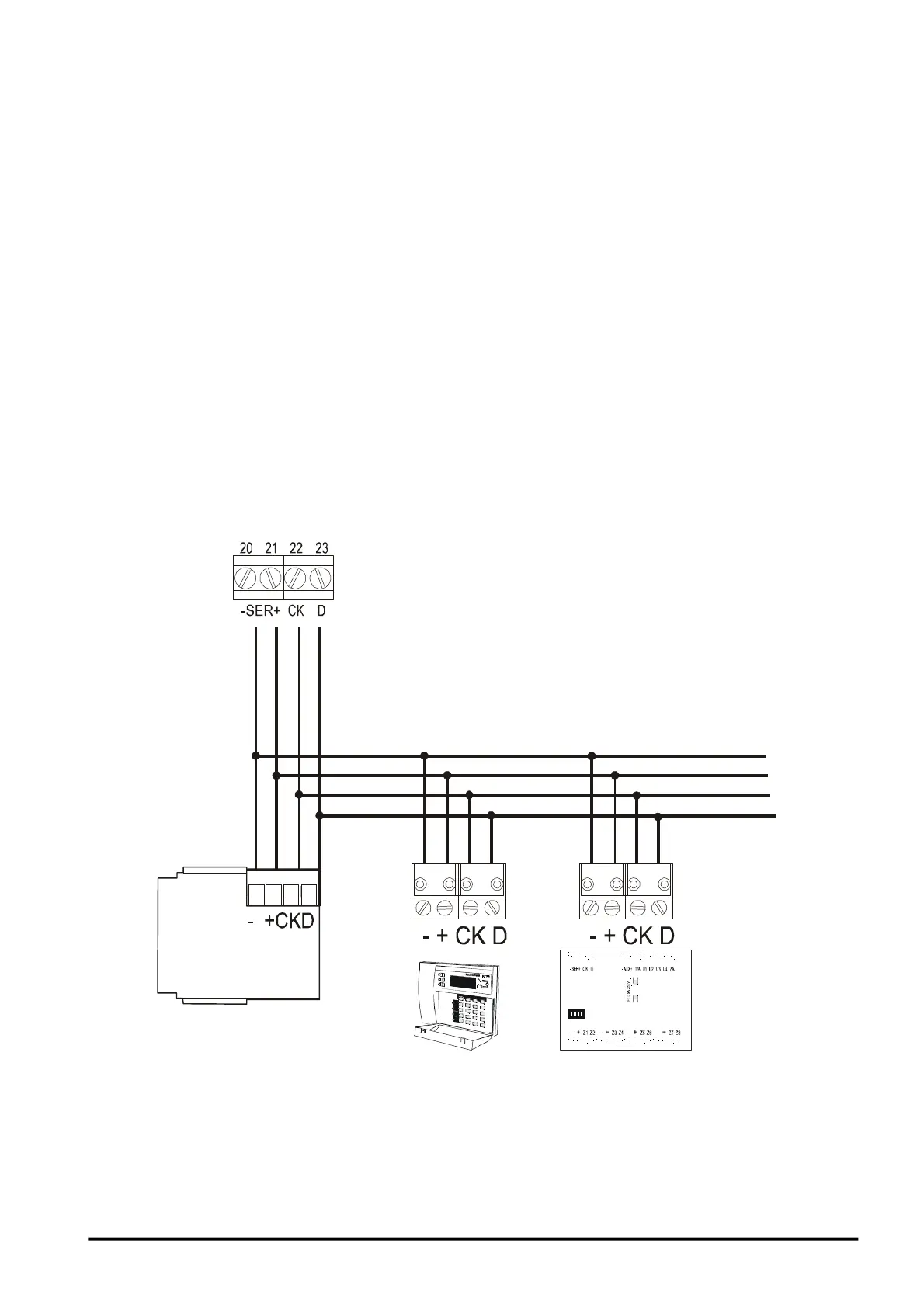
2.7.5 Devices Connection
AD0
AD1
AD2
IT0
INSERITORI
CONTROL UNIT TERMINALS
KEYPAD
READER
EXPANSION
21



 To Next Page