EasyManua.ls Logo

Elmo GS-800 - Spot Recording

Elmo GS-800
56 pages
Print Icon
To Next Page IconTo Next Page
To Previous Page IconTo Previous Page
Loading...
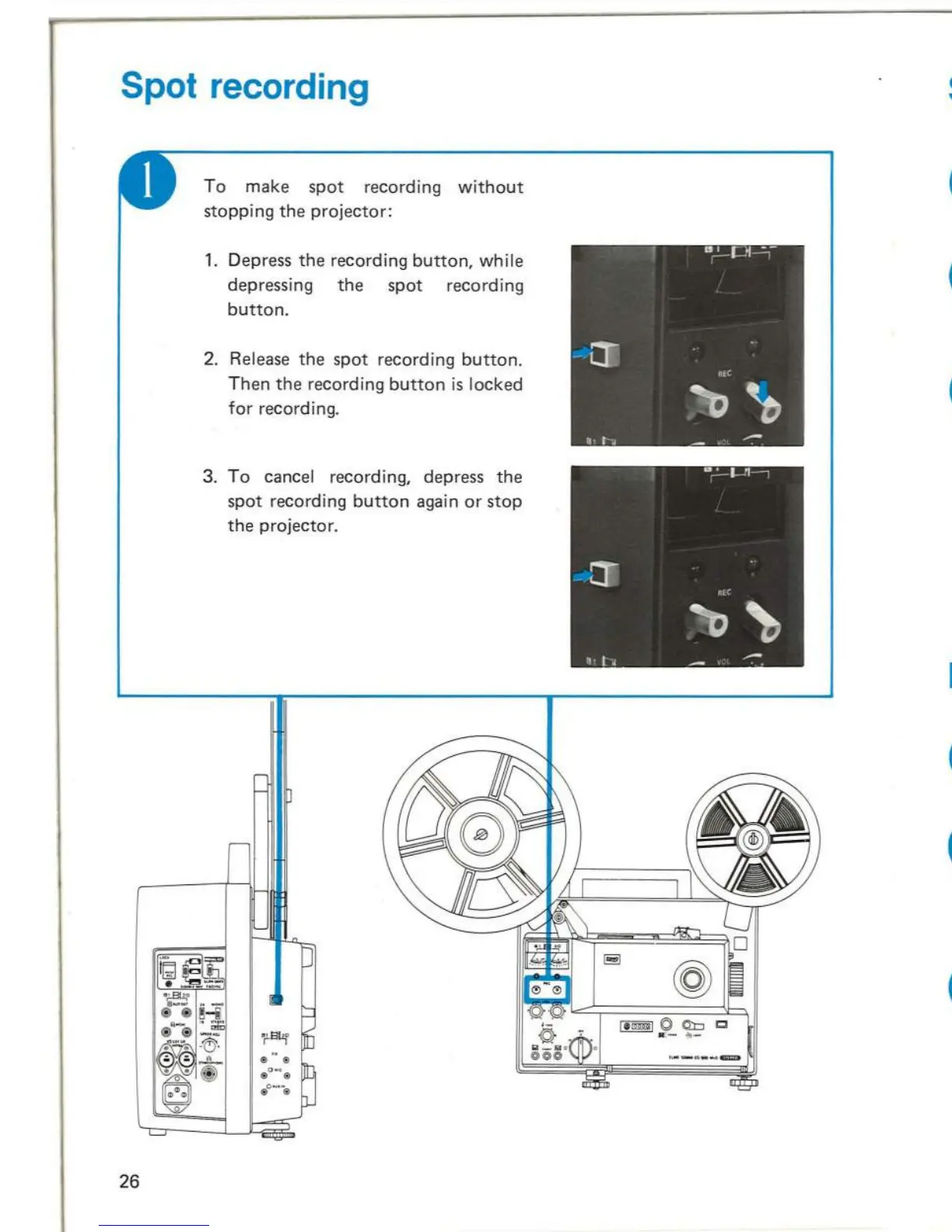
Spot recording
26
To
make
spot
recording
without
stopping
the
projector:
1.
Depress
the
recording
button,
while
depressing
the
spot
re
cord
ing
button.
2. Release
the
spot
re
co
rding
button.
Then
the
recording
button
is
locked
for
recording.
3.
To
cancel recording, depress
the
spot
recording
button
again
or
stop
the
projector.
Stereo recording
o
Use
track
1 for
the
left channel
sound
and
track
2
for
the
right
channel sound.
Adjust
the
recording level
of
each
track
with
the
volume
contro
l
knob
of
respective
channe
l.
Sta
rt
the
projector
wh i
Ie
depressi
ng
both
recording
buttons
for
track
1
and
track
2.
Note
:
Make
sure
that
the
recording
indicators
of
both
channels
light.
Recording
button
Monaural recording
o
For
monaural recording, use
either
track
1
or
track
2.
For recording
procedure,
see
"Record-
ing
procedure"
on
page 20.
Adjust
the
level
with
the
volume
control
knob
for
the
track
being recorded.
Make sure
that
the
recording
indicator
lights while recording.
Recording
indicator
Volume
control
knob
27

Related product manuals