EasyManua.ls Logo

Elmo GS-800 - Double and Fade Recording

Elmo GS-800
56 pages
Print Icon
To Next Page IconTo Next Page
To Previous Page IconTo Previous Page
Loading...
22
Adjust
recor
ding
level.
A.
Input
the
sound.
B.
Adjust
the recording level
whi
le depressing
the
record
butto
n.
a.
Recording l
eve
l setting
Adjust
the
recording level
with
the
volume
control
knob
so
that
the
level
meter
needle
may
swing
to
0 (100%)
position
at
maximum.
When unexpected over-level sound
is
supplied,
built-in
limiter
circuit
works
to
maintain
optimum
distort
ion
free recording
level.
The
limiter
works
for
the
signals
from
both
M IC and
AUX
IN
jacks.
When the
projector
is
set
for
recording,
the
recording in-
dicator
lights.
b.
Mixing
Sound
from
AUX
IN
jack
. and
MIC
jack can
be
mixed
.
To
adjust
the
mixing
recording level,
use
the
volume
control
knob
of
the
GS-800
for
the
input
from
MIC jack, and
the
output
volume
knob
of
tape recorder
or
other
sound source
for
the
input
from
AUX
IN jack.
ing
button
lume
control
knob
MICjack
AUX
IN
jack
Note:
To
achieve
the
best
possible
quality
recording
with
the
least
background
and
inherent
projector
noises,
record
at
the
lowest
level
and
with
the
microphone
as far
away
from
the
projector
as
possible.
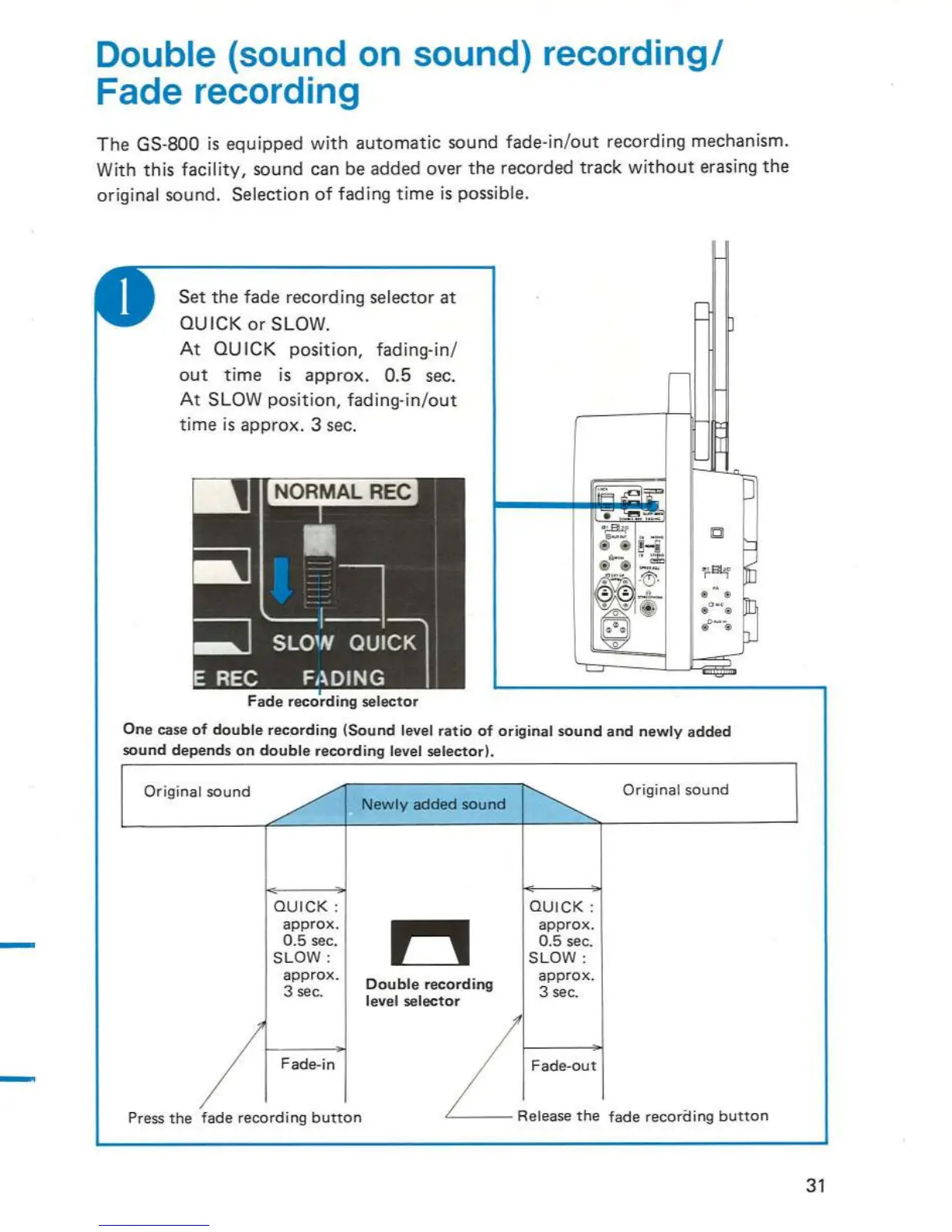
Double (sound
on
sound) recordingl
Fade recording
The
GS-800
is
equipped wi
th
automatic
sound fade-in/
out
recording mechanism.
Wi
th
this
facility,
sound can be added over
the
recorded
track
without
erasing
the
original sound. Selection
of
fading
time
is
possible.
Set
the
fade recording selector at
QU
ICK
or
SLOW.
At
QU
ICK
position,
fadi
ng
-in/
out
time
is
approx.
0.5
sec.
At
SLOW
position,
fading-in/out
time
is
approx. 3
sec.
Fade
recording
selector
One
case
of
double
rec
.
ord
ing
(Sound
level
ratio
of
original
sound
and
newly
added
sound
depends
on
double
recording
level
selector).
Original
sound
/
~
Original
sound
I
~
Newly
added
sound
QUICK:
QU
I
CK:
approx
.
~
approx.
0
.5
sec.
0.5
sec.
SLOW:
SLOW:
approx.
Double
recording
approx.
3
sec
.
level
selector
3
sec
.
/
Fade-in
Fade-out
Press
the
fade
recording
button
- .
J
31

Related product manuals