EasyManua.ls Logo

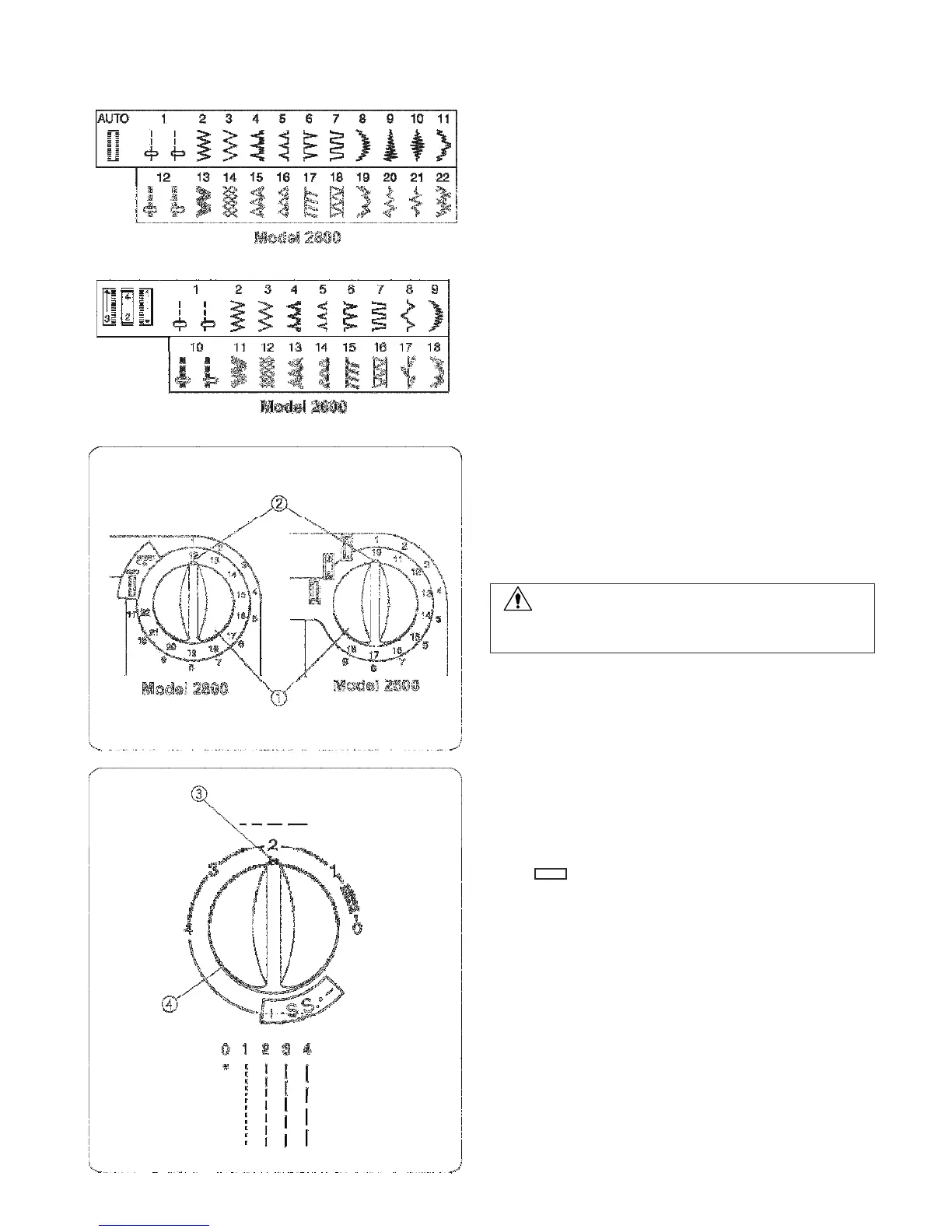
ELNA 2600 - Stitch Selection Dials

ELNA 2600
98 pages
Print Icon
To Next Page IconTo Next Page
To Previous Page IconTo Previous Page
Loading...
36
Selectin
g
a
Stitc
h
Rais
e
th
e
needl
e
t
o
it
s
highes
t
position.
Stitch
selecto
r
dial
T
o
selec
t
a
stitc
h,
tur
n
th
e
stitch
selecto
r
dial
until the
setting mark points to the stitch.
1
Stitch selector dial
2
Setting mark
CAUTION:
Do not turn the stitch selector dial while the needle is in
the fabric; the needle may bend or break.
T
o
selec
t
th
e
stretc
h
stitc
h
es
(12
-
22 in model 2800 or
10-18 in model 2600), set the stitch length dial at S.S.
Stitc
h
Leng
t
h
Dial
Turn the stitch length dial until the setting mark points
to the stitch length number.
The higher the number, the longer the stitch.
The ā€œ ā€ mark shows the adjustment range for
sewing the buttonhole.
3
Setting mark
4
Stitch length dial

Table of Contents