8
2.2 Operation with Scout
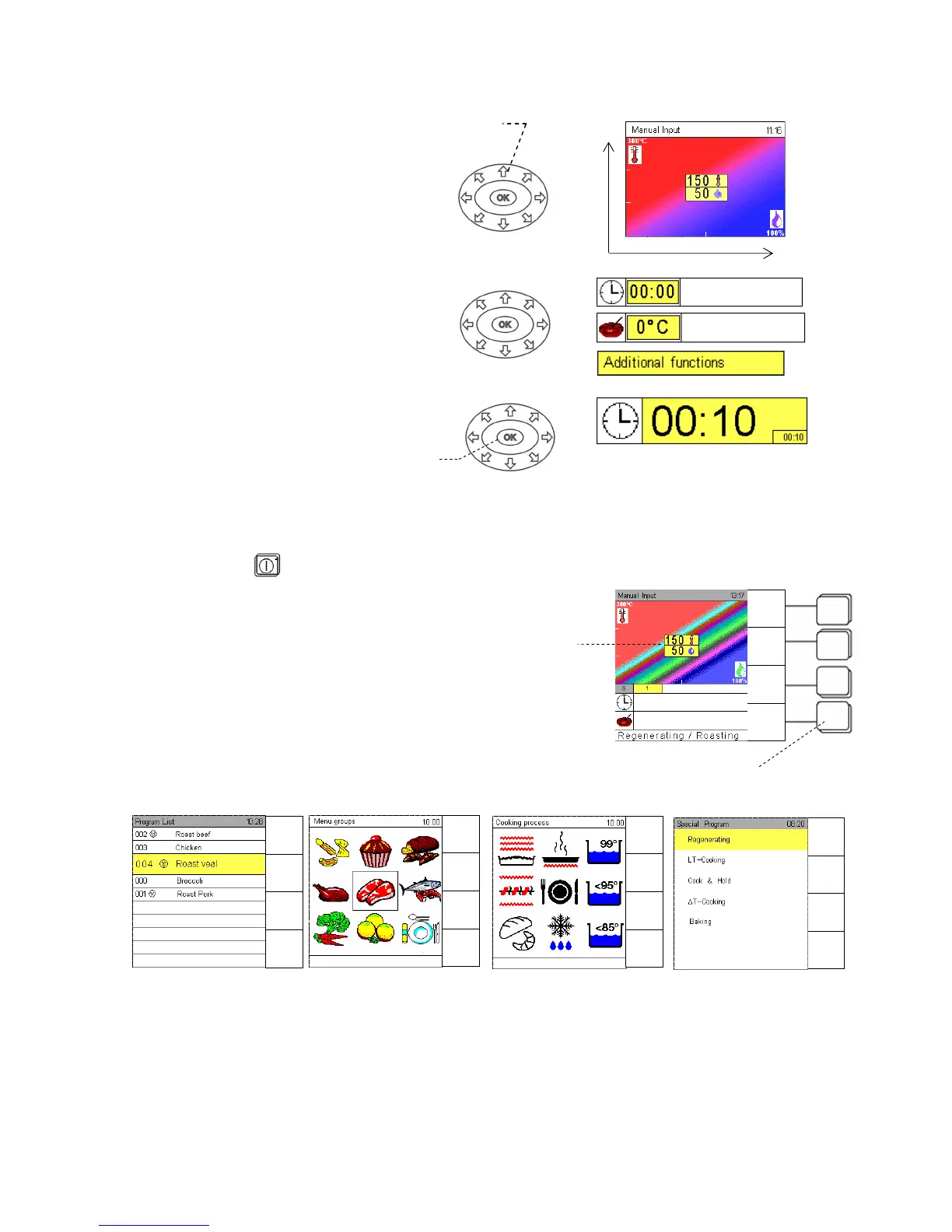
Use the Joker Scout direction arrows to
move the Climatic cursor on the
Climatic monitor, to reach other input
fields and to set data, characters etc.
Whenever a field is yellow, it is ready
for inputs.
A short touch of any arrow changes
inputs step by step. If you keep the arrow
pressed, changes are executed quickly.
Press OK to confirm every input or
setting.
2.3 Manual operation
As soon as the unit is connected to the mains, the Eloma standby screen appears.
Touch master key
to switch on, the start-up screen appears.
The red part of the screen represents dry heat, the blue one
moist heat.
The Climatic
®
Cursor indicates the temperature in degrees
in relation to the humidity percentage. Move it in all
directions.
Allocation of sensor keys
Press sensor keys to call the different menus.
Examples below
Direction arrows
OK
Climatic
Cursor
Sensor keys
Climatic Monitor
Humidit


 To Next Page