24
7.2. LT-Cooking (Low temperature)
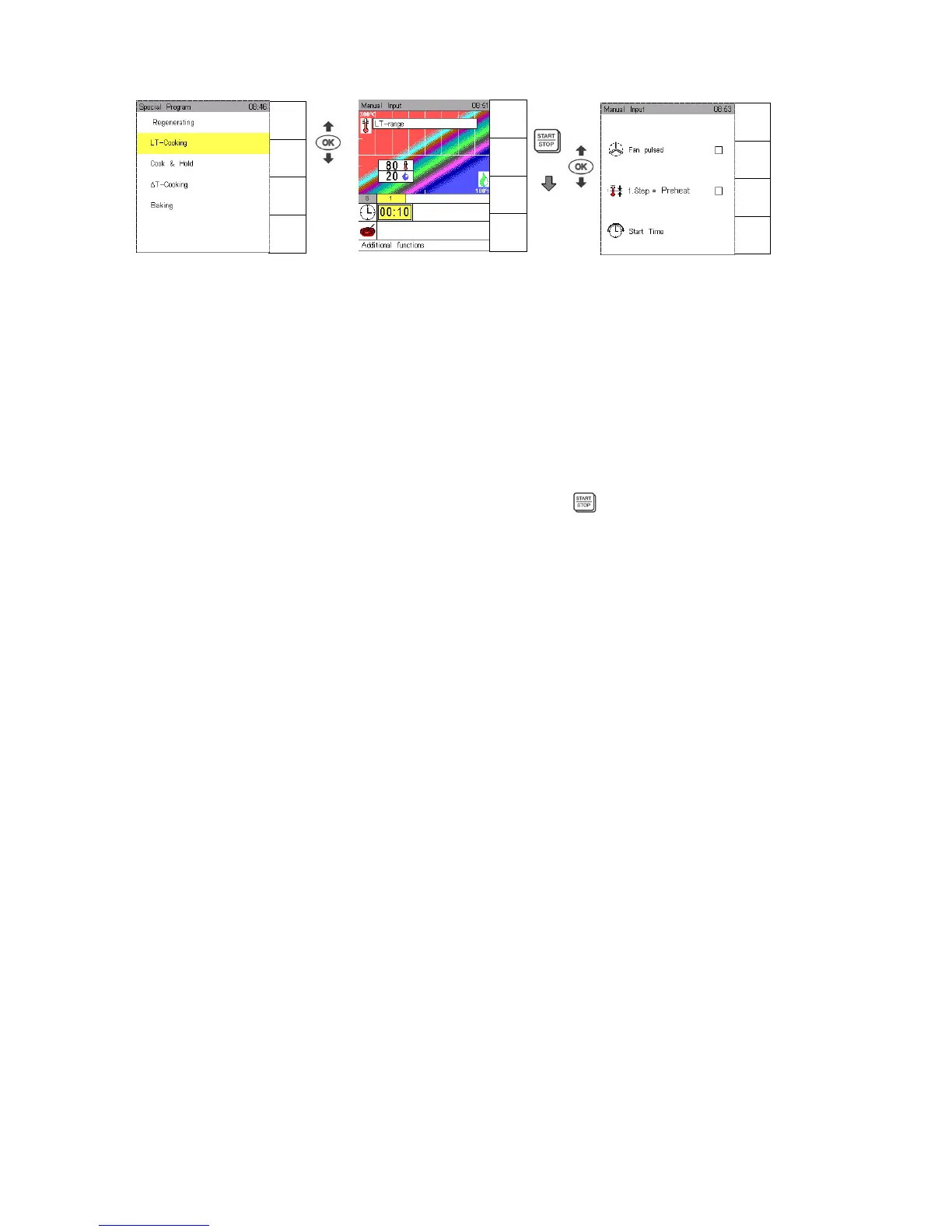
Touch sensor key Special program, use Joker arrow to select LT cooking and confirm with OK.
The Climatic monitor indicates below the striped field the LT cooking range for temperature/humidity.
Standard setting for LT cooking is 80°C and 20% humidity.
Use Joker Scout arrows to determine temperature/humidity and confirm with OK.
Input range: Temperature 30°C – 150°C; humidity 0 – 100%
As soon as this range is left, standard cooking processes are displayed. Consequently for instance it is
possible to start roasting at higher temperatures.
Select function Preheat as described in Sec. 9.
It is possible to enter up to 12 different cooking steps in an LT program, see Sec. 3.4.
Use Joker arrow , set time and/or core temperature and start
To save an LT program follow the instructions in Sec. 5.1.
When such a program is saved, the letters LT appear automatically at the beginning of its name, in
order to identify it in the program list.
Additional functions “LT cooking“:
Use Joker arrow , go to line Additional and select additional functions.
Use Joker Scout arrows or for selection.
Confirm functions to be on or off with OK , a selected function is marked ““ .
If the function “fan pulsing“ is used, the humidity level is adjusted accordingly.
Manual
Input
Autoclean
HACCP
Special
Menu
back
Save
Next
Step
Preheat
OFF
Menu
back
Save
Next
Step
Preheat
OFF


 To Next Page