32
11 Special programs
11.1 Weekly program
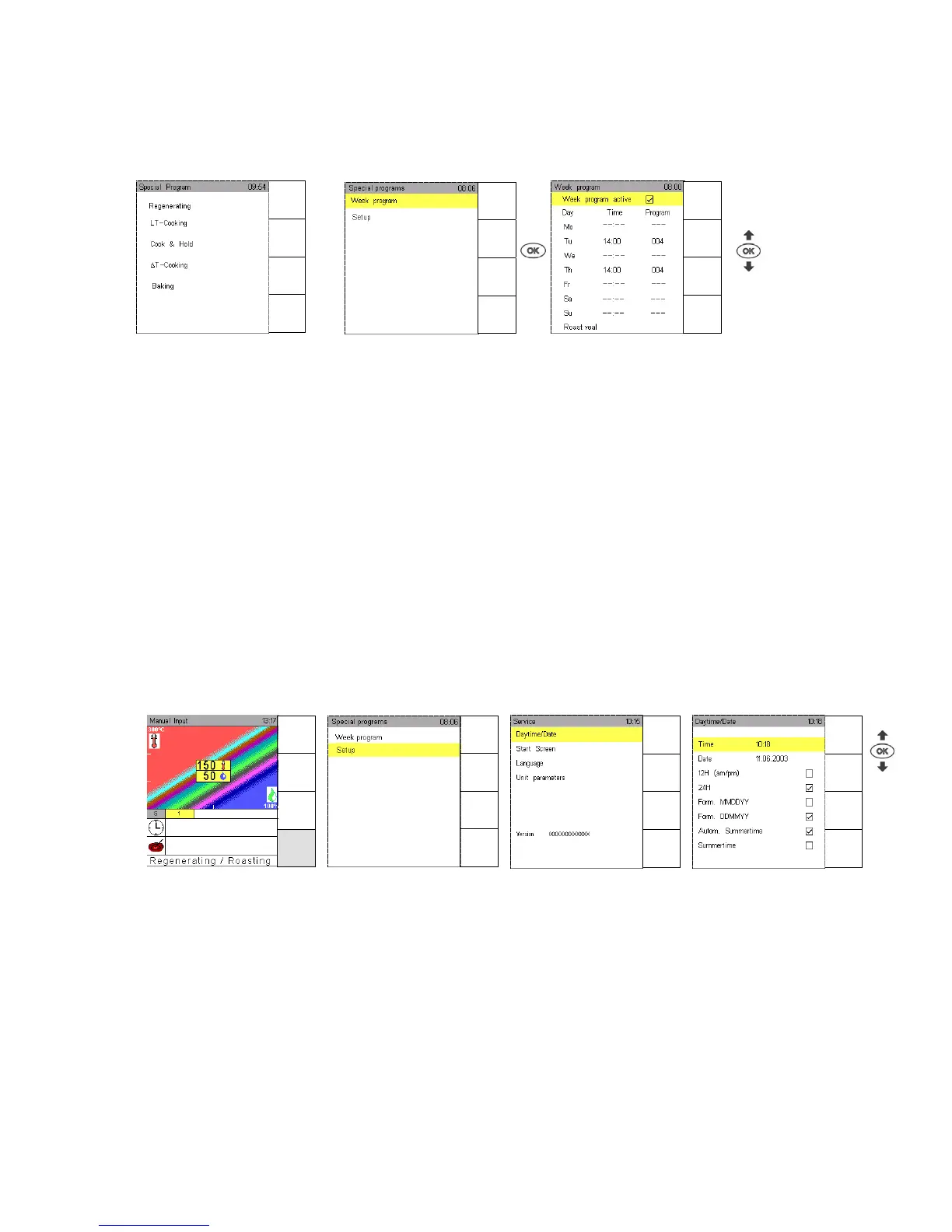
Use the function weekly program for stored programs that are supposed to be started at a certain day
and time of the week.
Touch sensor key Special Program, Special and confirm Week program with OK.
Use Joker Scout arrows to select the day of the week and to set the desired start time of the
selected program.
Confirm with OK. The appliance will start at the set day and time with the desired program.
Press sensor key Menu back to return to “Manual Input“.
11.2 Setup
11.2.1 Time/Date
The correct date and time is set when the combi steamer is delivered. However, it may be necessary to
change date and time.
Touch sensor key Special program, Special and confirm “Setup” with OK.
Confirm Time/Date with OK.Use Joker Scout arrows or to change time and/or date.
Confirm with OK.
The screen Time/Date offers further possibilities to change data, for instance summer time or the way of
indicating time and date. Use Joker Scout arrows or to select whatever you like, it is marked.
And confirm setting with OK.
Manual
Input
Autoclean
HACCP
Special
Menu
back
Menu
back
Help
Menu
back
Help
Program
List
Menu
group
Cooking
process
Special
program
Menu
back
Help
Menu
back
Help


 To Next Page